EasyManua.ls Logo

Alpine 7619R - Page 72

Alpine 7619R
80 pages
Print Icon
To Next Page IconTo Next Page
To Previous Page IconTo Previous Page
Loading...
GR
Series
GR
Series
4.
Replacement
of
the
parts
mounted
on
the
front
—_b.
Replacement
of
the
control
P.C.
board
c.
Disassembly
and
assembly
of
the
cassette
holder
d.
Replacement
of
the
reels
of
the
chassis
(1)
Remove
seven
solders
(8)
and
remove
the
three
(1)
Remove
four
screws
@4
and
remove
the
eject
(1)
Remove
M1.7
two
lock
washers
@)
(Refer
to
parallel
wires
and
the
wires
of
the
eject
frame
assembly
and
the
frame
holder
as
figure
19).
a.
Replacement
of
the
audio
P.C.
board
solenoid
and
of
the
play
solenoid
as
shown
in
shown
in
Figure
17.
(2)
Move
the
select
lever
in
the
direction
marked
(1)
Remove
two
solders
@)
and
remove
the
Figure
11.
(2)
Remove
M1.2
lock
washer
@)
and
plate
base
(®)-1
in
the
Figure
and
remove
the
reel
by
parallel
wire
(7P)
and
the
head
P.C.
board
as
(2)
Remove
five
claws
@
and
remove
the
P.C.
roller
@6)
and
remove
the
cassette
holder
and
gripping
the
reel
gear
as
shown
in
Figure
19.
shown
in
Figure
16.
board
as
shown
in
Figure
11.
[For
GR75E020,
the
base
plate
assembly
as
shown
in
Figure
(3)
After
replacement,
mount
the
new
reels
(2)
Adjust
the
two
claws
@
to
the
rectangular
holes
GR75E010,
GR75E01A,
GR75E01C
models]
17.
following
the
removal
steps
in
the
reverse
on
the
P.C.
board
and
remove
the
P.C.
board
Remove
four
claws
@)
and
remove
the
P.C.
(3)
Remount
them
following
the
removal
steps
in
order.
as
shown
in
Figure
16.
board
as
shown
in
Figure
11.
the
reverse
order.
(4)
After
mounting,
check
the
tape
speed
and
the
(3)
After
replacement,
mount
the
new
P.C.
board
[For
GR75L020,
GR75L010
models]
wow
and
flutter
with
test
tape
MTT-111.
following
the
removal
steps
in
the
reverse
(3)
After
replacing
the
old
P.C.
board
with
a
new
Notes:
1.
When
mounting
the
cassette
holder
and
.
order.
one,
mount
it
following
the
removal
steps
in
the
base
plate,
insert
the
slider
shaft
Note:
Since
the
reel
is
easily
loosened
if
the
cap
is
the
reverse
order.
into
the
eject
arm
and
fix
them
turning
gripped,
always
handle
it
gripping
the
gear.
Note:
The
head
P.C.
board
and
the
parallel
wire
the
slider
shaft
in
the
direction
indicated
Do
not
reuse
the
used
washers.
Take
care
are
easily
damaged.
Handle
them
with
care.
Note:
As
mentioned
in
Item
4-a,
handle
the
by
the
arrow
in
the
figure.
Make
sure
to
avoid
damage
by
piercing
and
tearing.
Refer
to
Item
2-C
to
make
sure
that
the
parallel
wires
carefully,
and
be
sure
that
the
that
the
cassette
holder
and
the
base
temperature
of
the
soldering
iron
and
the
temperature
of
the
soldering
iron
and
the
plate
are
in
the
cassette-in
mode
during
soldering
time
are
proper.
Do
not
bring
the
soldering
time
are
proper.
As
the
wires
of
this
operation.
(Refer
to
Figure
18).
soldering
iron
near
the
head
P.C.
board.
the
eject
solenoid
are
not
insulated,
do
not
2.
When
mounting
the
eject
frame
let
them
cross
each
other.
assembly,
push
the
cassette
push
lever
in
the
direction
indicated
by
the
arrow
in
the
Figure
17.
(4)
3.
When
mounting
the
base
plate
assembly
and
the
eject
frame
assembly,
or
when
mounting
the
eject
frame
assembly
to
the
chassis,
do
not
apply
excessive
force
to
avoid
deformations
of
the
eject
arm
and
the
frame.
4.
Do
not
reuse
the
used
washers.
Take
care
to
avoid
damage
by
piercing
and
tearing.
Base
plate
assembly
Cassette
holder
Head
P.C.
board
Frame
holder
Audio
P.C.
board
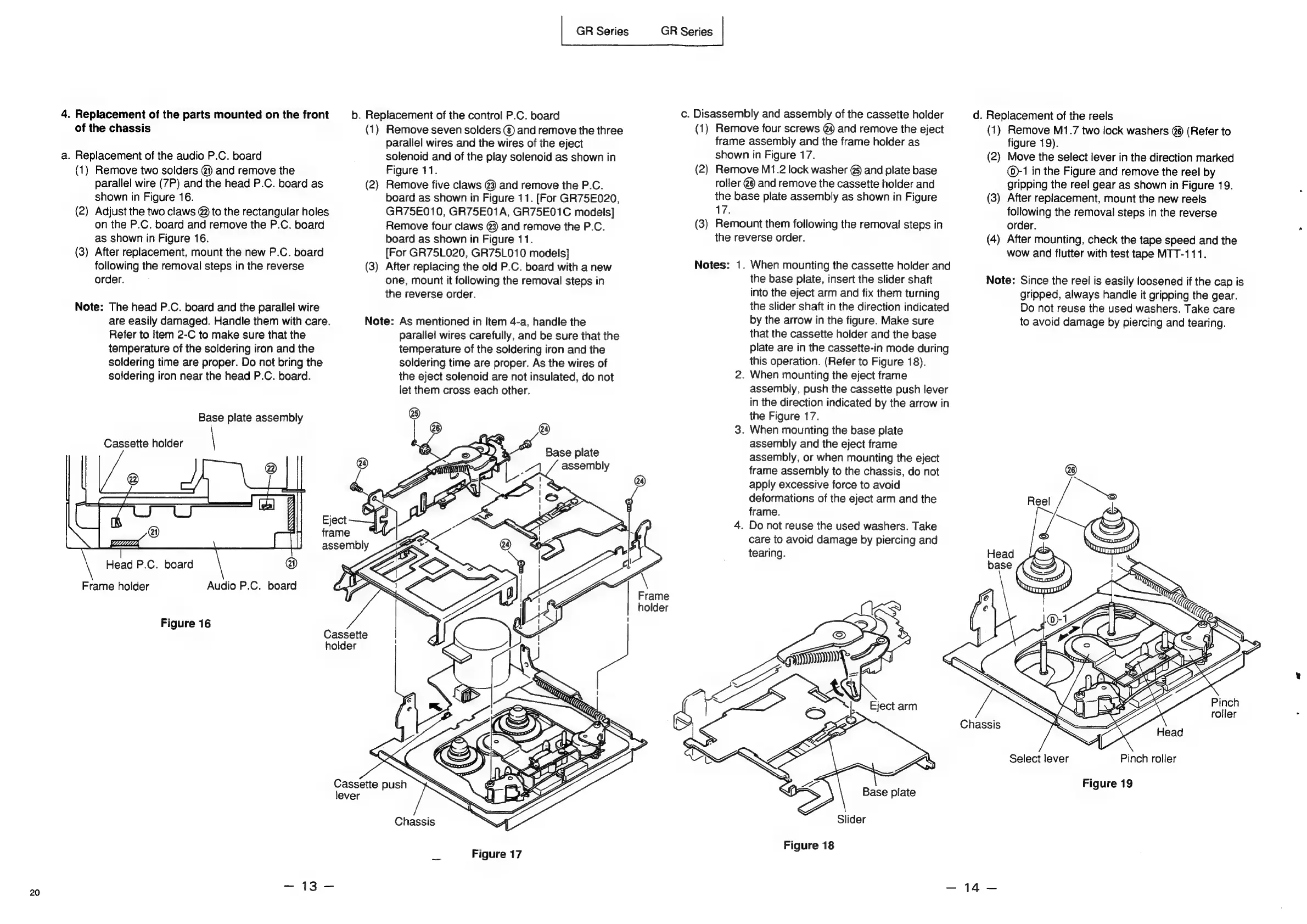
Figure
16
Cassette
holder
Chassis
Select
lever
Pinch
roller
Cassette
push
Figure
19
lever
Chassis
Slider
Figure
18
Figure
17
=
13
=
=e
20