22-EN
01GB04INE-W940E.fm
ALPINE INE-W940E 68-25285Z52-A (EN)
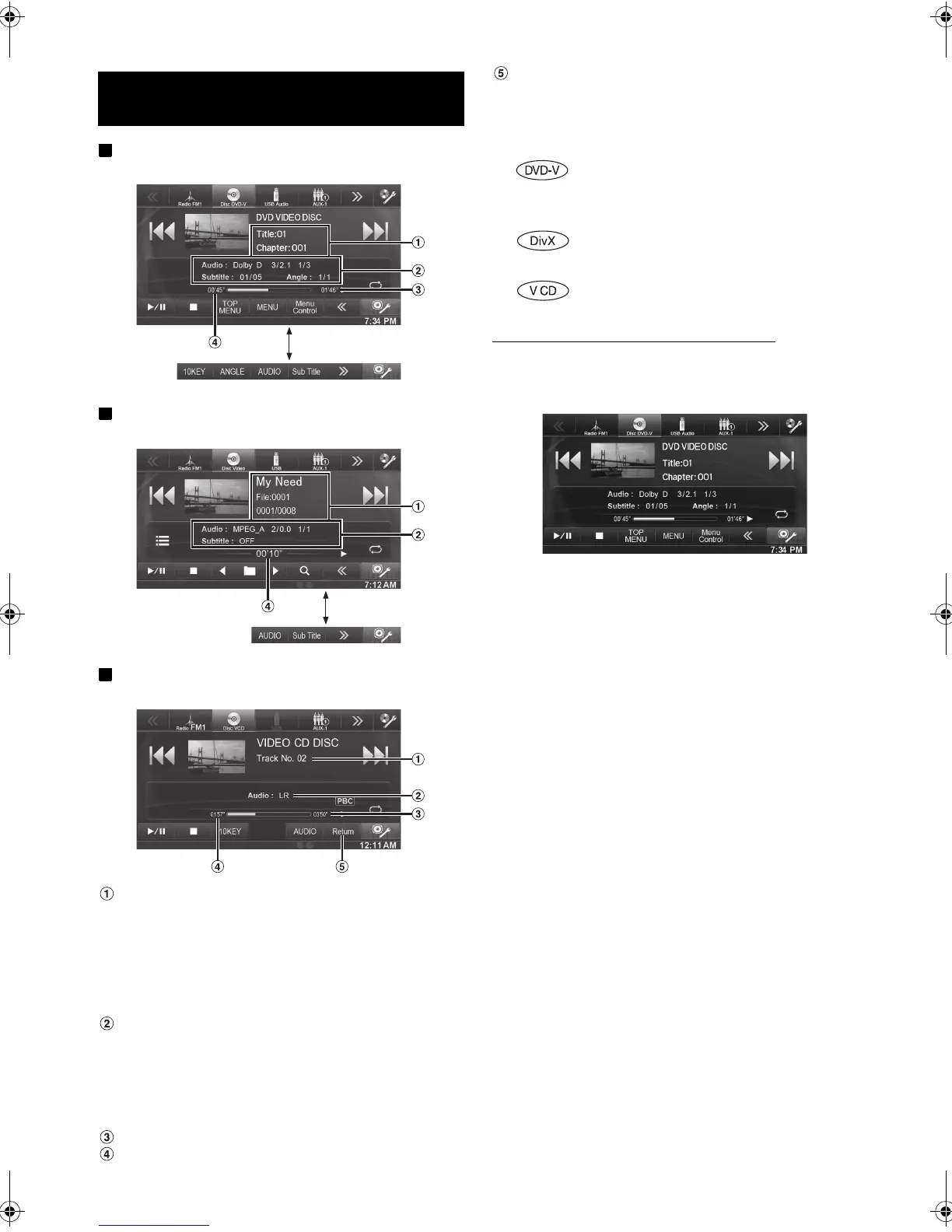
Display example for DVD Video main screen
Display example for DivX
®
main screen
Display example for Video CD main screen
Information display-1
DVD-Video:
Title name/Chapter No.
DivX
®
:
Title name/File No./Current File No./Total File No. in Current
Folder
Video CD:
Tra ck NO.
Information display-2
DVD-Video:
Audio signal output/Subtitle/Angle
DivX
®
:
Audio signal output/Subtitle
Video CD:
Audio Output channel
Remaining time for playing
Elapsed time
[Return]
Returns to the previous screen.
Disc types that can be used for each heading are
represented by the following marks.
The DVD/Video CD operation screen display
Touch the screen while the DVD/Video CD playback
screen is displayed.
The DVD/Video CD operation screen is displayed.
• The operation screen changes to the visual screen in the DVD or
Video CD mode for 5 seconds after an operation has been performed.
• If you try to activate the DVD/Video CD while driving, the display
will show the warning-Picture off for your safety.
• Some operations cannot be carried out depending on the disc or
playback screen.
DVD/Video CD
Touch [<<], [>>]
Touch [<<], [>>]
DVD Commercial Video discs (used for the
distribution of movies, etc.) or a DVD-R/DVD-
RW, DVD+R/DVD+RW recorded in a video
mode can be used.
CD-R/CD-RW/DVD-R/DVD-RW/DVD+R/
DVD+RW discs that are recorded in the
DivX
®
mode can be used.
Video-CD discs can be used.
01GB00INE-W940E.book Page 22 Monday, July 8, 2013 5:14 PM



 To Next Page