This document describes the QLP952SLR-2 Solar Outdoor Bluetooth Enabled Rock Speaker, a set of two speakers designed for outdoor use.
Function Description:
The QLP952SLR-2 is a set of two solar-powered, Bluetooth-enabled rock speakers designed to provide wireless audio in an outdoor environment. These speakers are built to resemble rocks, blending into garden or patio settings. They feature both solar charging capabilities and a Micro USB charging option, ensuring continuous operation. The speakers are designed to pair with each other automatically, creating a stereo sound experience, and then connect to a Bluetooth-enabled device for music playback.
Important Technical Specifications:
- Product Model: QLP952SLR-2
- Speaker Quantity: Set of 2
- Charging Method: Solar Panel and Micro USB
- Battery Type: Built-in rechargeable battery
- Recommended USB Charge Time: 2-3 hours
- Recommended Solar Charge Time: 8 hours (for first-time use and subsequent charging)
- Bluetooth Range (Speaker to Speaker): Up to 25 ft.
- Bluetooth Range (Device to First Speaker): Up to 50 ft. (15m)
- Playback Time: Approximately 12 hours on built-in battery (depending on music level and other factors)
- Indicators: Bluetooth Indicator Light, Charging Indicator Light (RED for charging, GREEN for fully charged)
- Controls: On/Off Button, Pairing Button
Usage Features:
Unpacking and Components:
The package includes two Solar Bluetooth Speakers and a Micro USB Charging Cable. Users are advised to carefully unpack and ensure all components are present.
Charging the Speakers:
- USB Charging:
- Plug the small end of the Micro USB Charging Cable into the USB Charge Port on the back of the speaker.
- Connect the larger end of the Micro USB Charging Cable into a USB charging device.
- Recommended charge time is 2-3 hours.
- The Charging Indicator will glow RED while charging and GREEN when fully charged.
- Solar Charging:
- Place the speaker under direct sunlight or in a brightly lit room to allow the solar panel to charge the built-in rechargeable battery.
- For first-time use, it is recommended to charge the speaker for at least 8 hours using the solar panel.
- Charge times may vary depending on solar conditions.
Basic Operation:
- Powering On/Off: Push the power button on the back of the speaker to turn it ON or OFF.
Pairing the Two Speakers Together:
- The two speakers in the set are designed to pair with each other automatically.
- If manual pairing is needed, ensure speakers are unpaired from any device before starting.
- Keep speakers and the Bluetooth-enabled device within 3 feet during the pairing process.
- Manual Pairing Steps:
- Turn both speakers ON. A flashing blue light will appear on each.
- Double-click the pairing button on each speaker simultaneously.
- One speaker's Bluetooth Indicator Light will flash BLUE, and the other will show a "Steady" BLUE light, indicating successful speaker-to-speaker pairing.
- Connecting to a Bluetooth-Enabled Device:
- Ensure no paired devices are in range, or the speaker will connect automatically. If no paired device is in range, the speaker will enter pairing mode.
- On your Bluetooth-enabled device (iOS, Android, or other cell phones), go to Bluetooth settings and ensure Bluetooth is ON.
- Search for devices and select "Alpine Corporation" from the list.
- After successful pairing, a tone will be heard, and the Bluetooth indicator light will turn BLUE.
- Set the speakers in your preferred location within 25 ft. of each other.
- Note on Range: If the Bluetooth device moves out of range of the second speaker (50 ft. or 15m), the first speaker will remain paired. However, if the device moves out of range of the first speaker, both speakers will lose their pairings and stop playing.
Playing Music:
- Once connected to a Bluetooth-enabled device, open your media player and press PLAY.
- Music and volume can be controlled from the connected device.
Troubleshooting:
Speakers Not Connecting to Bluetooth-Enabled Device:
- If "ALPINE CORPORATION" does not appear in your Bluetooth list:
- Check previously connected devices, disconnect them, and remove the speakers from your Bluetooth list.
- Ensure both speakers are charged and turned on.
- Connect to "Alpine Corporation" in your Bluetooth settings. A chime from the speakers will confirm successful connection.
Only One Speaker Has Sound:
- Ensure one speaker's Bluetooth Indicator Light is "flashing" and the other is "steady." If both are "flashing," double-click the small pairing button on one of the speakers.
- Ensure only one "ALPINE CORPORATION" entry appears in your Bluetooth list. If two entries are present, remove both from your device's Bluetooth list (e.g., for iOS: Settings > Bluetooth > (i) icon > Forget Device; for Android: Settings > Bluetooth > Gear icon > Unpair).
- Turn on both speakers, allow 5 seconds for setup (chimes will be heard intermittently).
- Connect to "Alpine Corporation" in your Bluetooth settings. A chime will indicate successful connection.
Maintenance Features:
- Alpine Corporation products are constructed from high-quality materials.
- Warranty Coverage: Repair or replacement at Alpine's discretion within the warranty period.
- Proof of Purchase: A valid proof of purchase with the date clearly indicated is required.
- Photographs: Photos of defective merchandise are required to help distinguish the cause of the defect.
- Warranty Period: One-year limited warranty from the date of purchase.
- Replacement Parts: Available through the original seller or approved retailer. Credit card information may be requested for shipping charges for warranty claims after 30 days of purchase.
What is NOT Covered Under Warranty:
- Water Damage:
- Damage from freezing water due to improper storage.
- Damage from "hard water" and/or caustic cleaners affecting paint or finishes.
- Failure to keep the unit clean and free of additives/cleaners.
- Note: Some splashing is normal for fountains and not covered.
- Paint & Color (Retention and/or Loss):
- Natural erosion of color due to water use.
- Gradual fading and discoloration over time.
- Only severe or complete fading within the first year from the date of purchase (excluding natural erosion).
- Damages Caused By:
- Transit (unless specified).
- Inadequate care and/or neglect.
- Environmental and/or natural elements.
- Immersion in water (unless specified).
- Improper installation/storage and/or maintenance.
- Voided Warranty: If the product has been damaged by accident, misuse, negligence, improper installation, and/or modifications. This includes freezing water damage, hard water damage, failure to keep the unit clean, and use of harmful additives (bleach, chlorine, etc.) affecting paint and/or parts.
- Additional Costs: The warranty does not cover installation, removal, disposal, shipping costs, or consequential damage associated with any warranty claim.
Procedure/Service for Warranty Claims:
- Contact the retailer from whom the product was purchased.
- If not possible, contact Alpine Corporation at www.alpine4u.com.
- Be prepared to provide proof of purchase, photographs, and any other information needed to validate your claim.
- The warranty covers only the individual defective component, not items with multiple parts.

 Need help?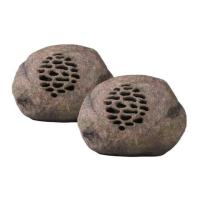

 To Next Page
 General