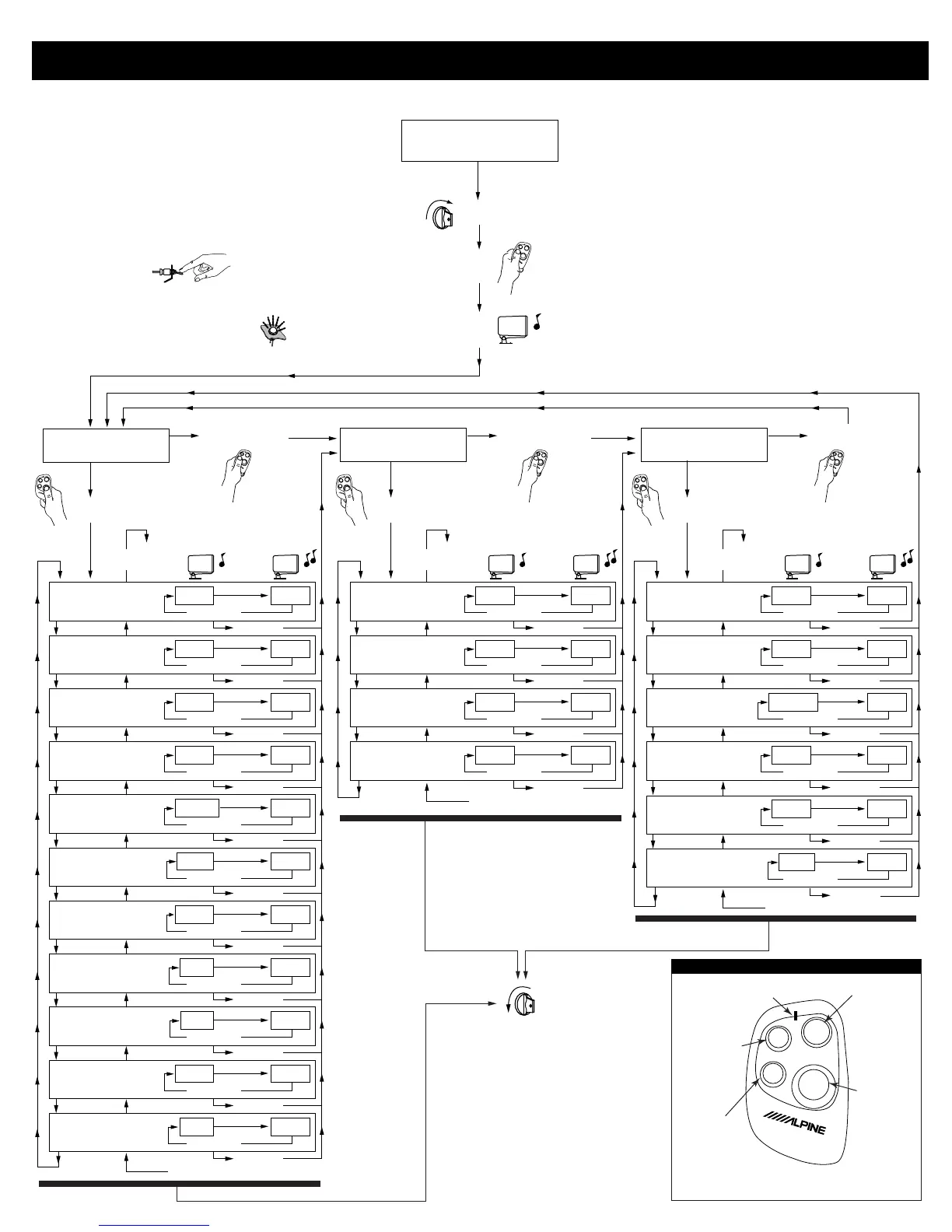
Feature Programming
Rev. 1/28/00
SEC-8028
Page 2
Installation Instructions (English)
Disarmed &
not in VALET Mode
Function Setup
Sensor Setup
EXT Setup
Turn Ignition On
LED will Blink for One Second then
TX/
PANIC
EXT2/
EXT3
EXT1/
VALET
MODE
1
Siren will Chirp Once
Press MODE
Press MODE
Press TX/PANIC
Hold the Disarm/Valet Switch for 1 Second then
Press MODE on the Remote Control within 1 Second
T
X
/
P
A
N
I
C
E
XT2/
EX
T3
EX
T
1/
V
ALE
T
M
OD
E
T
X
/
P
A
N
I
C
E
X
T
2
/
E
X
T
3
E
X
T
1
/
V
A
L
E
T
M
O
D
E
T
X
/
P
A
N
I
C
E
X
T
2
/
E
X
T
3
E
X
T
1
/
V
A
L
E
T
M
O
D
E
Press MODE
1 Chirp 2 Chirp
ON
Turn Ignition OFF at
anytime to exit Programming
Mode
OFF
From top of the row
Chirp Select
1-short LED blink
(repeating)
Siren will "Chirp" Once Siren will "Chirp" Twice Siren will "Chirp" Three times
ON OFF
Press
TX/PANIC
Press TX/PANIC
Press EXT-1 Press EXT-2
Press MODE
Auto Lock
2-short LED blinks
(repeating)
OFF ON
Press
TX/PANIC
Press TX/PANIC
Press EXT-1 Press EXT-2
Press MODE
Ignition Lock
3-short LED blinks
(repeating)
OFF ON
Press
TX/PANIC
Press TX/PANIC
Press EXT-1 Press EXT-2
Press MODE
Ignition Unlock
4-short LED blinks
(repeating)
OFF ON
Press
TX/PANIC
Press TX/PANIC
Press EXT-1 Press EXT-2
Press MODE
Arming Type
1-long LED blink
(repeating)
Manual Auto
Press
TX/PANIC
Press TX/PANIC
Press EXT-1 Press EXT-2
Press MODE
Siren Duration
1-long, 1-short LED blinks
(repeating)
30 Sec. 60 Sec.
Press
TX/PANIC
Press TX/PANIC
Press EXT-1 Press EXT-2
Press MODE
Door Lock Pulse Length
1-long, 2-short LED blinks
(repeating)
1 Sec. 3 Sec.
Press
TX/PANIC
Press TX/PANIC
Press EXT-1 Press EXT-2
Press MODE
Panic Arm
1-long, 3-short LED blinks
(repeating)
OFF ON
Press
TX/PANIC
Press TX/PANIC
Press EXT-1 Press EXT-2
Press MODE
2-Car Operation
1-long, 4-short LED blinks
(repeating)
Car 1 Car 2
Press
TX/PANIC
Press TX/PANIC
Press EXT-1 Press EXT-2
Press MODE
Double Pulse Door Unlock
2-long LED blinks
(repeating)
OFF ON
Press
TX/PANIC
Press TX/PANIC
Press EXT-1 Press EXT-2
Press MODE
Priority Door Unlock
2-long, 1-short LED blinks
(repeating)
OFF ON
Press
TX/PANIC
Press TX/PANIC
Press EXT-1 Press EXT-2
Press MODE
Press EXT-2 to go to
the bottom of the row
TX/
PANIC
EXT2/
EXT3
EXT1/
VALET
MODE
Press TX/PANIC
1 Chirp 2 Chirp
From top of the row
Door Sensor Input
1-short LED blink
(repeating)
ON OFF
Press
TX/PANIC
Press TX/PANIC
Press EXT-1 Press EXT-2
Press MODE
Door Sensor Polarity
2-short LED blinks
(repeating)
Negative Positive
Press
TX/PANIC
Press TX/PANIC
Press EXT-1 Press EXT-2
Press MODE
Hood/Trunk Sensor Input
3-short LED blinks
(repeating)
ON OFF
Press
TX/PANIC
Press TX/PANIC
Press EXT-1 Press EXT-2
Press MODE
Impact Sensor Input
4-short LED blinks
(repeating)
ON OFF
Press
TX/PANIC
Press TX/PANIC
Press EXT-1
Press EXT-2
Press MODE
Press EXT-2 to go to
the bottom of the row
T
X
/
P
A
N
I
C
E
X
T
2
/
E
X
T
3
E
X
T
1
/
V
A
L
E
T
M
O
D
E
TX/
PANIC
EXT2/
EXT3
EXT1/
VALET
MODE
Press TX/PANIC
1 Chirp 2 Chirp
From top of the row
EXT-1 Output Configuration
EXT-2 Output Configuration
EXT-3 Output Configuration
1-short LED blink
(repeating)
1 Sec.
Latched
Press
TX/PANIC
Press TX/PANIC
Press EXT-1 Press EXT-2
Press MODE
2-short LED blinks
(repeating)
1 Sec.
Latched
Press
TX/PANIC
Press TX/PANIC
Press EXT-1 Press EXT-2
Press MODE
3-short LED blinks
(repeating)
Continuous
1 Sec.
Press
TX/PANIC
Press TX/PANIC
Press EXT-1 Press EXT-2
Press MODE
EXT Trunk & Impact
Sensor Cancel
1-long LED blink (repeat)
ON OFF
Press
TX/PANIC
Press TX/PANIC
Press EXT-1 Press EXT-2
Press MODE
EXT Trunk & Impact
Sensor Selection
1-long, 1-short LED blinks (rpt)
EXT-2 EXT-3
Press
TX/PANIC
Press TX/PANIC
Press EXT-1 Press EXT-2
Press MODE
EXT-1 Impact & Ignition
Sensor Disable
4-short LED blinks (repeat)
OFF ON
Press
TX/PANIC
Press TX/PANIC
Press EXT-1
Press EXT-2
Press MODE
Press EXT-2 to go to
the bottom of the row
TX/
PANIC
EXT2/
EXT3
EXT1/
VALET
MODE
SEC-8428 Remote Control Layout
TX/PANIC
MODE
EXT1/VALET
STATUS LED
EXT1/VALET
Press and
release to
activate EXT-2.
Press and Hold to
activate EXT-3.
Blinks once while transmitting
CAR 1 information and will
Blink TWICE while
transmitting CAR 2
Information.
Press and release
to activate the
MODE function for
programming
options.
Press and release
to activate the
ARM/DISARM
Command. Press
and Hold for 3-
Seconds to
Activate the Panic
Command.
Press and release
to activate the
EXT-1 Command.
Press and Hold for
3-Seconds to
Activate the
PROTECTED
VALET mode.
NOTE 1: Pressing and Holding both TX/PANIC and EXT1/VALET for more
than 2-seconds will change the car transmit status (CAR-1/CAR-2).
NOTE 2: See Owners Manual for complete operation and additional functions.


 To Next Page
 Loading...