Owner's manual
Favorite
Function
Favorite Function
This
unit
enables
you
to
recall
functions
easily
by
registering
frequently
used items such
as
the
Audio
source,
the
navigation search
function,
etc
to
the
Favorite screen. You can recall
any
of
these
items
easily.
1
Press
the*
(Favorite) button.
The Favorite screen
is
displayed.
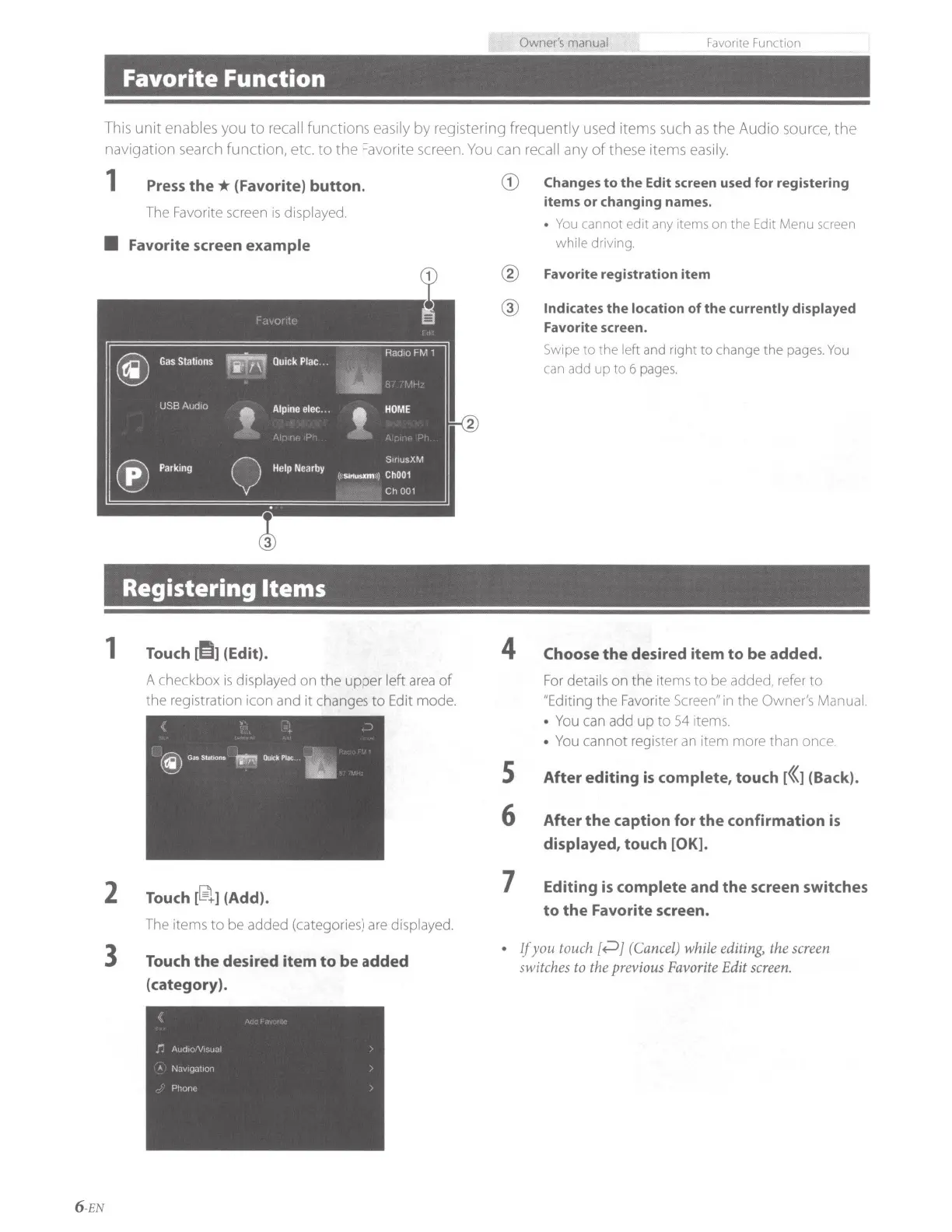
• Favorite screen example
Registering Items
1 Touch
d!IJ
(Edit).
A checkbox
is
displayed on the upper left
area
of
the registration icon and
it
chan
ges
to
Edit mode.
2
Touch
[
~
]
(Add).
The items
to
be added (categories)
are
displayed.
3
Touch
the
desired
item
to
be added
(category).
6 -EN
G) Changes
to
the
Edit screen used for registering
items
or
changing names.
•
You
cannot
edit
any items
on
the Edit
Menu
screen
while driving.
@ Favorite registration item
@ Indicates
the
location
of
the
currently displayed
Favorite screen.
4
s
6
7
.
Swipe
to
the
left and right
to
change
the
pages.
You
can add
up
to
6 pages.
Choose
the
desired item
to
be added.
For
details on the items
to
be added, refer
to
"Editing the Favorite Screen" in the Owner's Manual.
•
You
can add
up
to
54 items.
•
You
cannot register
an
item more than once.
After editing
is
complete, touch [((] (Back).
After
the
caption for
the
confirmation
is
displayed, touch [OK].
Editing
is
complete and
the
screen switches
to
the
Favorite screen.
If
you
touch[~]
(Cancel)
while
editing,
the
screen
switches
to
the previous
Favo
r
ite
Edit
screen.


 To Next Page