EasyManua.ls Logo

Alpine X110 - HD Radio;RBDS Operation

Alpine X110
255 pages
Print Icon
To Next Page IconTo Next Page
To Previous Page IconTo Previous Page
Loading...
Radio/HD
Radio'M/RBDS
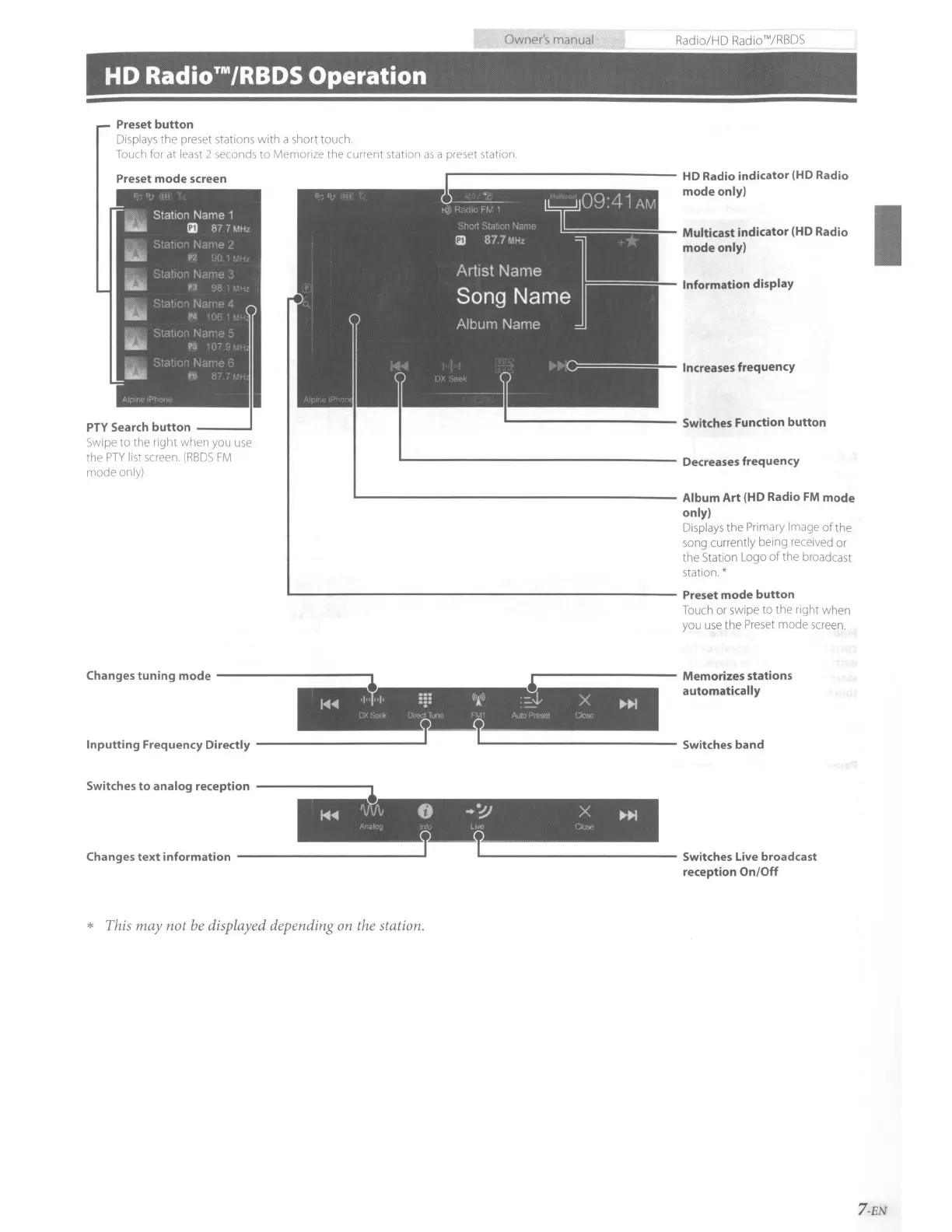
HD
Radio™/RBDS
Operation
Preset
button
Disp
l
ays
the preset
sta
tions with a short touch.
Touch
for
at
least
2
seconds
to Memorize the current station
as
a preset station.
Preset
mode
screen
PTY Search
button
___
_.
Swipe
to the right when you
use
the
PTY
list
screen.
(RBDS
FM
mode only)
Information display
Increases
frequency
L....--------------------
Album
Art
(HD Radio FM
mode
only)
Displays
the
Primary
Image
of
the
so
ng currently being
received
or
the Station Logo
of
the broadcast
station.*
L--------------------------
Preset
mode
button
Touch
or swipe to the right when
you
use
the
Preset
mode
screen.
Changes
tun
i
ng
mode
-----------,~
1~"'---------
Memorizes stations
automatically
1-4.,.
, '
:~:
''r
::_:.L-
x
~
Inputt
ing Frequency Directly
-------------''
-~-
--
T.._
____________
Switches band
Switches
to
analog reception
1-4.,.
'',V•"
0
..
".!)
X
_.,11>1
Changes
text
information
____________
_.T
* This
may
not
be displayed depending on the station.
''
'
T.__
____________
Switches Live broadcast
reception
On/
Off
7 -EN

Table of Contents

Related product manuals