EasyManua.ls Logo

Alstom Drive Data Manager ALSPA MV3000 - User Manual

Alstom Drive Data Manager ALSPA MV3000
8 pages
Print Icon
To Next Page IconTo Next Page
Loading...
ALSPA MV3000 Drive Data Manager™ Lead/Mounting Kit
Part Number MVS3001-4001
Instruction Sheet T1916EN Rev. 0002 (07/00)
Page 1 of
8
Features / Specification :
3 metre extension cable for hand-held operation, or
enclosure mounting of Drive Data Manager™
Mounting Kit to achieve IP65, when mounted on an
enclosure panel
Drilling template for enclosure mounting of the Drive
Data Manager™
Humidity : 5% to 95% Relative Humidity,
non condensing
Temperature : Operating 0°C to 50°C
Storage -25°C to 70°C
Related Documents
Failure to comply with any of the general requirements for installation, operation and maintenance
provided in the technical manuals will significantly increase the risk of maloperation, fire or electric
shock.
T1676 ALSPA MV3000 Getting Started Manual
Scope
This instruction sheet explains how to mount the Drive Data Manager™ on an enclosure, and how to correctly
use the extension cable for hand held operation.
Question and Answer IconNeed help?

Do you have a question about the Alstom Drive Data Manager ALSPA MV3000 and is the answer not in the manual?

Summary

Product Features and Specifications

Features Overview

Details the 3-meter extension cable, IP65 mounting kit, and environmental conditions.

Environmental Specifications

Specifies humidity limits (5-95% RH non-condensing) and temperature ranges for operation and storage.

Document and Product Information

Related Documents

Lists the ALSPA MV3000 Getting Started Manual (T1676) for further guidance.

Scope of Instruction Sheet

Explains mounting procedures and extension cable usage for hand-held operation.

Kit Contents and Compatibility

Related Product Compatibility

Confirms the enclosure mounting kit is for MV3000 Drive Data Manager MVS3000-4001, enabling IP65.

Box Contents Listing

Lists all items included in the kit, such as seals, leads, screws, and cable ties.

Enclosure Mounting Instructions

Template and Drilling Procedure

Guides on using the drilling template, drilling holes, and preparing the enclosure panel.

Seal and Component Fitting

Details on fitting the seal to the Drive Data Manager and preparing for enclosure mounting.

Hand-Held Operation Instructions

Connecting the Extension Lead

Instructions for connecting the extension lead for hand-held use and securing the cable.

Customer Support

Technical Support and Training

Guidance on contacting local technical support for queries about the product.

Overview

The ALSPA MV3000 Drive Data Manager™ Lead/Mounting Kit (Part Number MVS3001-4001) is an accessory designed to facilitate the mounting and operation of the MV3000 Drive Data Manager. This kit allows for both fixed enclosure mounting, achieving an IP65 rating, and flexible hand-held operation using an extension cable.

Function Description

The primary function of this kit is to provide the necessary components and instructions for securely mounting the MV3000 Drive Data Manager onto an enclosure panel, ensuring environmental protection, or for enabling its use as a hand-held device. When mounted on an enclosure, the kit helps the Drive Data Manager achieve an IP65 rating, indicating protection against dust ingress and low-pressure water jets from any direction. This makes it suitable for use in industrial environments where such protection is required. For hand-held operation, a 3-meter extension cable is provided, allowing the user to operate the Drive Data Manager remotely from the drive itself. The kit includes all necessary hardware such as screws, washers, and a seal, along with a drilling template to ensure accurate installation.

Important Technical Specifications

Environmental Conditions:

  • Humidity: The device is designed to operate within a relative humidity range of 5% to 95%, non-condensing. This broad range allows for operation in various industrial settings without issues related to moisture.
  • Operating Temperature: The acceptable operating temperature range is 0°C to 50°C. This covers typical indoor industrial environments.
  • Storage Temperature: For storage, the device can withstand temperatures from -25°C to 70°C, providing flexibility for warehousing and transportation.

Physical Specifications (for Enclosure Mounting):

  • IP Rating: Achieves IP65 when mounted on an enclosure panel using the provided kit. This signifies a high level of protection against dust and water.
  • Extension Cable Length: A 3-meter extension cable is included for hand-held operation, offering flexibility in positioning the Drive Data Manager.
  • Mounting Hardware: The kit includes M4 x 8mm screws (4), M4 spring washers (4), and 4-40UNC female screw locks (2) for secure attachment.
  • Drilling Template: A precise drilling template is provided for creating the necessary holes (four 4.5mm diameter holes and one 35mm diameter hole) on the enclosure panel, ensuring accurate and secure mounting.

Usage Features

Enclosure Mounting:

  • Secure Installation: The kit provides a robust method for mounting the Drive Data Manager onto an enclosure panel. This is achieved by fixing a drilling template to the enclosure, drilling the specified holes, and then securing the Drive Data Manager with the provided seal, screws, and washers.
  • Environmental Protection: Once mounted, the Drive Data Manager benefits from an IP65 rating, protecting it from dust and water, which is crucial in harsh industrial environments.
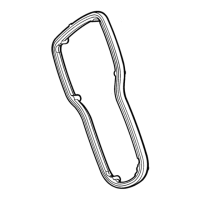
  • Integrated Seal: A dedicated seal is included to ensure a watertight and dust-tight fit between the Drive Data Manager and the enclosure panel. The seal has six raised points that align with corresponding holes on the Drive Data Manager for correct positioning.
  • Cable Routing: Instructions detail how to route the Drive Data Manager lead through the enclosure's 35mm diameter hole and connect it to the drive, including opening the yellow Control Door and routing the cable within the Control Wiring area.
  • Screw Locks: 4-40UNC screw locks are used to secure the lead to the drive, preventing accidental disconnections.

Hand-Held Operation:

  • Flexibility: The 3-meter extension cable allows the Drive Data Manager to be used as a hand-held device, providing greater flexibility and convenience for operators who need to monitor or adjust drive parameters from a distance.
  • Easy Connection: The extension lead is designed for easy connection to the Drive Data Manager, with a tab on the connector to help retain the lead securely.
  • Versatility: This dual-purpose kit ensures that the Drive Data Manager can be adapted to various operational needs, whether it's fixed for continuous monitoring or used portably for diagnostics and adjustments.

Maintenance Features

  • Corrosion Prevention: The instructions recommend de-burring and painting the drilled holes on the enclosure panel to prevent corrosion, thereby extending the lifespan of the installation.
  • Instruction Sheet: A comprehensive instruction sheet (T1916) is provided, detailing all steps for fitting and using the kit, which aids in correct installation and troubleshooting.
  • Related Documents: The kit references the "ALSPA MV3000 Getting Started Manual" (T1676) for general installation, operation, and maintenance guidelines, emphasizing the importance of adhering to these to prevent maloperation, fire, or electric shock.
  • Customer Support: Users are directed to their local technical support center for any queries regarding the product, ensuring assistance is available for maintenance and operational issues.

The kit's design focuses on ease of installation, robust environmental protection, and operational flexibility, making the ALSPA MV3000 Drive Data Manager a versatile tool for drive management in industrial applications.

Alstom Drive Data Manager ALSPA MV3000 Specifications

General IconGeneral
BrandAlstom
ModelDrive Data Manager ALSPA MV3000
CategoryRacks & Stands
LanguageEnglish