EasyManua.ls Logo

ALTA Bliss Automation - User Manual

ALTA Bliss Automation
11 pages
Print Icon
To Next Page IconTo Next Page
Loading...
2
3
4
5
6
7
8
8-9
9
10
10
11
11
BLISS
Automation by ALTA
15 CHANNEL REMOTE CONTROL
PROGRAMMING AND USERS GUIDE
Declarations
Safety Instructions
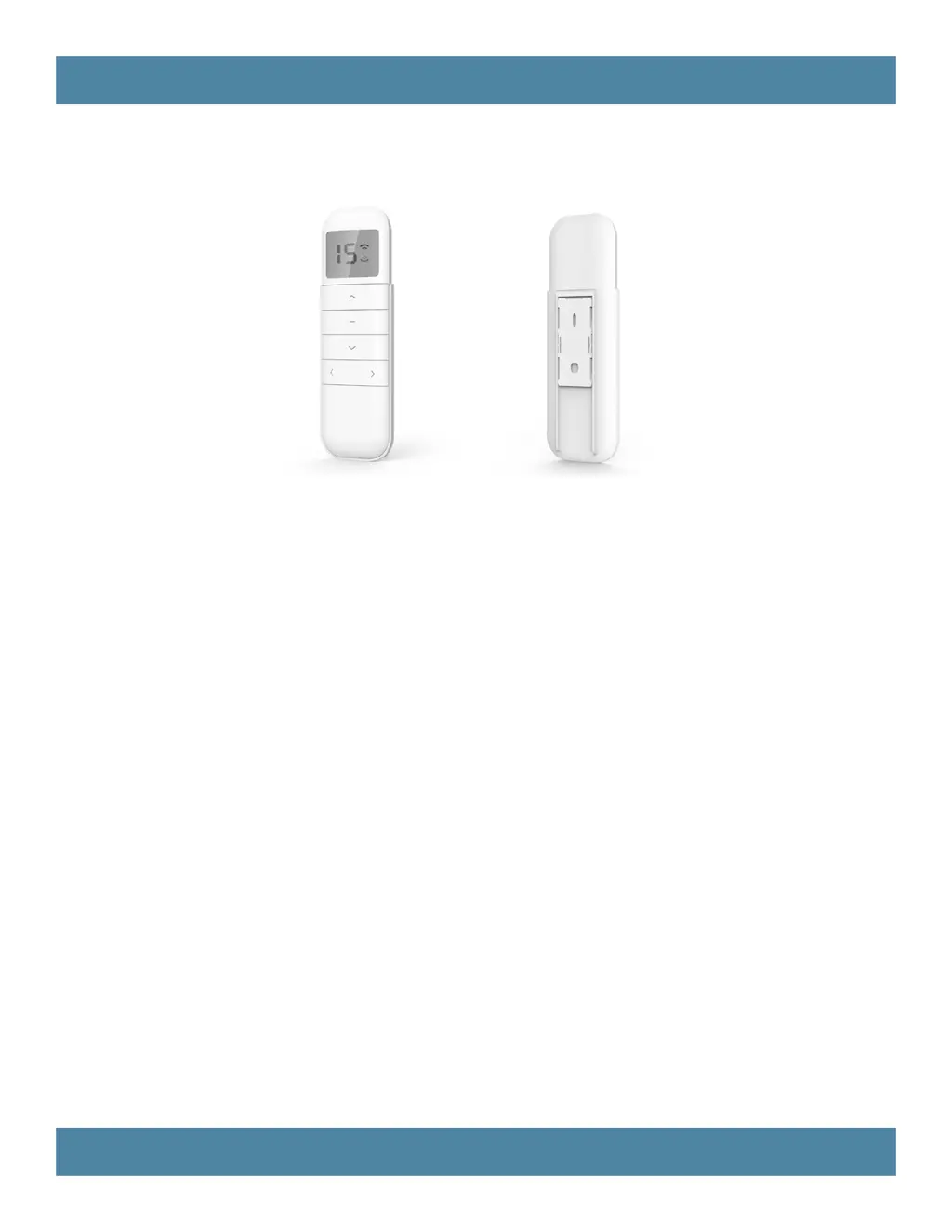
BLISS™ Remote Overview
BLISS™ Remote Functions
P1 Button Instructions
Initial Set-up
Adjust Limits
Favorite Position
Add or Remove Additional Remote
Adjust Motor Speed
Roller or Sheer Mode
Quick Index
Troubleshooting

Other manuals for ALTA Bliss Automation

Questions and Answers

  • K
    Kathryn McintoshAug 16, 2025
    Why does my ALTA Solar panel motor beep 10 times when in use?
    • C
      Christopher FieldsAug 17, 2025
      If your ALTA Solar panel motor beeps 10 times during use, it indicates that the battery voltage is low or there's an issue with the PV (solar panel). To resolve this, recharge the motor with a charger or check the connection and positioning of the solar panel.
  • M
    Miguel RamosAug 20, 2025
    What to do if ALTA Remote Control motor has no response?
    • R
      Robyn LuceroAug 20, 2025
      If your ALTA Remote Control motor isn't responding, there might be several reasons: * **Radio interference/shielding:** Keep the remote control and motor antenna away from metal objects. * **Distance:** Move the remote control closer to the receiver. * **Power:** Check the power supply to the motor to ensure it is connected and active. * **Wiring:** Verify that the wiring is connected correctly.
  • J
    joshua61Aug 23, 2025
    Why does my ALTA Bliss Automation motor beep 10 times?
    • L
      Leon BaileyAug 23, 2025
      If your ALTA Remote Control motor beeps 10 times during use, it indicates that the battery voltage is low or there is an issue with the PV (solar panel). To resolve this, recharge the motor with the provided charger and/or check the connection and positioning of the solar panel.
  • M
    Michael RamosAug 27, 2025
    What to do if cannot program a single motor (multiple motors respond) on ALTA Remote Control?
    • P
      Paul StricklandAug 27, 2025
      When you can't program a single motor and multiple motors respond to ALTA Remote Control, it could be due to a few reasons: 1. Multiple motors are paired to the same channel. In this case, always reserve an individual channel for programming functions. 2. It is a system best practice to provide an extra remote control for multi-motor projects that provides individual control for each motor for programming purposes. 3. Place all other motors into sleep mode (refer to P1 button instructions).
  • K
    kellerlindaAug 31, 2025
    How to recharge depleted battery in ALTA Bliss Automation motor?
    • K
      kelly19Aug 31, 2025
      If the ALTA Remote Control motor battery is depleted, recharge it using the provided charger and/or check the connection and positioning of the solar panel.
  • K
    kelliejohnstonSep 4, 2025
    Why is ALTA Remote Control solar panel not charging properly?
    • N
      nguyenevanSep 4, 2025
      If you're experiencing insufficient charging from the solar panel for your ALTA Remote Control, check the connection and orientation of the solar panel.
  • M
    Michelle WhiteSep 8, 2025
    What to do if ALTA Bliss Automation Remote Control battery is not inserted correctly?
    • F
      franklinjosephSep 8, 2025
      If the battery is not inserted correctly in your ALTA Remote Control, check the battery polarity and ensure it is properly aligned.
  • J
    Jacob PooleNov 11, 2025
    What to do if my ALTA Solar panel motor has no response?
    • R
      Robert EvansNov 12, 2025
      If your ALTA Solar panel motor isn't responding, there are several potential causes: * The motor's battery might be depleted. Recharge it using a compatible charger, and verify the connection and positioning of the solar panel. * Insufficient charging from the solar panel could be the issue. Check the connection and orientation of the solar PV panel. * The remote control battery might be discharged. Try replacing it. * The battery may be incorrectly inserted into the remote control. Check the battery polarity. * Radio interference or shielding could be disrupting the signal. Make sure the remote control and the antenna on the motor are away from metal objects. * The remote control might be too far from the motor/receiver. Move it closer. * There may be a power failure. Ensur...

Summary

Declarations

Safety Instructions

BLISS Remote Overview

Available Products

Lists available shade types compatible with the remote control.

Specifications

Details technical specifications of the BLISS remote control, including voltage and frequency.

Remote Button Instructions

Explains the functions of each button on the BLISS remote control.

Replace;Install CR2450 Battery

Provides step-by-step instructions for replacing the remote control battery.

BLISS Remote Functions

Channel Options

Instructions for selecting and hiding channels on the BLISS remote control.

Advanced Setting - Disable Limit Setting

How to enable or disable advanced settings like limit setting and motor direction.

P1 Button Instructions

P1 Button Location

Shows the physical location of the P1 button on different BLISS remote models.

P1 Button Instruction

Details the operational modes triggered by pressing the P1 button for various durations.

Initial Set-up

Pair; Unpair Remote Control

Steps to connect or disconnect a remote control to the motor.

Change Motor Direction (if necessary)

Guide on how to reverse the motor's direction of operation.

Setting the Upper and Lower Limits

Instructions for setting the maximum and minimum travel limits for the shade.

Adjust Limits

Adjust the Upper Limit

Procedure to set the highest position for the shade.

Adjust the Lower Limit

Procedure to set the lowest position for the shade.

Set Favorite Position

Set Favorite Position

Steps to assign a specific position as a favorite for the shade.

Send Shade to Favorite Position

Instructions to move the shade to its pre-set favorite position.

Favorite Position Management

Delete Favorite Position

Procedure for removing a previously saved favorite position.

Using Current Remote Control

Steps to add a new remote using an existing paired remote.

New Remote Control

Instructions for pairing a new remote control independently.

Adjust Motor Speed

Acceleration Speed

Procedure to increase the motor's acceleration speed.

Deceleration Speed

Procedure to adjust the motor's deceleration speed.

Roller or Sheer Mode

Roller Shade Mode

Configures the shade for continuous movement after a short press.

Sheer Shade Mode

Enables jog movement after a short press, with continuous after long.

Quick Index

Troubleshooting

ALTA Bliss Automation Specifications

General IconGeneral
BrandALTA
ModelBliss Automation
CategoryRemote Control
LanguageEnglish