EasyManua.ls Logo

Altec Lansing 1270 - Amplifier Operation Procedures; Stereo (Independent Channel) Operation; Bridge (Mono) Operation

Altec Lansing 1270
3 pages
Print Icon
To Previous Page IconTo Previous Page
Loading...
OUTPUT
-0
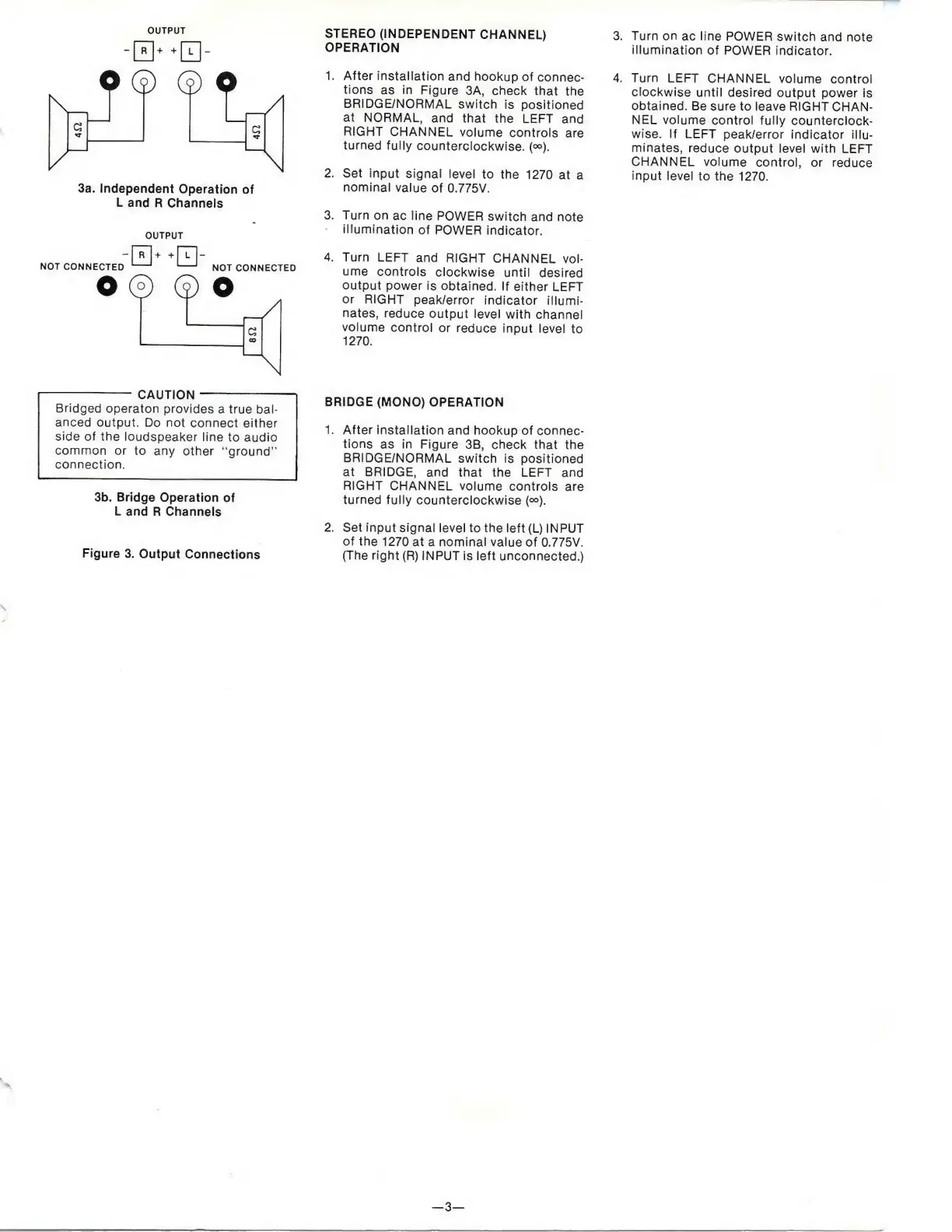
3a.
Independent
Operation
of
L
and
R
Channels
NOT
CONNECTED
OUTPUT
0
+
+
0
-
NOT
CONNECTED
STEREO
(INDEPENDENT
CHANNEL)
OPERATION
1.
After
installation
and
hookup
of
connec¬
tions
as
in
Figure
3A,
check
that
the
BRIDGE/NORMAL
switch
is
positioned
at
NORMAL,
and
that
the
LEFT
and
RIGHT
CHANNEL
volume
controls
are
turned
fully
counterclockwise.
(<»).
2.
Set
input
signal
level
to
the
1270
at
a
nominal
value
of
0.775V.
3.
Turn
on
ac
line
POWER
switch
and
note
illumination
of
POWER
indicator.
4.
Turn
LEFT
and
RIGHT
CHANNEL
vol¬
ume
controls
clockwise
until
desired
output
power
is
obtained.
If
either
LEFT
or
RIGHT
peak/error
indicator
illumi¬
nates,
reduce
output
level
with
channel
volume
control
or
reduce
input
level
to
1270.
-
CAUTION-
Bridged
operaton
provides
a
true
bal¬
anced
output.
Do
not
connect
either
side
of
the
loudspeaker
line
to
audio
common
or
to
any
other
“ground”
connection.
3b.
Bridge
Operation
of
L
and
R
Channels
Figure
3.
Output
Connections
BRIDGE
(MONO)
OPERATION
1.
After
installation
and
hookup
of
connec¬
tions
as
in
Figure
3B,
check
that
the
BRIDGE/NORMAL
switch
is
positioned
at
BRIDGE,
and
that
the
LEFT
and
RIGHT
CHANNEL
volume
controls
are
turned
fully
counterclockwise
(<»).
2.
Set
input
signal
level
to
the
left
(L)
INPUT
of
the
1270
at
a
nominal
value
of
0.775V.
(The
right
(R)
INPUT
is
left
unconnected.)
3.
Turn
on
ac
line
POWER
switch
and
note
illumination
of
POWER
indicator.
4.
Turn
LEFT
CHANNEL
volume
control
clockwise
until
desired
output
power
is
obtained.
Be
sure
to
leave
RIGHT
CHAN¬
NEL
volume
control
fully
counterclock¬
wise.
If
LEFT
peak/error
indicator
illu¬
minates,
reduce
output
level
with
LEFT
CHANNEL
volume
control,
or
reduce
input
level
to
the
1270.
3

Related product manuals