EasyManua.ls Logo

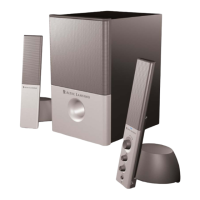
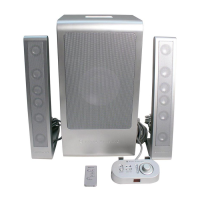
Altec Lansing 2100 - User Manual

Altec Lansing 2100
16 pages
Print Icon
To Next Page IconTo Next Page
Loading...
User's guide
Mode d’emploi
Guía del usuario
Guia do Usuário

Questions and Answers

  • A
    Amanda FrancoSep 23, 2025
    What if the DIN connector pins are bent on my Altec Lansing Speaker System?
    • K
      katie29Sep 23, 2025
      Try to gently straighten the pins with tweezers or very small pliers. If this does not work, then contact the Altec Lansing Consumer Support Department for further instructions.
  • K
    Kenneth FigueroaAug 23, 2025
    How to fix Altec Lansing Speakers when one speaker isn't working?
    • D
      Dr. Michael HarmonAug 25, 2025
      If one or both of your Altec Lansing Speakers aren't working, check the following: * Ensure the input cable from the speaker is connected to the audio source's line-out jack (the un-amplified source). * Verify that all cables are correctly plugged in and have a good connection. * Try plugging the cable into the headphone jack of an alternate source (e.g., Walkman, Discman, or FM radio) to test the speakers.
  • B
    Brian FowlerAug 25, 2025
    Why is there no sound from my Altec Lansing Subwoofer?
    • T
      tsmithAug 26, 2025
      If there is no sound coming from your Altec Lansing Subwoofer: * Test the speakers on another audio device by connecting the audio cable to the line-out or headphone jack of another audio source. * If your model has a Subwoofer Volume control, adjust it to increase the Subwoofer volume. If there is a Bass Selector function on the System Controller, adjust it and raise the volume level. * If listening to .WAV files, try listening to a CD, as .WAV files often have little low frequency content.
  • L
    Laura BerryAug 27, 2025
    What to do if my Altec Lansing Speaker System has distorted sound?
    • J
      Jennifer BartlettAug 27, 2025
      Sound distortion can occur due to several reasons. Try decreasing the speaker system's master volume level. If using Windows, adjust the volume and balance controls to the center, then use the speaker controller to adjust the volume. Also, the sound source itself might be distorted; for example, .WAV files are often of poor quality. Try using a different sound source like a music CD.
  • G
    George BowenAug 27, 2025
    How to fix Altec Lansing Speaker System when all LEDs are unlit?
    • R
      Robert SimonAug 27, 2025
      If all LEDs are unlit, it indicates a power issue. First, press the Power On button on the System Controller. Check that the AC cord is connected to the wall outlet. If using a surge suppressor, ensure it is switched on. Also, make sure the System Controller is connected to the Subwoofer. Finally, plug another device into the wall outlet to ensure it is functioning.
  • M
    Michael GarciaSep 16, 2025
    What causes crackling sounds from my Altec Lansing Speaker System?
    • P
      Patricia WelchSep 16, 2025
      Crackling sounds, static, or other noise can stem from a few sources. Check that all cables are connected to the line-out or audio-out jack on your sound card or audio source, and not speaker-out. If using a computer, ensure the Windows volume control is not set more than halfway, as high levels can cause distortion. If the noise continues, test with an alternate audio source (e.g., Walkman, FM radio) by plugging the stereo cable into the headphone jack. If the noise disappears, the problem likely lies with your original audio source.
  • B
    brandyleeSep 13, 2025
    Why does my Altec Lansing Speaker System subwoofer distort my monitor?
    • B
      Bryan SandersSep 13, 2025
      The subwoofer is not magnetically shielded, and this can cause distortion if it is less than 3 feet from your monitor.
  • K
    Kimberly HollandSep 14, 2025
    How do I increase the bass output on my Altec Lansing Speaker System subwoofer?
    • R
      robertabakerSep 15, 2025
      To increase the bass output, adjust the BASS control through your audio sound source, such as your computer sound card control or CD player control. Also, verify that all cables are correctly connected and making a good connection.
  • T
    terrence12Sep 5, 2025
    How to increase bass output on Altec Lansing Subwoofer?
    • R
      Raymond SullivanSep 5, 2025
      To increase the bass output from your Altec Lansing Subwoofer, adjust the BASS control through your audio sound source (computer sound card control, CD player control, etc.). Also, verify that all of your cables are hooked up correctly and are making a good connection.
  • E
    Eric BrewerSep 3, 2025
    How to stop loud hum from Altec Lansing Subwoofer?
    • D
      daisybrownSep 3, 2025
      If you are experiencing a loud hum from your Altec Lansing Subwoofer, try these solutions: * Move the power cord from the power surge protector (if applicable) and plug it directly into an AC wall outlet. * Check the cables to ensure they are making a good connection. * If disconnecting the stereo cable from the audio source makes the hum disappear, adjust the volume control in your audio source, as you might be overdriving the volume settings on your speaker system.

Summary

Users Guide and Introduction

Product Identification

Identifies the Altec Lansing 2100 Speaker System and its basic configuration.

Introduction to the System

Welcomes the user and highlights the product's capabilities and design philosophy.

Safety and Warnings

General Safety Precautions

Details essential safety measures to prevent electric shock, fire, and other hazards during use.

Service and Maintenance Guidelines

Outlines conditions requiring professional service and proper care to avoid damage.

Setup and Operation

Feature Highlights

Lists the key components and advanced features of the 2.1 speaker system.

Connection Guide

Provides a step-by-step procedure for connecting the speakers, controller, and audio sources.

System Controls and Usage

Explains the functionality of the power button, volume adjustments, and the wired controller.

Speaker Placement Recommendations

Offers guidance on optimal placement for satellites and the subwoofer for sound quality and safety.

Specifications and Troubleshooting

Technical Specifications

Details the system's performance metrics, drivers, and power requirements.

Troubleshooting Common Issues

Provides solutions for common problems like no sound, distortion, and connection errors.

Warranty Information

One Year Limited Warranty Details

Outlines the terms, conditions, and limitations of the product's warranty coverage.

Altec Lansing 2100 Specifications

General IconGeneral
BrandAltec Lansing
Model2100
CategorySpeaker System
LanguageEnglish

Related product manuals