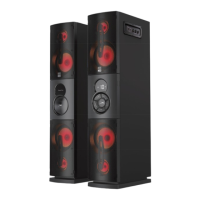
The Altec Lansing Party Duo Bluetooth Tower Set (IMT7003) is a 2.0 channel speaker system designed to deliver powerful audio with deep bass and multi-light modes, making it suitable for entertainment and home theater use. It features 240 watts of total power (120W RMS) and includes HDMI ARC for TV connectivity, enhancing the audio experience for television viewing.
Technical Specifications:
- Power Audio: 120W (RMS) 2.0 Channel, 240 W (PMPO) Total
- Driver Units: 5.25" x 4 + 2.25" x 4
- Frequency Response:
- Satellite: 120Hz-20KHz
- Subwoofer: 20Hz-170Hz
- Separation: ≥40dB
- Signal-to-Noise Ratio (S/N): ≥70dB
- Distortion: ≤0.5% (at 1K, 1W)
- Power Supply: 110-120V~ 60Hz 100W
- Dimensions:
- Subwoofer: W172mm x H830mm x D343mm
- Satellite: W172mm x H830mm x D343mm
- Cable Lengths:
- Audio cable (stereo-to-stereo): 110cm
- Audio cable (stereo-to-RCA): 110cm
- UL power cable: 120cm
- Satellite cable: 180cm
- Wired microphone's cable: 285cm
Usage Features:
The Party Duo system consists of a main speaker and a satellite speaker, which are connected via a dedicated cable with two plugs for the output and light ports on the main speaker. Once connected, the main speaker's power cable can be plugged into a power outlet.
The main speaker offers multiple audio input ports for connecting various external devices:
- ARC (HDMI Audio Return Channel): For audio input from a TV.
- OPTICAL: For optical digital audio input from devices like TVs, DVD players, or CD players.
- SRC 1 & SRC 2: For line-level or headphone output from other audio sources.
Remote Control Functions:
The included remote control provides comprehensive control over the speaker system:
- Power ON/OFF (Standby): Turns the speakers on or off.
- LIGHTS: Toggles through various multi-light settings.
- MUTE: Mutes the audio output.
- VOL + / VOL -: Increases or decreases the volume.
- Last Track / Next Track: Navigates between audio tracks.
- Play/Pause: Controls audio playback.
- BT ARC OPT: Selects Bluetooth audio, or audio from devices connected to the ARC or OPT ports. Press and hold to disconnect Bluetooth.
- SRC1 / SRC2: Selects audio from devices connected to the SRC1 or SRC2 ports, respectively.
- TONE: Toggles between Bass and Treble settings. Use VOL + and VOL - to adjust the selected tone setting.
Speaker Controls (Front Panel):
The main speaker also features a front control panel for direct interaction:
- Power/Play/Pause: Controls power and audio playback.
- SOURCE (BT, ARC, OPT, SRC1, SRC2): Selects the audio input source. Press and hold to disconnect Bluetooth.
- VOLUME + / -: Adjusts the overall volume.
- TONE: Likely provides access to tone adjustments similar to the remote.
Side Control Panel (Karaoke Features):
The side panel of the main speaker is dedicated to karaoke functionality:
- Mic1 & Mic2 Input Jacks: Allows two wired microphones to be plugged in for singing along with music.
- MIC1 VOLUME & MIC2 VOLUME Knobs: Independently adjusts the volume for each microphone.
- ECHO Knob: Adds vocal effects to the microphone output.
Bluetooth Pairing:
- Power on the speakers using the remote control.
- Press the "BT" button on the remote to enter Bluetooth mode.
- On your phone, go to the Bluetooth settings menu, ensure Bluetooth is turned on, and connect to the device listed as "AL Party Duo".
Speaker Placement:
For optimal audio experience, it is recommended to place one speaker directly to the left of a TV or computer monitor and the other speaker directly to the right.
Safety Precautions:
The manual emphasizes several important safety instructions to ensure safe operation and prevent damage:
- Read and retain all safety and operating instructions.
- Heed all warnings on the appliance and in the instructions.
- Follow all operating and use instructions.
- Do not use near water or moisture.
- Clean only with a dry cloth.
- Do not block ventilation openings.
- Do not install near heat sources.
- Do not defeat the safety purpose of polarized or grounding plugs.
- Protect the power cord from being walked on or pinched.
- Use only manufacturer-specified attachments/accessories and with specified carts, stands, tripods, brackets, or tables.
- Unplug during lightning storms or when unused for long periods.
- Refer all servicing to qualified personnel, especially if the apparatus is damaged, exposed to moisture, or does not operate normally.
- Servicing instructions are for qualified personnel only to reduce the risk of electric shock.
- Do not expose to rain or moisture; no objects filled with liquids should be placed on the apparatus.
- Terminals marked with the "4" symbol may carry sufficient voltage to cause electric shock, requiring installation by an instructed person or use of ready-made leads/cords.
- The equipment is a Class II or double insulated electrical appliance, designed not to require a safety connection to electrical earth.
- The lightning flash symbol warns of non-insulated "dangerous voltage" inside the enclosure.
- The exclamation point symbol warns of important operating and maintenance instructions.
- To reduce the risk of electric shock, do not remove the cover (or back) as there are no user-serviceable parts inside.
Maintenance Features:
The manual advises against user servicing and directs all servicing to qualified personnel. It also provides contact information for customer support for troubleshooting and warranty service.
The product comes with a one-year warranty covering defects in material or workmanship under normal usage. Damages from unauthorized repairs, tampering, modification, or accident are not covered. To obtain warranty service, customers should contact Altec Lansing support and provide proof of purchase. The consumer is responsible for properly packaging and sending defective products to the authorized service center at their expense. The warranty is non-transferable.
This comprehensive set of features and specifications makes the Altec Lansing Party Duo Bluetooth Tower Set a versatile audio solution for home entertainment, offering powerful sound, customizable lighting, and karaoke capabilities.

 Need help?
 General








 To Next Page