EasyManua.ls Logo

Altec Lansing MZX008 - User Manual

Altec Lansing MZX008
2 pages
Print Icon
To Next Page IconTo Next Page
Loading...
MZX008
In the Box
A Closer Look
Controlling
Music
Charging
Powering On/
Bluetooth
Pairing
QUICK START GUIDE
USB Cable
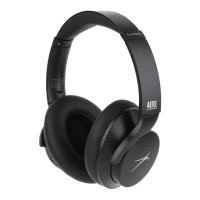
MZX008 Bluetooth
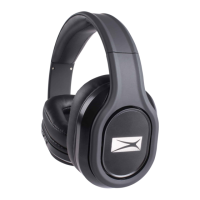
On Ear Headphones
1-2 Hours
Full Charge
(red) = Charging
Complete
2-3 SEC
Pairing Mode
Red & Blue Flashing LED
Paired
Blue Slowly Flashing LED
MZX008
-
+
PRESS
PRESS
Phone Calls/
JUST ASK
For additional user materials and warranty information,
please visit us at www.alteclansing.com
Aux In
Micro USB Port Charging Indicator
Bluetooth Indicator
Answer Call
End Call
X
PRESS & HOLD (2sec)
Reject Incoming Call
PRESS
PRESS x2
Activate Siri or
Google Assistant
Power/Play/Pause
Microphone
Volume Up/
Next Track
Volume Down/
Previous Track
PRESS & HOLD
PRESS & HOLD
PRESS
PRESS & HOLD
Overall battery performance varies dependent upon
use,settings and environmental conditions.For
further information,please visit www.
alteclansing.com
The Bluetooth® word mark and
logos are registered trademarks
owned by the Bluetooth SIG, Inc.
and any use of such marks by Sakar
International is under license. Other
trademarks and trade names are
those of their respective owners.
Question and Answer IconNeed help?

Do you have a question about the Altec Lansing MZX008 and is the answer not in the manual?

Overview

This document describes the Altec Lansing MZX008 Bluetooth On-Ear Headphones, a wireless audio device designed for personal listening.

Function Description

The Altec Lansing MZX008 headphones allow users to listen to audio wirelessly via Bluetooth connectivity. They feature on-ear design and provide controls for music playback, call management, and voice assistant activation. The headphones are rechargeable, offering a portable and convenient audio solution.

Important Technical Specifications

  • Model: MZX008
  • Connectivity: Bluetooth
  • Charging: Micro USB port
  • Battery Life: Approximately 1-3 hours for a full charge, providing up to 3 hours of full playback. Overall battery performance may vary depending on usage.
  • FCC Compliance: The device complies with Part 15 of the FCC Rules, ensuring it operates without causing harmful interference and accepts interference received.

Usage Features

In the Box

The package includes:

  • MZX008 Bluetooth On-Ear Headphones
  • USB Cable (for charging)

A Closer Look (Controls and Indicators)

The headphones feature several controls and indicators:

  • Volume Up/Next Track Button: Increases volume or skips to the next track.
  • Volume Down/Previous Track Button: Decreases volume or goes to the previous track.
  • Power/Play/Pause Button: Turns the headphones on/off, plays/pauses music, and manages calls.
  • Bluetooth Indicator: Shows Bluetooth pairing status.
  • Microphone: For hands-free calling.
  • Aux In: For wired connection (cable not included).
  • Micro USB Port: For charging the headphones.
  • Charging Indicator: Shows the charging status.

Charging

  1. Connect: Plug the USB cable into the Micro USB port on the headphones and connect the other end to a power source.
  2. Indicator:
    • Red (solid): Charging
    • Off: Charging complete
  3. Charge Time: A full charge takes approximately 1-3 hours.
  4. Battery Performance: Overall battery performance varies depending on usage. For more information, visit www.alteclansing.com.

Powering On/Off & Bluetooth Pairing

  1. Powering On/Off:
    • To Power On: PRESS & HOLD the Power/Play/Pause button for 2-3 seconds. The Pairing Mode LED will flash red and blue.
    • To Power Off: PRESS & HOLD the Power/Play/Pause button for 2-3 seconds. The Pairing Mode LED will turn off.
  2. Pairing Mode: When powered on, the headphones enter pairing mode, indicated by a flashing red and blue LED.
  3. Bluetooth Connection:
    • On your device (e.g., smartphone), go to Bluetooth settings and select "MZX008" from the list of available devices.
    • Once paired, the Bluetooth indicator will show a slowly flashing blue LED.
    • The headphones will automatically reconnect to the last paired device when powered on, if the device is within range and Bluetooth is enabled.

Controlling Music

  • Play/Pause: PRESS the Power/Play/Pause button.
  • Next Track: PRESS the Volume Up/Next Track button.
  • Previous Track: PRESS the Volume Down/Previous Track button.
  • Volume Up: PRESS & HOLD the Volume Up/Next Track button.
  • Volume Down: PRESS & HOLD the Volume Down/Previous Track button.

Phone Calls/Voice Assistant

  • Answer Call: PRESS the Power/Play/Pause button.
  • End Call: PRESS the Power/Play/Pause button.
  • Reject Incoming Call: PRESS & HOLD the Power/Play/Pause button for 2 seconds.
  • Activate Siri or Google Assistant: PRESS the Power/Play/Pause button twice.

Maintenance Features

FCC Statement

The device complies with Part 15 of the FCC Rules. Any changes or modifications not expressly approved by the party responsible for compliance could void the user's authority to operate the equipment.

Interference Information:

  • This device must not cause harmful interference.
  • This device must accept any interference received, including interference that may cause undesired operation.
  • The equipment has been tested and found to comply with the limits for a Class B digital device, pursuant to Part 15 of the FCC Rules. These limits are designed to provide reasonable protection against harmful interference in a residential installation.
  • This equipment generates, uses, and can radiate radio frequency energy and, if not installed and used in accordance with the instructions, may cause harmful interference to radio communications.
  • Important: There is no guarantee that interference will not occur in a particular installation.
  • Troubleshooting Interference: If this equipment does cause harmful interference to radio or television reception, which can be determined by turning the equipment off and on, the user is encouraged to try to correct the interference by one or more of the following measures:
    • Reorient or relocate the receiving antenna.
    • Increase the separation between the equipment and receiver.
    • Connect the equipment into an outlet on a circuit different from that to which the receiver is connected.
    • Consult the dealer or an experienced radio/TV technician for help.

Warranty and Support

For additional user materials and warranty information, please visit us at www.alteclansing.com. You can also follow Altec Lansing on social media:

  • Facebook: @alteclansing
  • Instagram: @alteclansingoffical
  • Twitter: @alteclansing
  • YouTube: Altec Lansing

Altec Lansing is a trademark of Sakar International, Inc. The Bluetooth® word mark and logos are registered trademarks owned by Bluetooth SIG, Inc. and any use of such marks by Sakar International is under license. All other trademarks and trade names are those of their respective owners.

Altec Lansing MZX008 Specifications

General IconGeneral
BrandAltec Lansing
ModelMZX008
CategoryHeadphone
LanguageEnglish

Related product manuals