The Altec Lansing Hydrabuds ANC (Active Noise Canceling) Truly Wireless Earphones, model MZX6200, are designed for an immersive audio experience with the added benefit of active noise cancellation. These earbuds are Bragi Enabled and support voice commands, offering a hands-free and intuitive user experience.
Function Description:
The Hydrabuds ANC are truly wireless earphones that connect via Bluetooth 5.2. They feature active noise cancellation to minimize ambient distractions, allowing users to focus on their audio. The Bragi Enabled functionality indicates advanced smart features, likely including gesture control and intelligent audio processing. Voice commands are a key feature, enabling users to control music playback, calls, and other functions without needing to physically interact with their device. The earphones are designed for both music listening and call management, with dedicated controls for each. They also include a low latency mode, optimized for activities like lipsync and gaming, to reduce audio delay. Multipoint Bluetooth connection allows the earbuds to be simultaneously connected to two devices, such as a smartphone and a computer, for seamless switching between audio sources.
Important Technical Specifications:
- Sweat and Dustproof Rating: IP55, indicating resistance to dust and low-pressure water jets, making them suitable for workouts and outdoor use.
- Battery Type: Lithium Polymer Battery.
- Bluetooth Version: V5.2, ensuring stable and efficient wireless connectivity.
- Bluetooth Range: 50 ft, providing ample freedom of movement.
- Earbud Battery Capacity: 60mAh per earbud.
- Charging Case Battery Capacity: 600mAh.
- Earbud Charging Time: Approximately 1 hour.
- Fast Charge Time: 10 minutes of charging provides 2 hours of playtime.
- Play Time: Approximately 9 hours on a single charge.
- Total Play Time with Charging Case: The case holds 3 additional charges, extending the total playtime to approximately 36 hours.
Usage Features:
- Powering ON/Pairing: When the charging case is opened, the earbuds automatically connect to each other and enter pairing mode. Earbud LEDs indicate charge status (Low Battery, Charging, Fully Charged) when in the case, and pairing status (Pairing, Connected) when removed.
- Bluetooth Connection: To connect, users turn on Bluetooth on their device and select "AL HydraBuds ANC" from the available devices. The earbuds automatically reconnect to previously paired devices.
- Multipoint Bluetooth Connection:
- Turn off Bluetooth on the first paired device to disconnect the earbuds.
- Pair the earbuds to a second device.
- Turn Bluetooth back on on the first device; the earbuds will auto-reconnect, allowing simultaneous connection to both devices.
- Controlling Music:
- Play/Pause: Press either earbud once.
- Volume Up: Press the left earbud twice.
- Volume Down: Press the right earbud twice.
- Next Track: Press the left earbud three times.
- Previous Track: Press the right earbud three times.
- Controlling Calls:
- Answer/End Call: Press either earbud once.
- Reject Call: Press and hold either earbud.
- Switch Call: Press and hold either earbud during a call.
- Other Functions:
- Voice Assistant Activation: Press and hold either earbud until the first beep, then release.
- Spotify Tap™ Activation: Press and hold either earbud until the first beep, then release. The Spotify App will resume playback or play new music.
- Ambient Awareness and ANC Modes: Press the left earbud to cycle through these modes.
- Low Latency Mode: Press and hold either earbud until the second beep, then release, to toggle this mode on/off.
- Pairing a New Device: Turn off Bluetooth on the current device. The earphones will enter pairing mode. Alternatively, press and hold either earbud to drop the current connection and enter pairing mode.
- Voice Control (via Hydrabuds App): Once enabled in the app, say "Hey Hydra" followed by commands like "Play," "Pause," "Next," "Volume Up," "Volume Down," "Ambient ON," "Ambient OFF," "Noise Canceling ON," "Noise Canceling OFF," "Spotify," "Assistant," or "End Call." For incoming calls, "Accept" or "Reject" can be used without "Hey Hydra."
- Hydrabuds App: A dedicated app for iOS and Android allows users to enable hands-free voice control, customize button actions, browse advanced features, and update firmware.
Maintenance Features:
- Charging: The charging case is powered via a USB-C cable. The Battery Level LED Indicators on the case show its charge capacity (0-24%, 25-49%, 50-74%, 75-99%, 100%). The case battery level can be checked by pressing a button on its right side.
- Cleaning: Use a soft cloth or paper towel. Avoid harsh chemicals or detergents. Ensure earphones are dry before charging.
- Storage: Store earphones in a cool, dry place when not in use.
- Cable Handling: Connect and disconnect cables carefully; avoid tugging or yanking.
- Environmental Exposure: Do not expose earphones to high temperatures or extreme cold.
- Reset:
- Factory Reset: Disconnect from Bluetooth, remove from case, then press and hold for 6 seconds. This erases all settings (indicated by flashing red and blue lights).
- Hardware Reset: Press and hold for 10 seconds to restart earphones (indicated by flashing red and blue lights). Press again to power on. Hardware resets are for unresponsive earbuds.
- Firmware Updates: The Hydrabuds App will notify users of new firmware updates to ensure optimal performance.
- Recycling/Disposal: Dispose of earphones properly according to local laws and regulations.
The Hydrabuds ANC are designed for convenience, performance, and durability, offering a comprehensive set of features for modern wireless earphone users.

 Need help?
 General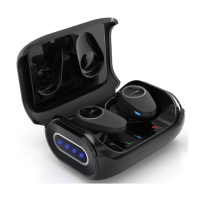

 To Next Page