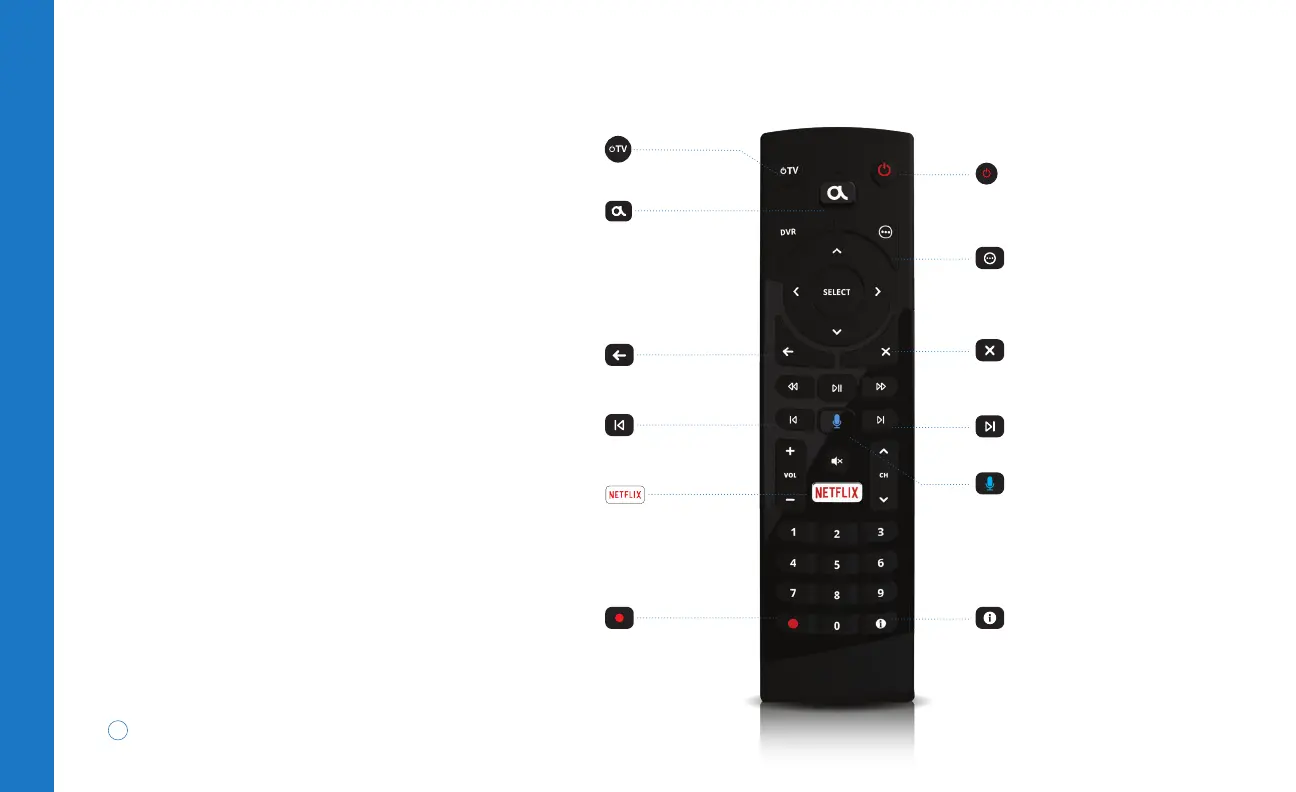
TV
Your remote may vary slightly from the one pictured.
To learn more about your specific remote model visit
suddenlink.com/remote
4
TV | Altice One
TV power
Displays or exits
main menu
Altice One power
Displays options menu
(where available)
Exits screens or apps, stops
playback and returns to live TV
Skips forward 30 seconds
Displays programming
information
Activates voice controls
Returns to previous
screen or channel
Skips back 10 seconds
Records programming
Opens Netflix app
Voice Remote
With voice commands and your Bluetooth-enabled
remote you can:
• Search for a movie or show: “Find Star Trek”
• Tune to a channel: “Put on Travel Channel”
• Launch an app: “Open Netflix”
• Navigate to a menu: “Go to On Demand”
In addition, sleek backlit keys help you navigate
in the dark and aim your remote anywhere
(up to 30 feet away) to control your Altice One,
even when it’s in an entertainment center.
To learn more about the voice remote visit
suddenlink.com/oneremote


 To Next Page