REMOTE CONTROL | 11
UsiNg the reMote coNtroL
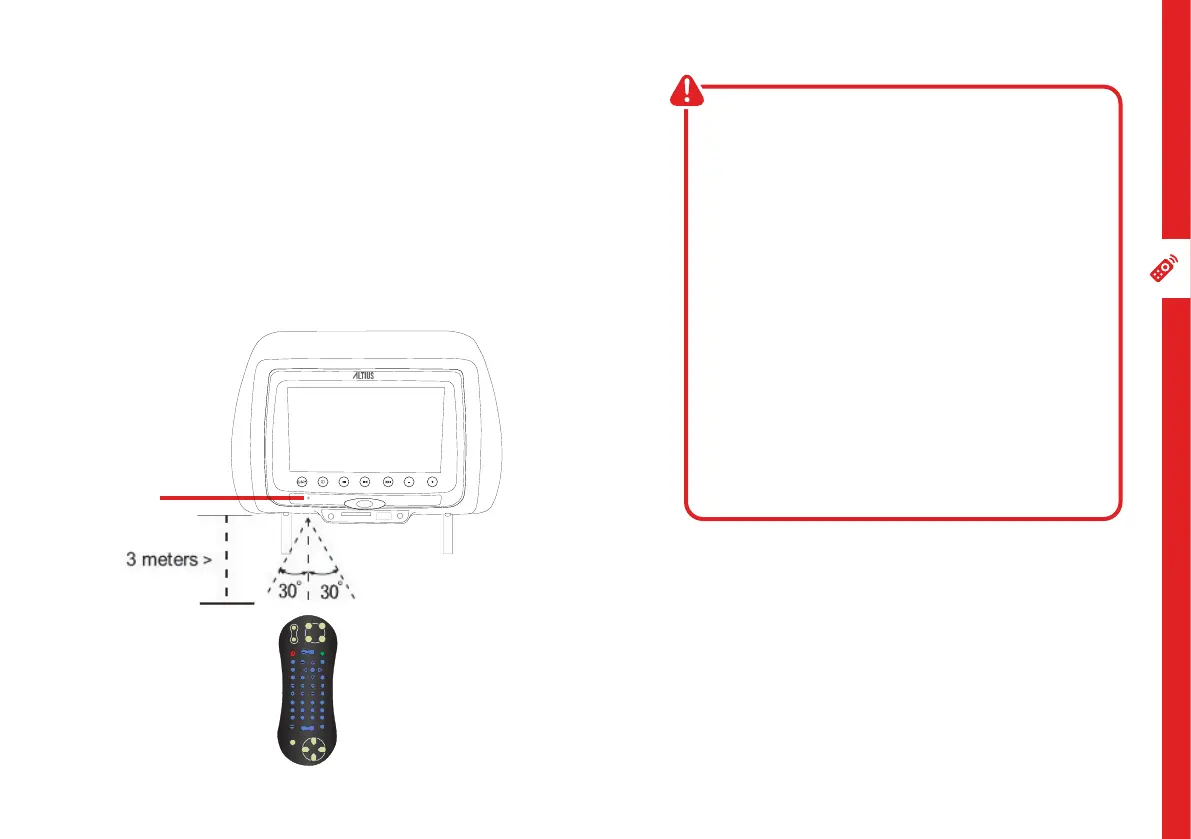
To use the remote, point it towards the remote sensor at the
front of the headrest.
The remote has a range of up to about 3 metres from the
headrest at an angle of up to 30 degrees to either side of the
sensor, as illustrated below.
reMote hiNts aNd tiPs
• Point the remote control directly
towards the sensor.
• Make sure no obstacles are blocking
its path. The remote control will not
operate if its path is blocked.
• Handle the remote control with care.
Do not drop, apply shock or step on the
remote control. Do not spill water on
the unit.
• If you do not intend to use the remote
control for an extended period of
time (more than a month), remove the
battery to prevent possible damage
from battery leakage and corrosion.
Sensor
Location
SELECT
PBC
MENU
TITLE
MUTE
PROG
TFT
MENU
DISP
ENTER
REPEAT
1
2
3
4
5
6
7 8
9 0
10+
ANGLE SETUP USB/SD
VOL+
VOL-
START
ZOOM
DVD
SUBTITLE AUDIO
SLOW
RETURN
AV


 To Next Page