12 | REMOTE CONTROL
SELECT
PBC
MENU
TITLE
MUTE
PROG
TFT
MENU
DISP
ENTER
REPEAT
1
2
3
4
5
6
7 8
9 0
10+
ANGLE SETUP USB/SD
VOL+
VOL-
START
ZOOM
DVD
SUBTITLE AUDIO
SLOW
RETURN
AV
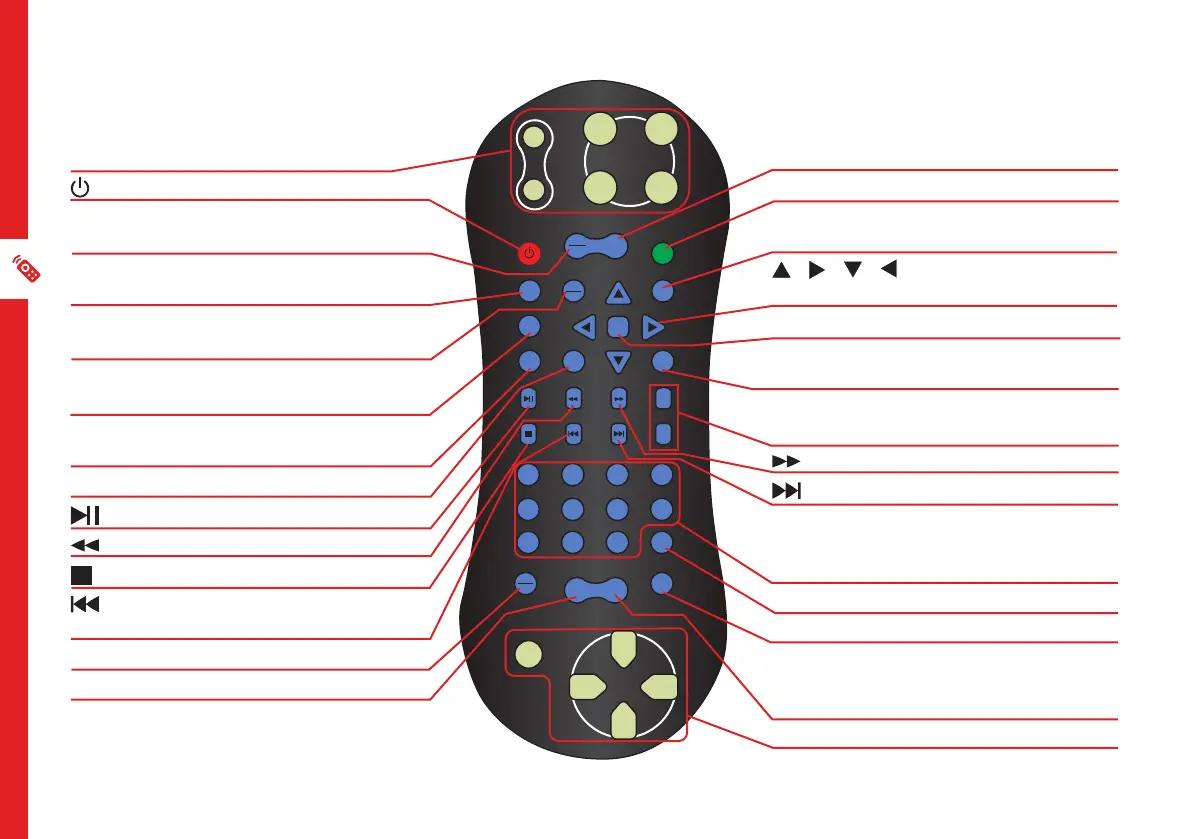
GAME PLAY BUTTONS
: Turn the unit on/off
PBC/MENU: Set PBC menu function on/
off/select panel setting
DISP : Display the DVD playback
information
TFT/MENU : Display the screen setting
menu
REPEAT : Switch between repeat one/
repeat all/repeat off
ANGLE : Change the angle of the
camera on DVD mode
SETUP : Display the system setup menu
: Play/pause playback
: Rewind
: Stop playback
: Skip to the previous title/chapter/
track
DVD/AV : Select the playback source
SUBTITLE : Select the subtitle
TITLE : Go to the title menu
MUTE : Mute sound
PROG : Program a playlist with track
numbers
/ / / : Navigate the system
menu
ENTER : Confirm a selection
USB/SD : Select between DVD/SD card/
USB
VOL+ / VOL - : Increase/decrease
volume
: Fast forward
: Skip to the next title/chapter/track
NUMBER BUTTONS : Numerical input
to directly access a specific chapter or
track
ZOOM : Zoom in on screen in AV mode
SLOW : Play in slow motion
AUDIO : DVD mode: select multi
language sound. CD/VCD/SD Card/USB:
Select audio channel
GAME PLAY BUTTONS


 To Next Page