

EasyManua.ls Logo

ALTUS ADC70W - User Manual

ALTUS ADC70W
28 pages
Print Icon
To Next Page IconTo Next Page
Loading...
ADC70W
EN
Dryer
User Manual
2960312937/201221.1324
Question and Answer IconNeed help?

Do you have a question about the ALTUS ADC70W and is the answer not in the manual?

Summary

Important Safety and Environment Instructions

General Safety

Guidelines for safe usage by children and adults, installation, and general warnings.

Electrical Safety

Instructions for safe electrical connection, grounding, voltage, and handling the plug.

Product Safety

Precautions regarding superheating, self-combustion, and fire hazards from specific items.

Child Safety

Warnings and precautions to protect children from hazards associated with the dryer.

Your Dryer

Overview

Diagram and labels identifying the main components of the dryer.

Package Contents

List of items included in the product packaging, noting optional components.

Installation

Appropriate Installation Location

Requirements for a stable, level, and well-ventilated location for dryer placement.

Removing Transportation Safety Assembly

Instructions to remove safety devices before the first use of the dryer.

Connecting Water Drain Hose

Procedure for connecting the water drain hose for models with a bottom water tank.

Adjusting the Feet

How to level the dryer by adjusting its feet for stability.

Preparation

Laundry Suitable for Drying

Guidance on selecting laundry items and checking garment tags for dryer suitability.

Laundry Not Suitable for Drying

List of fabrics and items that should not be put in the dryer.

Energy Saving Tips

Advice on how to reduce energy consumption during the drying process.

Correct Load Capacity

Instructions on following the programme table and not exceeding the load capacity.

Operating the Product

Control Panel Overview

Explanation of the buttons and indicators on the dryer's control panel.

Programme Selection and Consumption Table

Details of available programs, their capacity, spin speed, and drying time.

Child Lock

How to activate and deactivate the child lock feature to prevent accidental changes.

Warning Indicators

Information on what various warning indicators signify, such as filter cleaning or water tank status.

Maintenance and Cleaning

Lint Filter and Loading Door Inner Surface

Instructions for cleaning the lint filter and the inner surfaces of the loading door.

Cleaning the Sensors

Procedure for cleaning the dampness sensors inside the dryer.

Draining the Water Tank

Steps to drain the condensed water from the water tank after each drying cycle.

Cleaning the Condenser

Guide on how to clean the condenser unit, typically after 30 drying cycles.

Troubleshooting

Drying Performance Issues

Solutions for common problems like long drying times or damp clothes.

Start-up and Program Issues

Troubleshooting power, program start, and termination problems.

Laundry Care Issues

Addressing problems like shrunk clothes or incorrect wrinkle removal.

Indicator Warnings and Drips

Resolving issues related to warning lights, water tank, and drips.

Summary

Important Safety and Environment Instructions

General Safety

Guidelines for safe usage by children and adults, installation, and general warnings.

Electrical Safety

Instructions for safe electrical connection, grounding, voltage, and handling the plug.

Product Safety

Precautions regarding superheating, self-combustion, and fire hazards from specific items.

Child Safety

Warnings and precautions to protect children from hazards associated with the dryer.

Your Dryer

Overview

Diagram and labels identifying the main components of the dryer.

Package Contents

List of items included in the product packaging, noting optional components.

Installation

Appropriate Installation Location

Requirements for a stable, level, and well-ventilated location for dryer placement.

Removing Transportation Safety Assembly

Instructions to remove safety devices before the first use of the dryer.

Connecting Water Drain Hose

Procedure for connecting the water drain hose for models with a bottom water tank.

Adjusting the Feet

How to level the dryer by adjusting its feet for stability.

Preparation

Laundry Suitable for Drying

Guidance on selecting laundry items and checking garment tags for dryer suitability.

Laundry Not Suitable for Drying

List of fabrics and items that should not be put in the dryer.

Energy Saving Tips

Advice on how to reduce energy consumption during the drying process.

Correct Load Capacity

Instructions on following the programme table and not exceeding the load capacity.

Operating the Product

Control Panel Overview

Explanation of the buttons and indicators on the dryer's control panel.

Programme Selection and Consumption Table

Details of available programs, their capacity, spin speed, and drying time.

Child Lock

How to activate and deactivate the child lock feature to prevent accidental changes.

Warning Indicators

Information on what various warning indicators signify, such as filter cleaning or water tank status.

Maintenance and Cleaning

Lint Filter and Loading Door Inner Surface

Instructions for cleaning the lint filter and the inner surfaces of the loading door.

Cleaning the Sensors

Procedure for cleaning the dampness sensors inside the dryer.

Draining the Water Tank

Steps to drain the condensed water from the water tank after each drying cycle.

Cleaning the Condenser

Guide on how to clean the condenser unit, typically after 30 drying cycles.

Troubleshooting

Drying Performance Issues

Solutions for common problems like long drying times or damp clothes.

Start-up and Program Issues

Troubleshooting power, program start, and termination problems.

Laundry Care Issues

Addressing problems like shrunk clothes or incorrect wrinkle removal.

Indicator Warnings and Drips

Resolving issues related to warning lights, water tank, and drips.

Overview

This document is a user manual for an Altus ADC70W dryer, providing essential information for its safe and efficient operation, maintenance, and troubleshooting.

Function Description:

The Altus ADC70W is a domestic tumble dryer designed for drying laundry that is marked as suitable for machine drying. It offers various drying programs tailored to different fabric types and desired dryness levels, including options for cottons (iron dry, cupboard dry, cupboard dry plus, extra dry), synthetics (iron dry, cupboard dry), sport, freshen up, time programs, hygienic care, jeans, delicates, and Xpress Super Short. The dryer incorporates features like an audible warning for program completion, an End Time function for delayed starts, and a Child Lock to prevent unintended program interruptions. Some models may also include a steam function for odour removal and wrinkle prevention, requiring the use of distilled or condensed water.
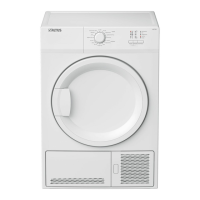
Important Technical Specifications:

  • Model Code: ADC70W
  • Height (Min./Max.): 84.6 cm / 86.6 cm (adjustable feet closed/opened maximum)
  • Width: 59.7 cm
  • Depth: 56.8 cm
  • Capacity (max.): 7 kg (dry laundry weight before washing)
  • Net Weight (± 4 kg): 34 kg
  • Voltage: See type label (located behind the loading door)
  • Rated Power Input: See type label
  • Energy Rating: 2 stars (for Cotton Cupboard Dry Plus program)
  • Energy Consumption (Cotton Cupboard Dry Plus): 310 kWh per year

Usage Features:

  • Program Selection: Programs are selected using the On/Off/Program selection knob. The machine turns on once a program is selected.
  • Starting a Program: After selecting a program, the Start/Pause button must be pressed to begin the drying cycle.
  • Loading Laundry: Laundry should be placed in the machine without jamming, and the loading door must be pushed and closed properly.
  • End Time Function: Allows delaying the start of a program by 3, 6, or 9 hours. Laundry can be added or removed during the countdown.
  • Audible Warning: An audible signal indicates program completion. This feature can be deactivated using the "Buzzer" button.
  • Child Lock: Prevents program interruption by deactivating all buttons except the On/Off/Program selection knob when activated. It is activated by pressing the End Time and Buzzer buttons simultaneously for 3 seconds.
  • Adding/Removing Clothes During Stand-by: Laundry can be added or removed by pressing the Start/Stand-by button, opening the door, and then restarting the program. However, this may affect drying results and increase program duration and energy consumption.
  • Changing Program: A program can be changed after it has started by turning the On/Off/Program selection knob to select a new program and then pressing the Start/Stand-by button.
  • Cancelling Program: Turning the On/Off/Cancel knob will cancel the running program. It is recommended to run a refresh program afterwards to cool down the hot interior.
  • Wrinkle Prevention: If laundry is not removed immediately after the program ends, a 2-hour wrinkle prevention function activates, tumbling laundry at 10-minute intervals.
  • Steam Function (for applicable models): Use only distilled or condensed water. Do not open the door during steam programs due to the risk of hot water expulsion. Stains should be removed before using steam programs.

Maintenance Features:

  • Lint Filter Cleaning: The lint filter and the inner surfaces of the loading door must be cleaned after each drying cycle. The lint filter can be removed, cleaned by hand or with a soft cloth, and its housing can be cleaned with a vacuum cleaner. Periodically, the lint filter should be washed with warm water to remove accumulated layers and dried completely before reinstallation.
  • Water Tank Draining: The water tank, which collects condensed water, must be drained after each drying cycle. If the tank fills during a program, a warning symbol will flash, and the machine will go into stand-by until the tank is emptied.
  • Condenser Cleaning (for condenser models): The condenser should be cleaned once a month or after every 30 drying cycles. This involves opening the kick plate, unlocking and pulling out the condenser, cleaning it with pressurized water, and then reinserting and securing it.
  • Filter Drawer/Heat Exchanger Cleaning (for heat pump models): The filter drawer should be cleaned periodically when fluff accumulates or when the cleaning indicator lights up.
  • Sensor Cleaning: The dampness sensors should be cleaned 4 times a year. This involves wiping their metal surfaces with a soft cloth dampened with vinegar and then drying them. Metal tools should not be used for cleaning sensors.
  • General Cleaning: Do not wash the dryer by spraying or pouring water. Avoid using solvents, cleaning agents, or similar substances due to fire and explosion risks.

ALTUS ADC70W Specifications

General IconGeneral
BrandALTUS
ModelADC70W
CategoryDryer
LanguageEnglish