Pro Tips
• Do not mount inside of a metal can. The cellular and Wi-Fi antennas need to be in free air to
communicate.
• Mount as high in the building as possible to optimize cellular strength.
• An auxiliary power supply may be used to power BAT-Connect. This power supply must have a
backup battery to provide power if AC power fails. Ensure voltage is 12 VDC.
Troubleshooting
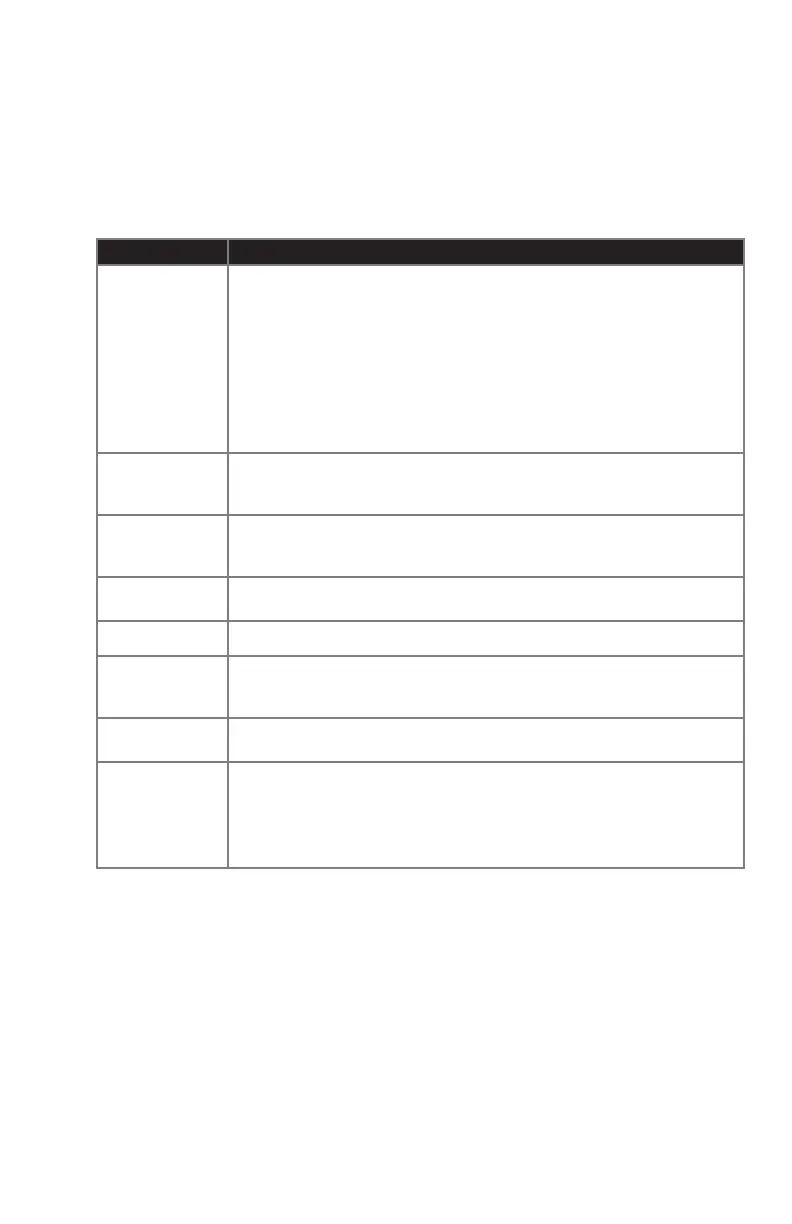
Symptom Troubleshooting Steps
Panel Bus LED
Blinking
General
1. Incorrect wiring.
2. Unsupported panel version.
3. Unsupported panel model.
4. Panel is in Installer Program Mode.
Honeywell Vista
1. AUI not enabled.
2. AUI used for some other function.
3. LRR not enabled.
4. Another LRR or IP/GSM device connected to panel bus.
Ethernet, Wi-Fi,
and Cellular LED
Flashing Slow
1. If registration information changes after the BAT-Connect is powered up,
perform a factory default.
2. For Wi-Fi and ethernet, ensure internet connectivity at the router.
Ethernet LED Off
1. Conrm cable connected.
2. Ensure router is powered.
3. Ensure UDP ports 1234 and 1235 are open in router/modem settings.
Wi-Fi LED Off
1. Ensure router is powered.
2. Ensure Wi-Fi credentials are correct.
Cellular LED Off Verify sufcient signal strength for cellular (see below).
Supervisory
Trouble
Information
Honeywell Vista - LRR Fault/bF error
1. Verify panel is 4.0 or later.
2. Verify that no other LRR devices are connected to the panel bus.
No Alarm CS
Reports
1. Incorrect wiring.
2. Conrm communication format is Contact ID.
Poor Cellular
Signal Strength
1. Make sure antenna is securely snapped into the circuit board.
2. Reposition the unit (move or rotate).
3. Move the unit higher in the building.
4. Move the unit away from metal objects (appliances, ducts).
5. Move the unit closer to a window.
6. Move to one of the below higher performance antenna options.


 To Next Page
 Loading...