Page 5
18
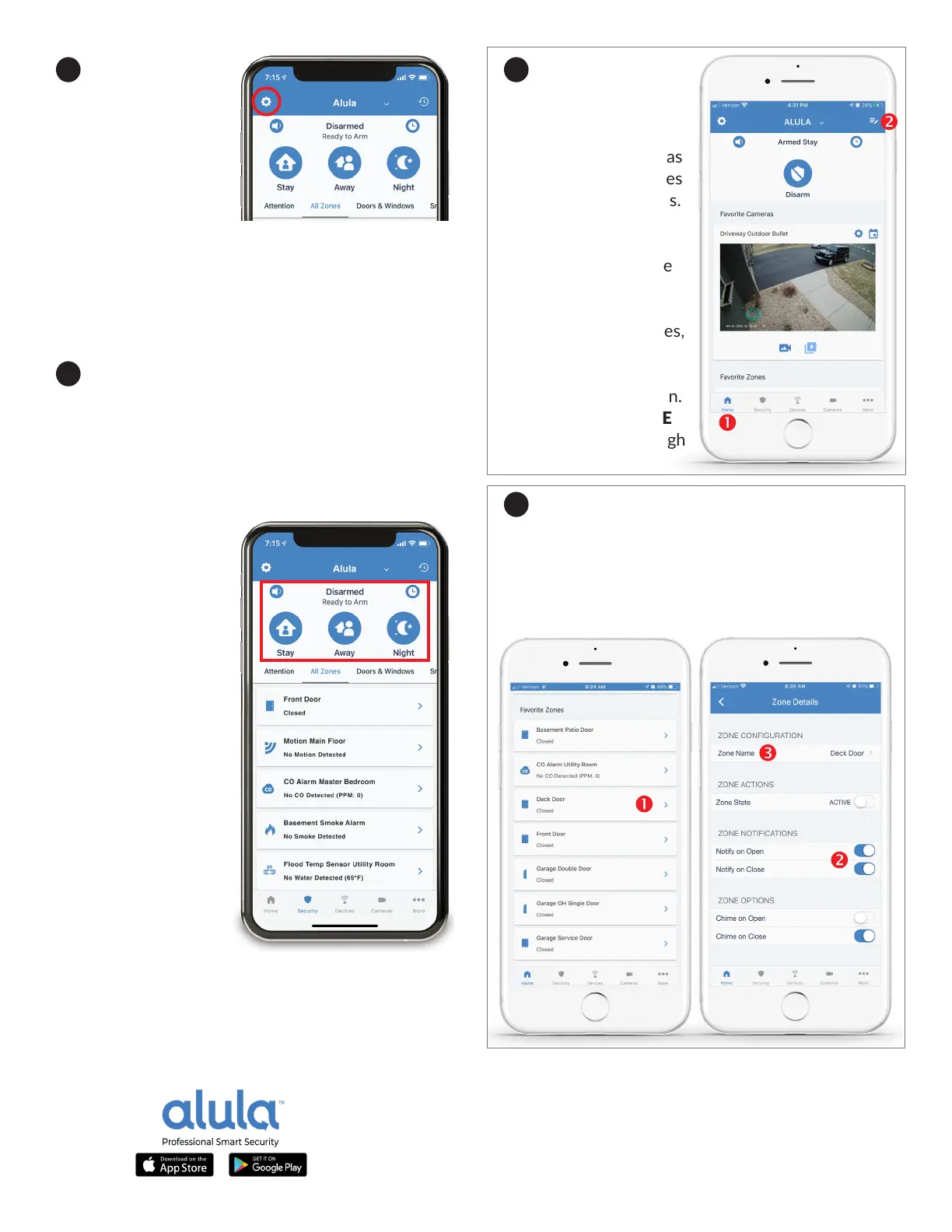
The Alula App
home screen can be
customized on each
smartphone, adding
security zones, cameras
and automaon devices
to each user’s favorites.
Tap the HOME icon
(1), then tap the EDIT
GROUP icon (2) at the
top right. Check the
boxes to include your
favorite cameras, zones,
automaon devices
and scenes for your
Alula App home screen.
Finally, tap the HOME
icon (1) to scroll through
your favorites.
19
Customize sensor names and nocaons in
the Alula App to select which zones and devices will
push an acvity nocaon to your smartphone.
Tap on any ZONE (1), then choose which OPTIONS
(2) you prefer. Tap ZONE NAME (3) to rename.
16
Adding users
in the Alula App is
completed from the
primary account
users smartphone.
Tap the Gear Icon at
the top le of your
home screen, then
tap “Manage Users.” Tap the “
+” icon at the top
right to add new users. Save new users by tapping
“Create” at top right. Aer adding new users, grant
access to the Connect+ Hub or security camera by
tapping each device’s slider icon to ON.
17
Arming Modes are controlled in the Alula App
with the three icons pinned to the top of the home
screen. STAY is used when people are present, the
system is armed and moon sensors are bypassed
for you to move freely around the building without
seng o the intrusion alarm. AWAY is an armed
state when no people are present on-site. All
intrusion sensors are
acve when armed
AWAY and will trigger
an alarm event if
any intrusion zone is
triggered. NIGHT is
an armed state for the
evening hours, it is a
more secure version
of armed STAY, giving
you the opon to keep
moon sensors acve,
this would trigger
an alarm if moon is
sensed at night. From
any armed state, tap
the DISARM icon
to deacvate your
security system.


 To Next Page