Page 6
20
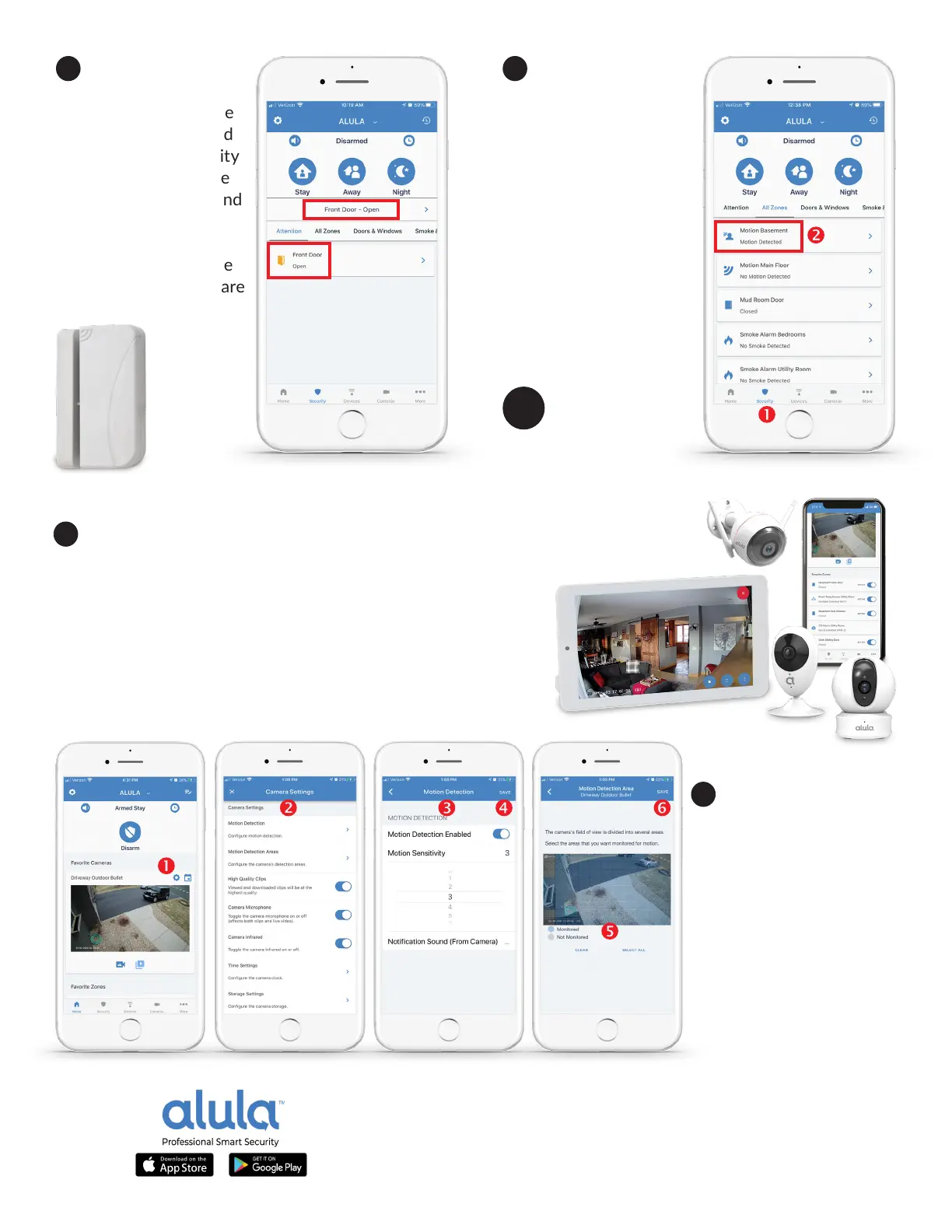
Test your Door
Window Sensors by
opening and closing the
protected windows and
doors with your security
system disarmed. Have
your Alula App open and
in hand to watch the
sensor status change
on screen, verifying the
door window sensors are
working correctly.
21
Test your Moon
Sensors. Step out of view
of the moon sensors
for three minutes and
tap the Security tab (1)
in the Alula App to show
your moon sensors on
screen. Walk past your
moon sensor or wave a
hand to see the moon
sensor status change to
Moon Detected (2) in
the Alula App to verify all
sensors are working.
22
Call your
local security pro to
acvate your system.
23
If you’ve already received cameras with your security system, you can add
them in the Alula App. First, make sure your local 2.4 GHz Wi-Fi network is acve
on your smartphone. Unpack your cameras and plug them in for
two minutes. Tap the Cameras tab in your app, then press the
+
icon at the top right to begin enrolling a new security camera to
your system. Follow the product manual and setup wizard in the
Alula mobile App to complete camera installaon.
24
Adjust your cameras
moon capture sengs
in the Alula App, by
tapping on the GEAR icon
(1) above the live camera
view. Edit CAMERA
SETTINGS (2), and
MOTION DETECTION (3),
MOTION DETECT AREAS
(5), ensuring to SAVE (4,6)
your sengs on each
screen.


 To Next Page