Page 7
25
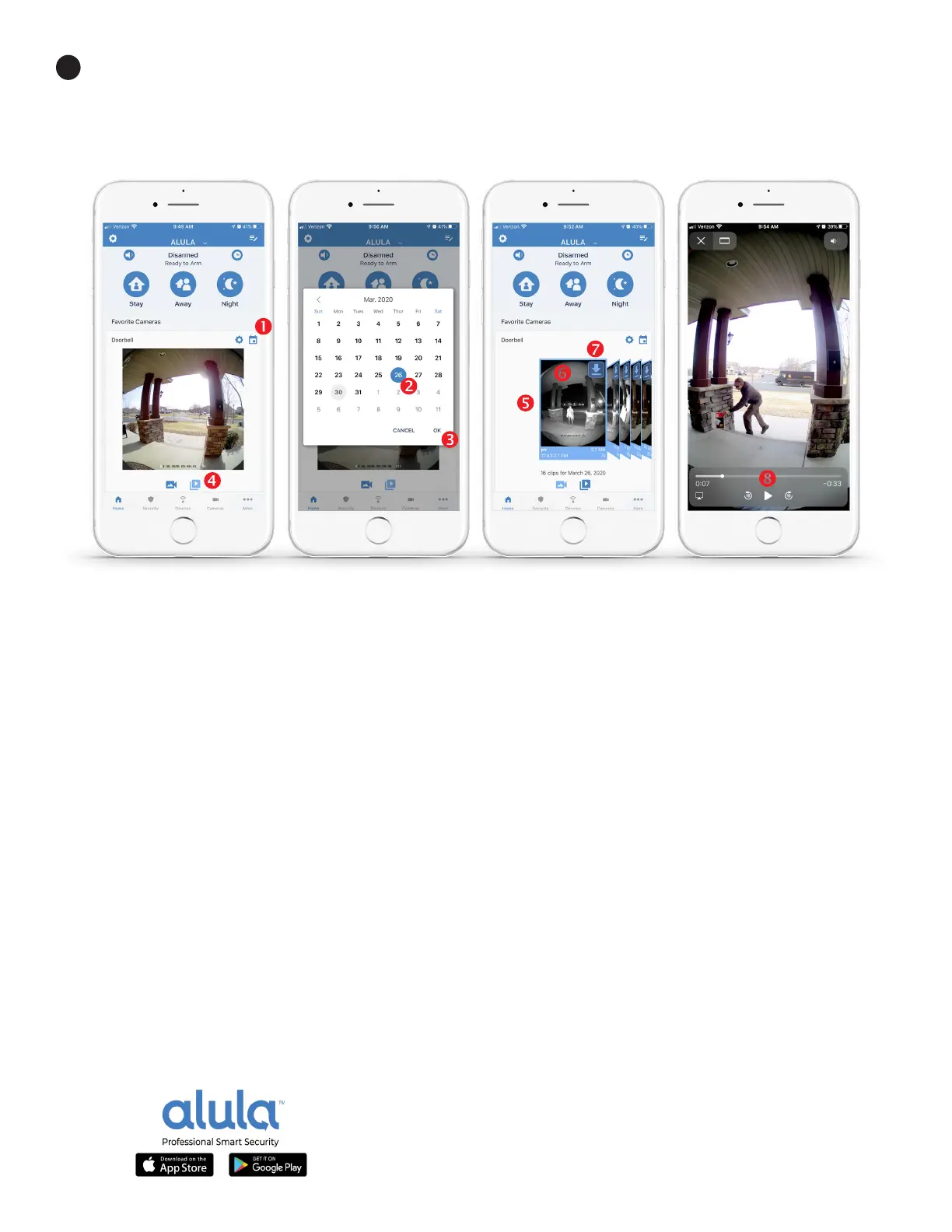
Viewing and navigang video clip recordings is accessed by tapping the CALENDAR icon (1) above each
camera, prompng a calendar view. Tap the DAY to view (2) then tap OK (3). Tap the CLIPS icon (4) to swipe
through the moon-captured RECORDINGS (5) stored in the cloud. Tap the individual video clip TILE (6) to play
or SAVE (7) a clip to your smartphone. Scan through video clip with the CONTROL BAR (8).
The most recent 1000 video clips for each camera are always available for your recall. Any user with granted
security rights can access the clips through the smart calendar funcons in the Alula Mobile App. Recording
frequency is based on moon-based video capture. Choosing higher sensivity and larger moon capture area
sengs for each camera’s passive infrared (PIR) sensor will result in more clips being recorded. PRO TIP: If your
Video Doorbell faces a busy road and you do not want a clip recording of every passing car, adjust the PIR range
to sense movement 10’ from your door.
Connued


 To Next Page