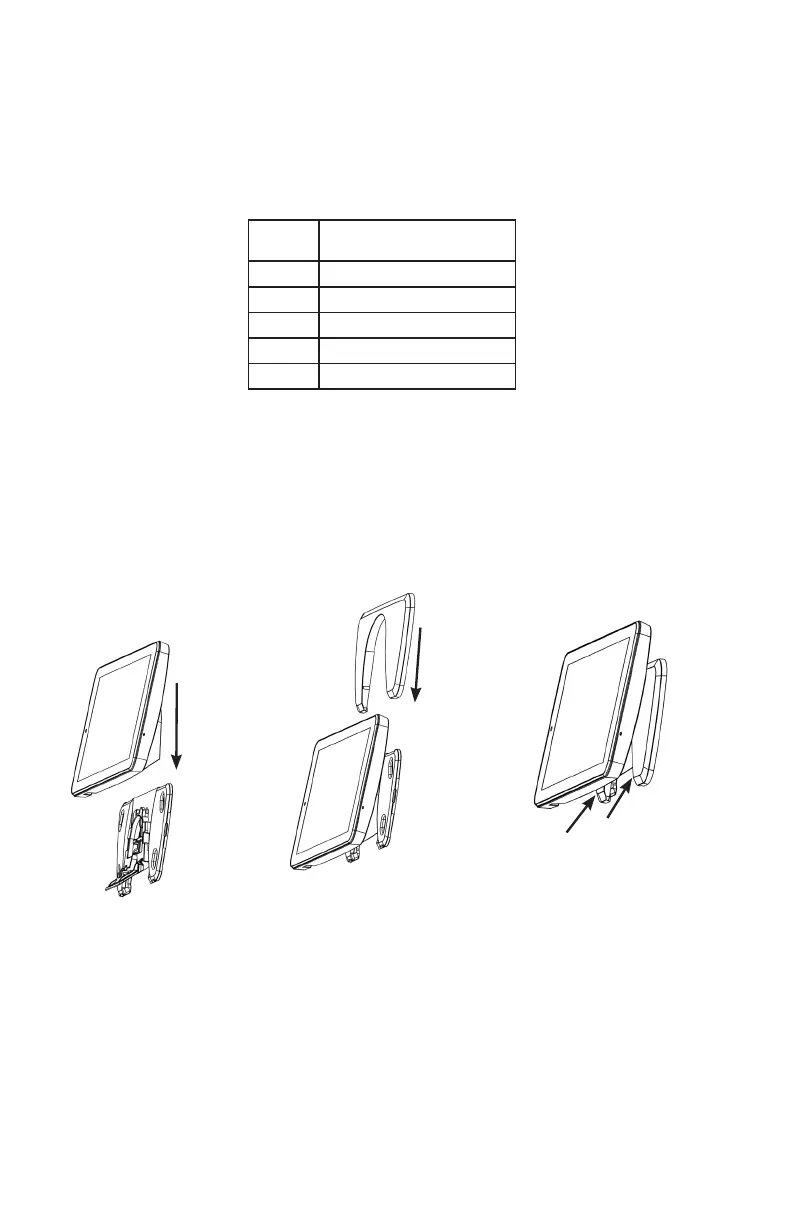
3. Slide the Touchpad
onto the mounting plate.
Push any extra wire into
wall before sliding onto
mounting plate.
4. Drop cover behind
Touchpad.
5. Lock in cover by pressing
at these locations until
snapped into place
6. Plug in power supply.
2. There are two methods for connecting power to the Touchpad.
A. If you desire to hide the power cable, you can drill a hole in the wall through one of the
four windows in the mounting plate and pull a wire behind the drywall to a location with
an AC power outlet. Connect one end of the wire to the terminal block on the back of the
tablet. Push the buttons on the terminal block to allow the wire to be inserted. Splice the
other end of the wires to the power supply wires after cutting off the barrel jack. MUST USE
PROVIDED POWER SUPPLY. Power from an existing panel may be insufcient. Wire length
must not exceed lengths listed below.
B. Barrel jack of the power supply can be plugged directly into the back of the Touchpad.
Wires can be routed through wire channel in the back of mounting base. This conguration
requires the barrel jack be routed through the mounting base before the mounting base is
screwed to the wall.
WIRE
GAUGE
MAXIMUM LENGTH BETWEEN
POWER SUPPLY AND TABLET
#24 Up to 70 feet
#22 Up to 100 feet
#20 Up to 175 feet
#18 Up to 250 feet
#16 Up to 450 feet


 To Next Page
 Loading...