6
Remote
Remote
Remote
Remote Control
Control
Control
Control
1
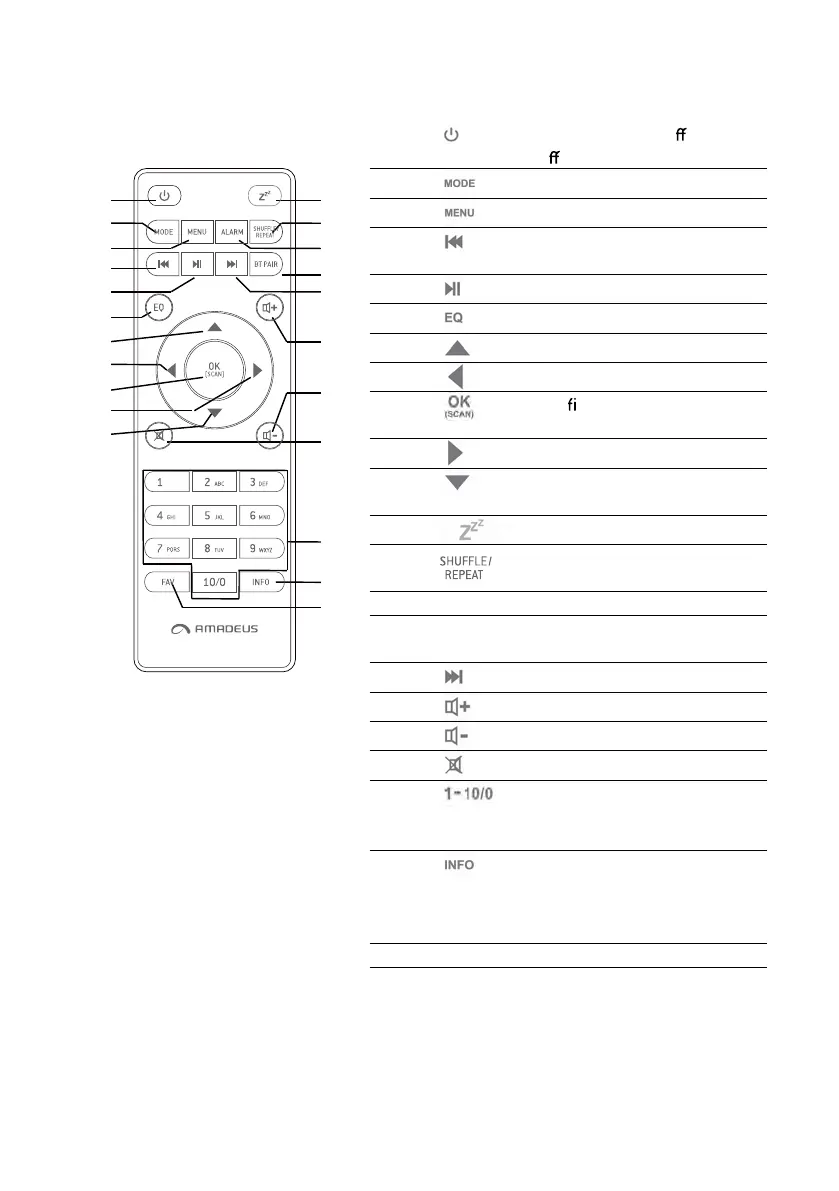
Device power on/o ; alarm
o
2
Open, clo se mode selection
3
Press to open, cl o se menu
4
Select track, hold down to
seek
5
Start playback, pause
6
Select e qualizer preset
7
Move up; FM: Set frequency
8
Move left, step back
9
Con rm entry; FM: Scan;
Playing: album in full screen
10
Move right, step next
11
Move down; FM: Set
frequency
12
Sleep se tting
13 Music: random and repeat
selection
14 ALARM Alarm setting
15 BT PAIR Press and hold to BT
discoverable under BT mode
16
Select track
17
Increase volume
18
Decrease volume
19
Mute, unmute
20
Number buttons: retrieve
saved favorite station,
hold down to save station
21
Display FM mode info
(Name, PTY, RT, frequency)
Display DAB mode info
(Station, track, artist etc.)
22 FAV Select favorite stations
1
2
3
4
5
6
7
8
9
10
11
12
13
14
15
16
17
18
19
20
21
22


 To Next Page