GB - 3
EnglishNorskSvenska Dansk Suomi
Remote Control
1
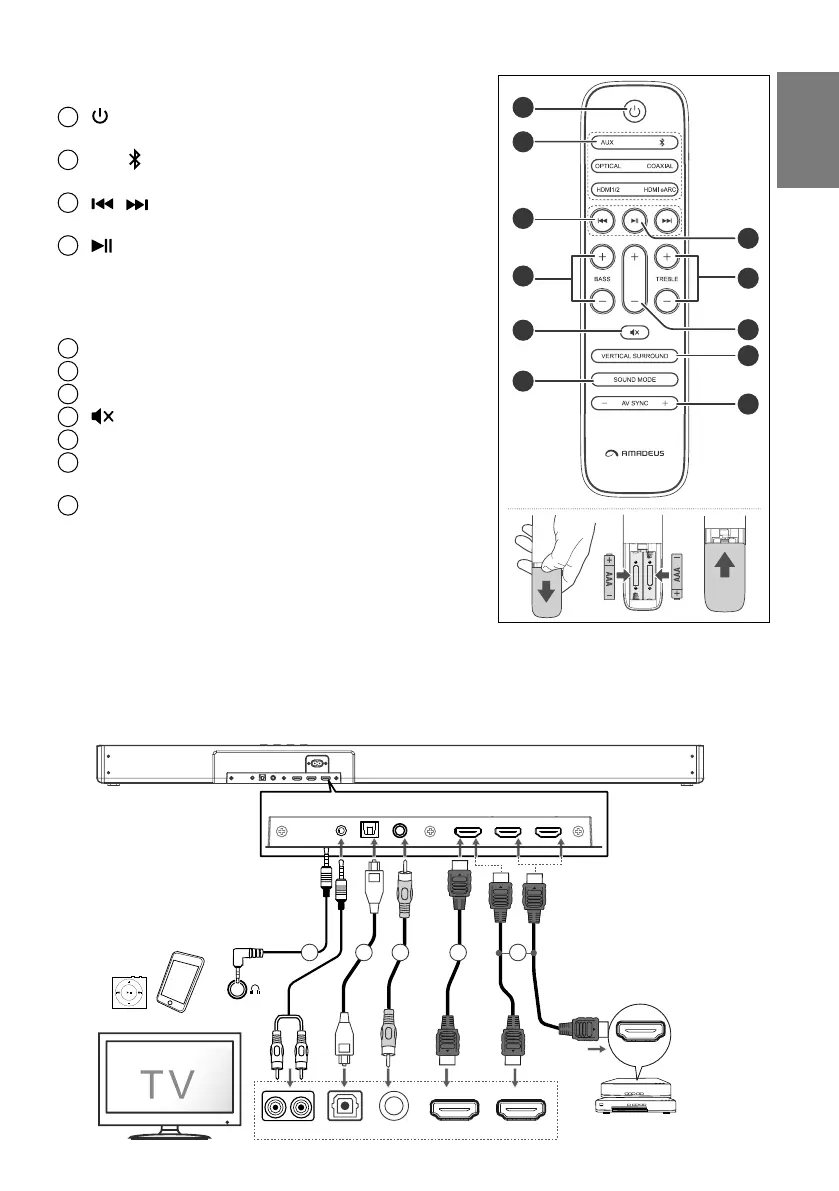
Switch the soundbar between ON and STANDBY mode.
2
AUX
, ,
OPTICAL, COAXIAL
,
HDMI 1/2
,
HDMI eARC
Select the play function.
3
/
Skip to previous/next track in Bluetooth mode.
4
Play/pause/resume playback in Bluetooth mode.
Press and hold to activate the pairing function in
Bluetooth mode or disconnect the existing paired
Bluetooth device.
5
╋
/
━
(
BASS
)
Adjust bass level.
6
╋
/
━
(
TREBLE
)
Adjust treble level.
7
╋
/
━
(
volume
)
Adjust the volume level.
8
(
MUTE
) Mute or resume the sound.
9
VERTICAL/SURROUND
Adjust the surround ON/OFF.
10
SOUND MODE
Select Equalizer (EQ) Eect (NEWS /
MUSIC / NIGHT / SPORT / CUSTOM / MOVIE).
11
AV SYNC
╋ / ━
Set the Audio Delay.
PREPARATIONS
Remote Control
Open the rear cover & insert 2pcs AAA/RO3, 1.5V
batteries on correct polarity.
Take out batteries if remote is not to be used in long time to avoid battery leakage.
EXCEPT BT CONNECTION, AUDIO INPUT CAN BE WITH 3.5MM AUDIO
CABLE / COAXIAL CABLE /OPTICAL CABLE/HDMI CABLE
HDMI eARC HDMI IN
OPTICAL COAXIAL
43 1
Headphone
MP3 player or mobile devicae
AUDIO OUT
AUXCOAXIALOPTICAL HDMI IN 1HDMI IN 2
HDMI OUT
(TV eARC/ARC)
2
Blu-ray Player / DVD Player /
Recorder / Set-top Box...
HDMI OUT
3.5mm audio cable
RAC cable
Coaxial cable
Optical cable
HDMI cable
HDMI cable
5
1
2
3
5
8
10
6
7
9
11
4


 To Next Page