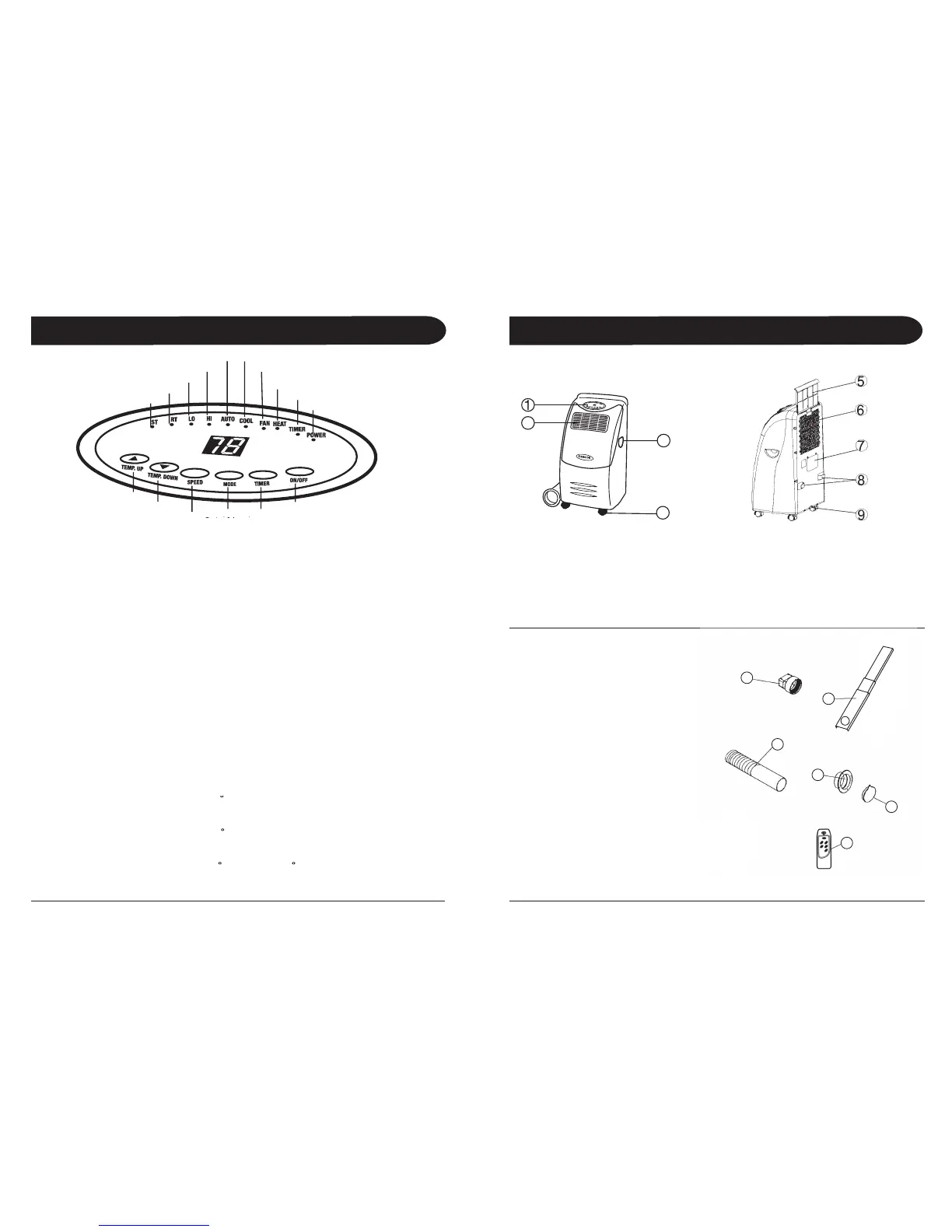
Press the MODE button to select the required working mode: Automatic, Cooling, Fan or Heating (Heating is only
available for AL-10,000EH). The green indicator illustrating your selected mode lights up. It is recommended to select
Cooling or Heating mode and set your desired temperature, as the Auto mode has a preset temperature (please see
below) that cannot be changed.
The indicators of the functions in progress come on at the same time, e.g. Cool and Lo = Cooling mode with Low fan speed.
When this mode is selected, the unit is preset to the following temperature settings and unit will only start to:
• Cool when room temperature is higher than 75ºF
• Heat when room temperature is lower than 68ºF (AL-10,000EH only)
If room temperature is between 68ºF and 75ºF, unit will stay in Fan mode. Again, when in Auto Mode, the temperature
settings cannot be changed.
Setting the Temperature in Cooling or Heating Mode
he display window’s default is to display the ambient room temperature. The green indicator light under RT is on.
To set your desired temperature, press the Temperature up or down buttons (ranging from 62ºF to 90ºF). Each press
will increase or decrease your set temperature by 1ºF. When pressing the temperature up or down buttons, the
window will change to display your set temperature. At this time, the green indicator will light under ST (Set
Temperature). Once the temperature up or down buttons is released, the window will return to displaying the
ambient temperature after a second.
When unit is in the following modes: Auto, Cool, or Heat - the compressor will cool/heat the room to reach
the set temperature. Once the ambient temperature has reached the set temperature, the compressor will stop and
unit will run in Fan mode. To conserve energy, the compressor will not start immediately after a couple degrees
increase or decrease, but will wait for a 5ºF allowance. For example:
In Cooling Mode with a set temperature of 70
When compressor first stops after reaching 70ºF, unit will auto-switch to Fan.
Compressor will start cooling again when ambient temperature increases to 75ºF or above.
In Heating Mode with a set temperature of 72
When compressor first stops after reaching 72ºF, unit will auto-switch to Fan.
Compressor will start heating again when ambient temperature drops to 67ºF or below.
In Auto Mode (with preset temperature of 68
Compressor will start cooling again when ambient temperature reaches above 80ºF or will start heating when
ambient temperature drops below 63ºF.
9. Water Stopper (Rubber Plug Inside)
10. Adaptor - for insertion over the
hose and into the back of the
14. Cap for Round Connector
(Electronic control models only)
(For Models With Heating Options)
Set Temperature Indicator
Room Temperature Indicator
Automatic Mode Indicator Cooling Mode Indicator
Timer Operation Indicator
Temperature Down Selector
Mode (Function)
Option Selector
Mode (Function)


 To Next Page