GB
5
CONTROLS
CONNECTING TO THE MAINS SUPPLY
POSITIONING YOUR DEHUMIDIFIER
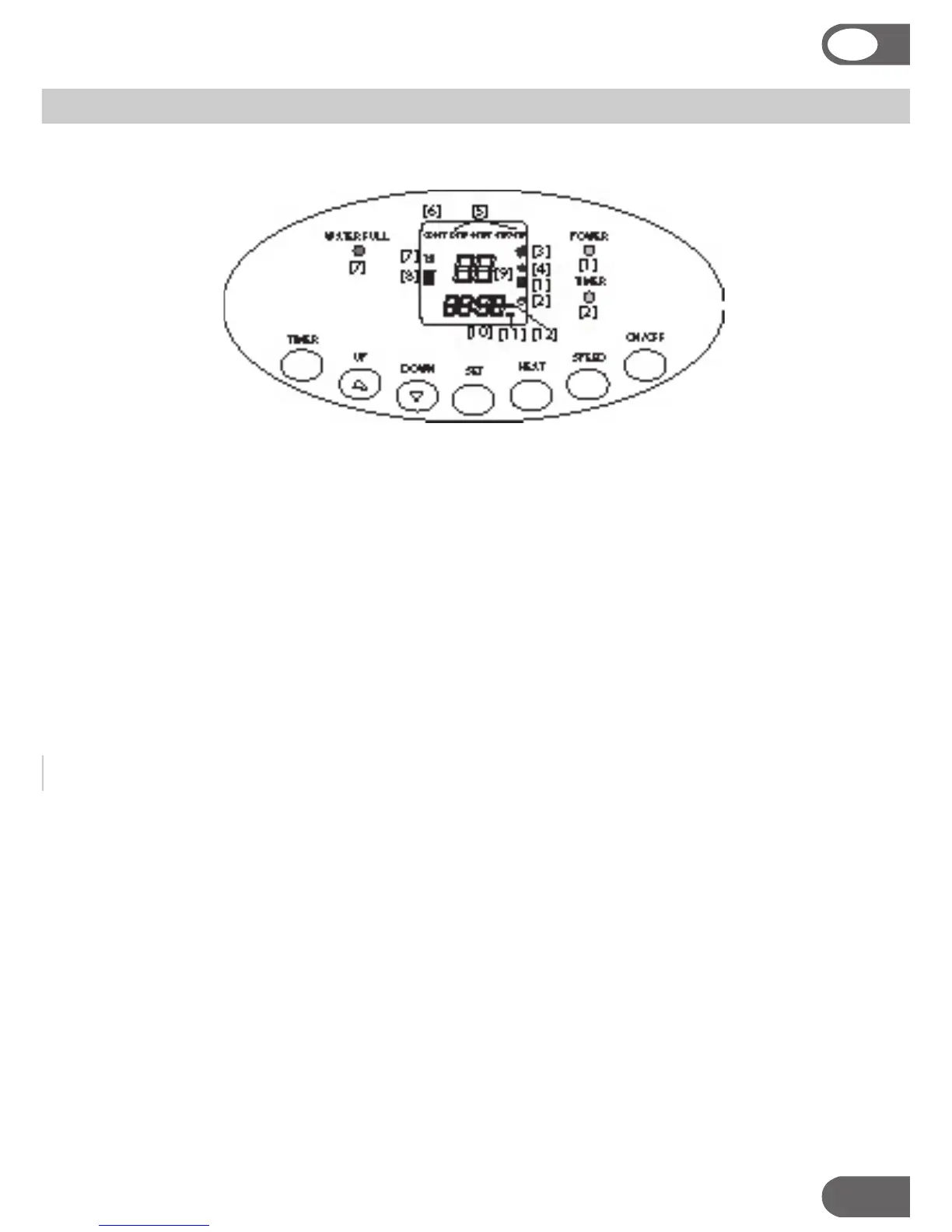
Control Panel Indicator:
1. POWER: indicating if the compressor is running- it will go off when in defrost
mode and when the unit has achieved the requested relative humidity level.
2. TIMER: timer indication – to show that either the start or the stop or both tim-
ers are set.
3. High speed fan
4. Low speed fan
5. Humidity requested: display shows the selected relative humidity level
6. CONT: continuous, display shows that the unit will run without considering the
air’s relative humidity
7. WATER FULL: water full indication, advises when it is time to empty the water
tank
8. HEAT indicator: visual display that the heater is on
9. LED: relative humidity indicator
10. Clock
11. OFF: timer “off” indicator
12. ON: timer “on” indicator
Control Buttons
ON/OFF _ SPEED _ HEAT _ SET _TIMER _ UP _ DOWN
When buttons on the control panel are pressed, a beeping sound will be heard .


 To Next Page