6
3 Connection & Installation
This section provides information about the connection and installation of your camera.
3.1 Connection Guide
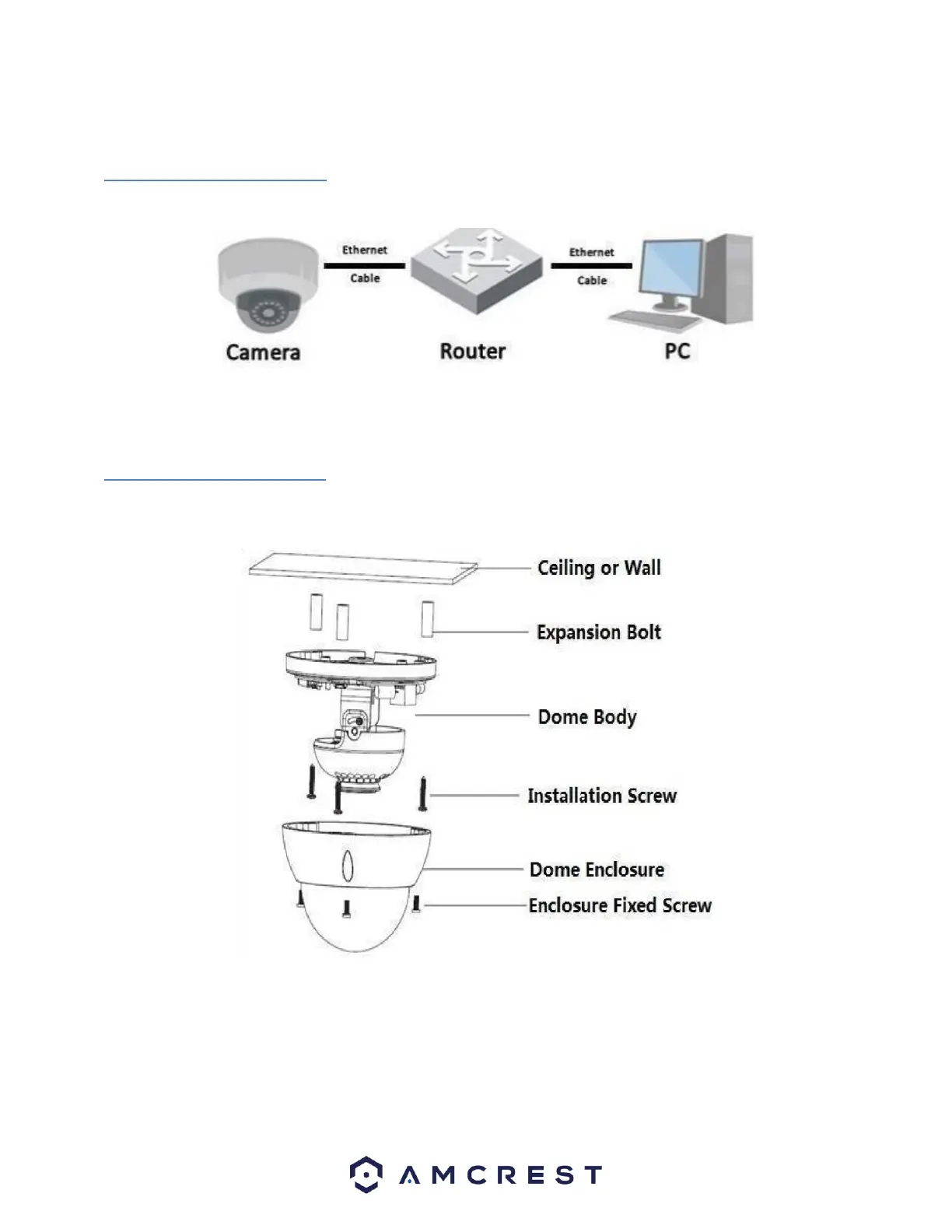
The camera initially should be connected via the following method:
Once connected to a PC or mobile device you will be able to configure the device to your network. For more
information.
3.2 Installation Guide
To install the camera on a ceiling or wall, please reference the below diagram as well as the steps:
Note: Prior to installation, please ensure that the installation environment can support at least 3x the weight of the
camera + bracket.
Note: Due to specific hardware limitations within your camera it is important to note that these devices will not be
able to automatically pan/tilt or pivot in either the app or via the web UI on a computer. For this reason, it is
imperative to make sure to mount the cameras properly and position them as efficiently as you can to the areas you
wish to monitor. All positioning actions to the camera will have to be performed manually.
To install the camera onto a wall, follow the steps below:














 To Next Page