Reboot
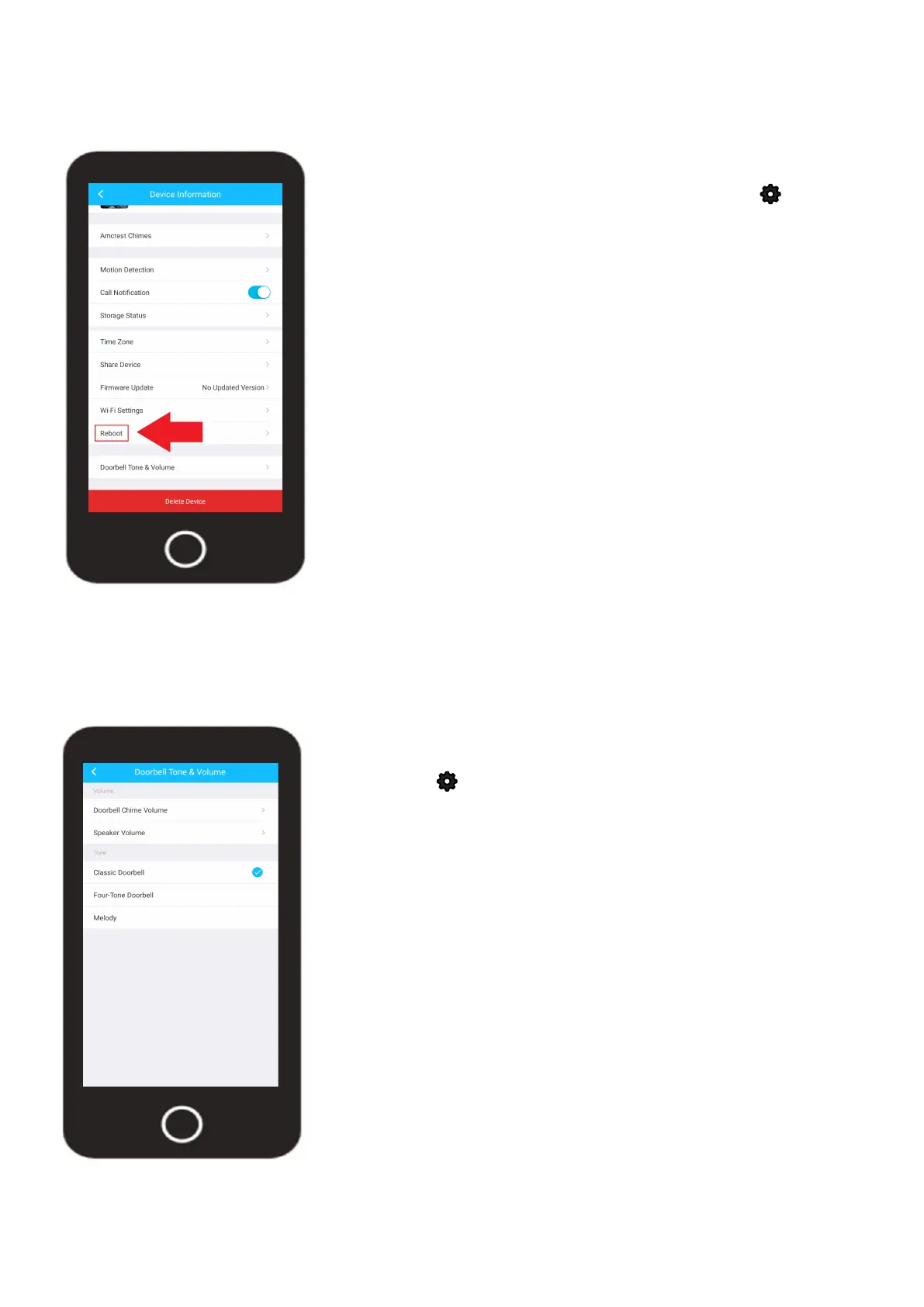
The reboot option allows you to reboot your device from the Amcrest Smart Home app.
To access the Reboot option, tap on the settings icon ( ) on
the live view screen.
Tap on the Reboot option and tap “Yes” to continue. The reboot
process will take up to 3 - 5 minutes to complete. Allow the
device to reboot before accessing the live feed or other related
options.
Doorbell Tones & Volume
This menu allows you to adjust the chime volume and well as speaker volume of the doorbell. You
can select from 3 default tones as well for your doorbell.
35
To access the Doorbell Tones & Volume menu, tap on the
settings icon ( ) on the live view screen.
Tap on the Doorbell Tones & Volume option. For more details on
the information provided in this menu, please refer to the informa-
tion provided below.
• Doorbell Chime Volume - Use this slider to adjusts the tone
volume on the doorbell.
• Speaker Volume - Use this slider to adjust the volume of your
voice when using two way audio.
• Tone - Allows you to choose between three different tone
options. When the call button is pressed, the chosen tone will
be heard from the doorbell.












 To Next Page