Need help?
Do you have a question about the AMD FirePro W600 and is the answer not in the manual?
Defines hardware, OS, and monitor specifications for the AMD FirePro W600.
Provides concise steps for experienced users to install the graphics card.
Details tasks before installation, like recording serial numbers and uninstalling old drivers.
Step-by-step guide for physically installing the graphics card into the PCIe slot.
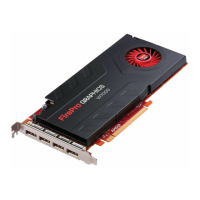
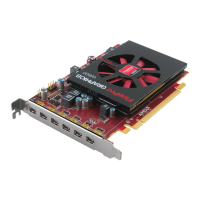
Illustrates and describes the display output connectors available on the graphics card.
Explains various display configurations and adapter usage for multiple monitors.
Details how to use adapters to connect different display types to the graphics card.
Explains the role of drivers and configuration software for graphics card operation.
Provides detailed instructions for installing drivers and software on Windows 7/Vista.
Introduces the Control Center application for managing graphics settings and displays.
Lists various ways to access and launch the AMD Control Center application.
Explains how to access the built-in help system for the Control Center.
Guides users through configuring displays using the Catalyst Pro Control Center.
Offers tips and solutions for common problems encountered with the graphics card.
Provides contact methods and resources for customer support and technical assistance.
Details the process for obtaining warranty service and shipping instructions.
Lists available accessories and where to purchase them.
Outlines regulatory compliance information for various international regions.
Defines technical terms and acronyms related to workstation graphics products.
 General
| Process Size | 28 nm |
|---|---|
| Memory Size | 2 GB |
| Memory Type | GDDR5 |
| Memory Bus | 128 bit |
| DirectX | 11 |
| OpenGL | 4.2 |
| OpenCL | 1.2 |
| Shader Model | 5.0 |
| TDP | 75 W |
| Interface | PCIe 3.0 x16 |
| Max Resolution | 4096 x 2160 |
| Outputs | 6x Mini-DisplayPort |

 To Next Page