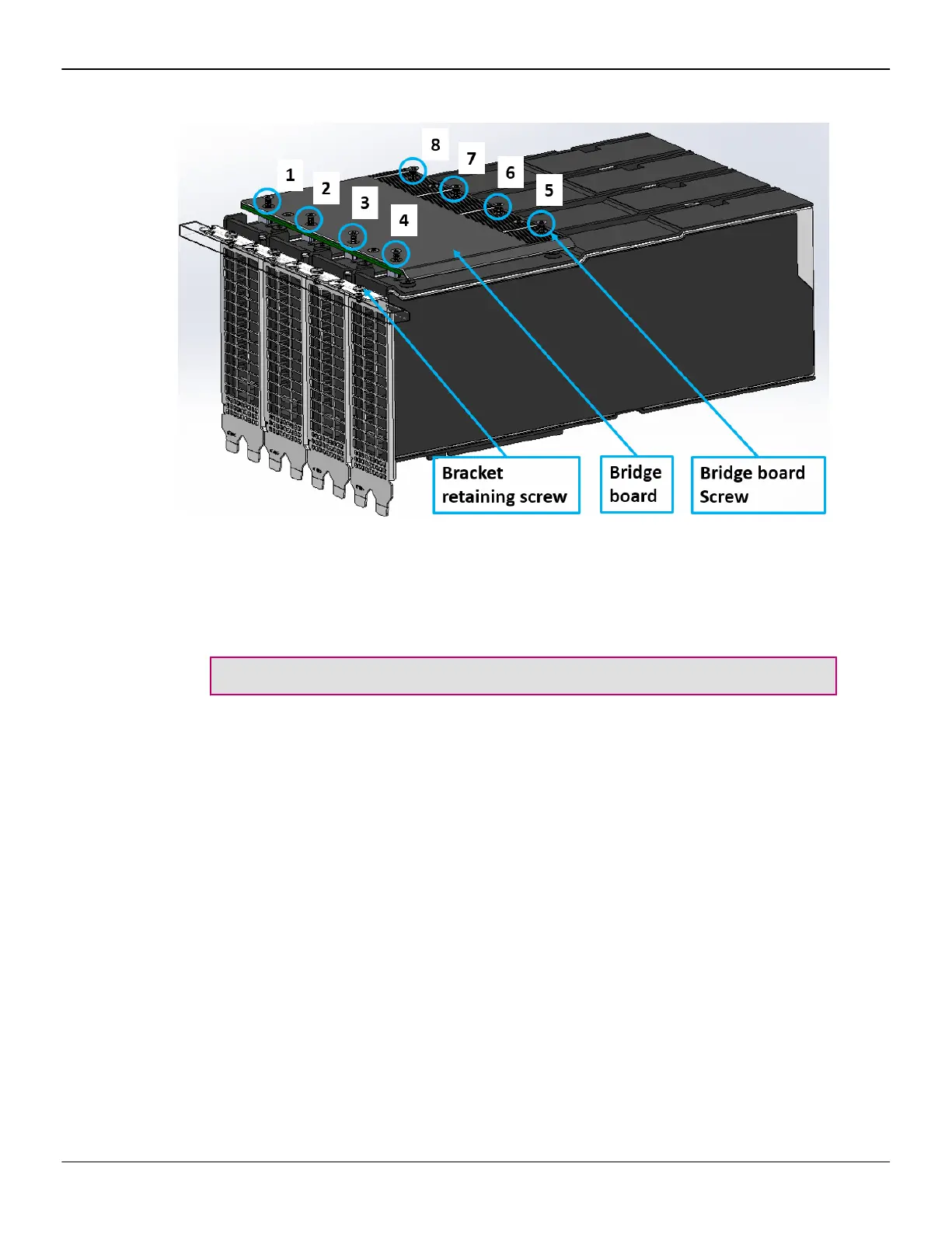
Figure 2–1 Four-card Assembly
2. Loose the retaining screws at the top of the bracket to allow each GPU to self-
center to the slots on the bridge board.
3. Align the AMD Infinity Fabric™ Link interconnect bridge with the slots at the top
of the accelerators and carefully push the bridge board down until flush with
the first row of golden fingers.
Important: Remember to use even pressure on each of the connectors.
4. Using a Torx head screw driver, screw each of the eight screws in a
1-2-3-4-5-6-7-8 pattern. Use one half of a full screw rotation (180 degrees, -
clockwise) until the AMD Infinity Fabric™ Link interconnect bridge is fixed on
the tray.
5. Finish tightening the retaining screws on the top of the PCIe card bracket.
4 Hardware Installation
AMD Infinity Fabric™ Link © 2020 Advanced Micro Devices, Inc.



 To Next Page