K2 Steamer Control and App
Install/Operating Instructions
4209-41 08-06-21 Technical Support: 1-320-286-3500 1-800-363-0251 support@amerec.com Page 5
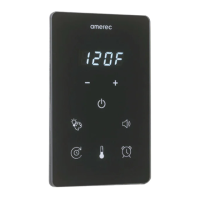
K2 Control
Display When power to the steamer is turned on, the K2 will set-up its program and display the software version (such
as S011) for about 5 seconds then the display will turn o. While the bath is on, the display alternates between showing
the current bath temperature and the time remaining before the bath automatically turns o.
Tap to decrease setting
Tap to increase setting
On/O Tap to start and stop the steam bath
LED light control Amerec Spectra LED lights may be turned on or o at any time and must be turned on/o manually.
This control is dedicated to special amerec Spectra LED lights and must not be used with other lights.
The amerec LEDs provide white lighting or various colors
• Tap the icon to turn the lights on. To turn the lights o, tap and hold the icon 3 seconds or step through to the end of
the color selection.
• The lights will always start at white when rst turned on.
• Tap the icon to change the display colors.
Color sequence: White – Red – Green – Blue – Yellow – Aqua – Purple – Rotating colors – O
The amerec LEDs are dimmable
• Turn the lights on then press the + or – minus icons to adjust the brightness. The current brightness level is displayed
for 3 seconds.
• The brightness can be adjusted to 25%, 50%, 75% or 100% light output.
Option On/O control Tap the icon to turn on or o an optional device at any time. The device must be turned on/o
manually. This option does not turn o automatically after a bath.
• This control provides an on/o switch control for low voltage, low current devices. It could be used to turn amerec’s
bluetooth speakers on/o, control amerec’s standard LED lighting, etc.
• Loads should be limited to about 2A and 30V or less.
Set Bath Run Time With the bath on, tap the icon then use the + and - icons to increase or decrease the bath run time.
Note: you must use a jumper on the steamer circuit board to choose between a max time of 60 minutes or 24 hours.
• In 60 minute mode (this is the default setting):
30 minutes default
setable 5 to 60 minutes
set in 5 min steps
• 24 hr mode (Note: in 24 hour mode the display shows remaining time in hours and minutes but without a :)
1 hour default
setable 1 to 24 hours
set in 1 hour steps
Set the Bath Temperature Turn the bath on then tap the temperature icon and use + and - icons to raise or lower
the bath’s temperature. Note: you must use a jumper on the steamer circuit board to choose between a display in °F
(default) or °C .
• Bath temperature is 120°F (49°C) default.
• settable 84°F (29°C) to 125°F (52 °C)
• Set in 1° steps.
Set delayed start A bath can be set to begin at a later time, such as setting it before going to sleep so it is ready to
use when you get up in the morning. See the General section for more details.
• With bath on, press icon then use + & - icons to raise or lower delay setting. The delay time is adjustable from 15
minutes to 24 hours in 15 minute steps. Default is 1 hour.
• After setting the delay time, wait about 3 seconds the bath will turn o and the control will alternately display dlAy and
the delay time remaining. Note that the K2’s on/off icon will remain lit while the delay is counting down.
• After delay has run out, the bath will run with previously set bath time & temperature.
• Press the icon again to cancel the delay.


 To Next Page
 Loading...