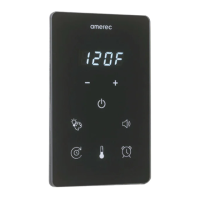
K2 Steamer Control and App
Install/Operating Instructions
4209-41 08-06-21 Technical Support: 1-320-286-3500 1-800-363-0251 support@amerec.com Page 7
General Information
The displays on the K2 and App show more than just the temperature (and remaining bath time on the K2)
K2 Program When power is turned on to the steam generator, The K2 will start up, then show its software version for 5 seconds.
This can be good information to have when contacting Technical Support with operating issues.
Temperature Sensing There are three error codes associated with the temperature sensing operations:
This indicates a missing or damaged steam room temperature sensor. It could be a missing or malfunctioning sensor, a
bad cable, or other problems. If the problem is corrected, simply turn the bath o and back on again and the temperature
displays should be ne again. If you have issues, please contact Technical Support.
This indicates a shorted steam room temperature sensor. It could be a malfunctioning sensor, corroded connectors, a
damaged cable (such as a staple through the cable, or other problems. If the problem is corrected, simply turn the bath
o and back on again and the temperature displays should be ne again. If you have issues, please contact Technical
Support.
This indicates a steam room temperature measured much too hot. If you see this reading, immediately turn the bath o
until the problem is found and corrected. There is a risk of being scalded if the room overheats.Once the problem
is corrected, you must turn the steamer’s power o and back on again to reset the error circuit. This is done to ensure
you know there was a problem so you can have it xed before resuming operation. If you have issues, please
contact Technical Support.
Defaults:
Steam Bath Temperatures may be set in 1° steps from 84°F (29°C) to 125°F (52°C). The factory setting is 120°F (49°C).
Steam Bath Run times are up to 60 minutes or up to 24 hour maximum, as set using a jumper on the steamer’s circuit board..
• 60 minute mode: 30 minutes default, adjustable from 5 to 60 minutes in 5 minute steps. While setting, the display
shows followed by the minutes.
• 24 hour mode: 1 hour default, adjustable from 1 to 24 hours in 1 hour steps. While setting, the display
shows followed by the minutes.
Light Option: Spectra Lights provide white or colored light from the same LED light. The light will always start at white after
power has been turned o or after the lights have been turned o.
Delay Start start times are settable for up to 24 hours and must be re-set for each session. The default delay is 1 hour. Always
make sure the steam room is ready for a bath before starting a delay: no towels in the room, door closed, and so on.


 To Next Page
 Loading...