INSTALLATION AND OPERATING INSTRUCTIONS
72-0113 08-03-18 4211-149 7014363 314 SYRA 77 D
Page 3
SECTION 2: PREMIUM/A60 CONTROL (1601-33 or 1601-33-1) OPERATION, Continued
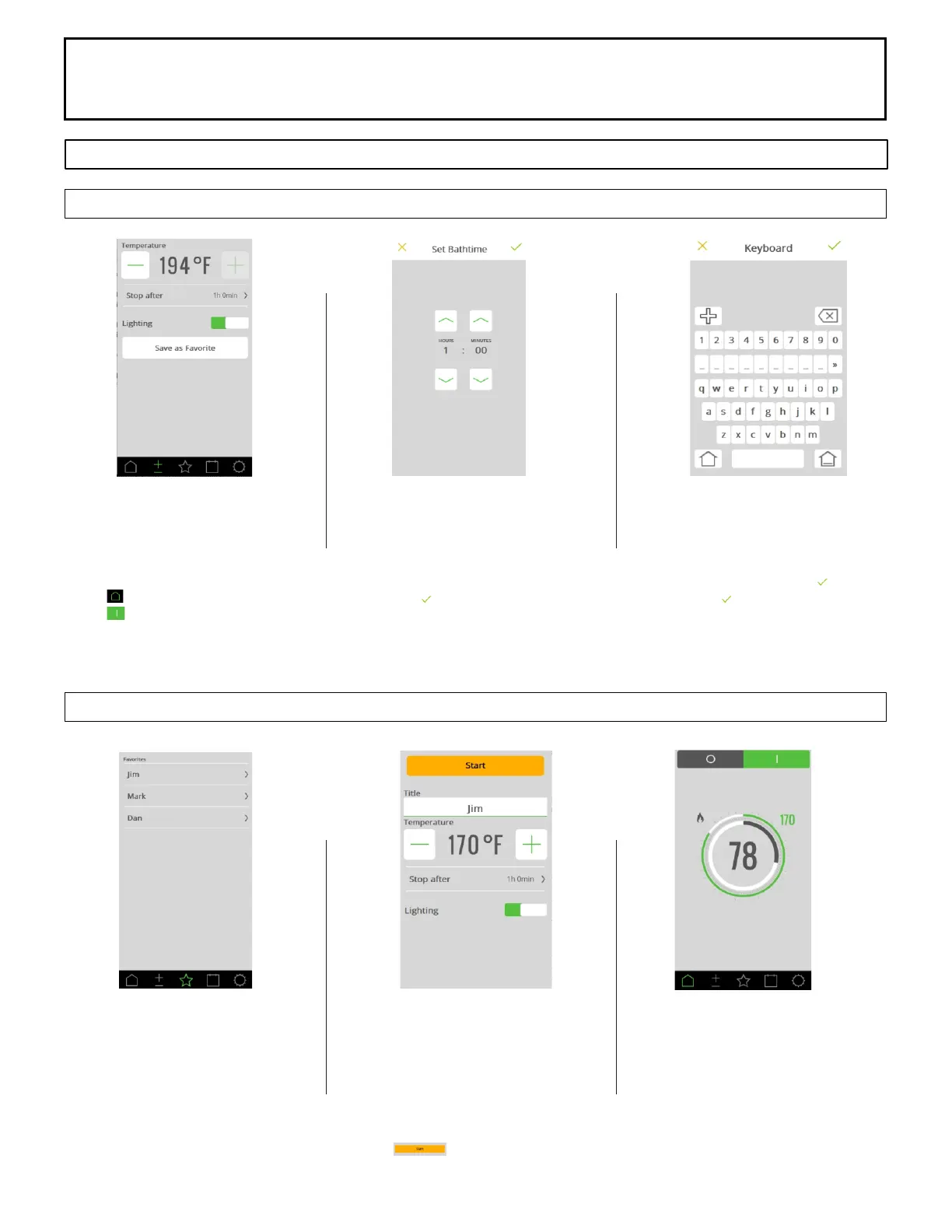
Temperature and Room Light
Change temperature by pressing +
or - to desired temperature.
Press the Lighting icon to turn On
or Off the room light.
Press Screen
Press button in upper right
corner to start sauna.
Temperature Screen Options
Sauna Duration
Change sauna length by pressing
the Stop After button
Change to desired length (normal
setting is 1 hour)
Press the to accept the change
Creating Favorites
Ensure temperature and sauna
length are correct.
Press Save as Favorite
Type in Name and press
Press the to accept information.
Favorites Screen Options
Favorites
Select the Favorite to edit or start
program
Favorite’s Settings
Click on Title to change name
Change temperature by pressing +
or - to desired temperature.
Change to desired length (normal
setting is 1 hour)
Press to activate program.
Home Screen
Home Screen will appear with
sauna heater started to favorites
setting.



 To Next Page