INSTALLATION AND OPERATING INSTRUCTIONS
72-0113 08-03-18 4211-149 7014363 314 SYRA 77 D
Page 5
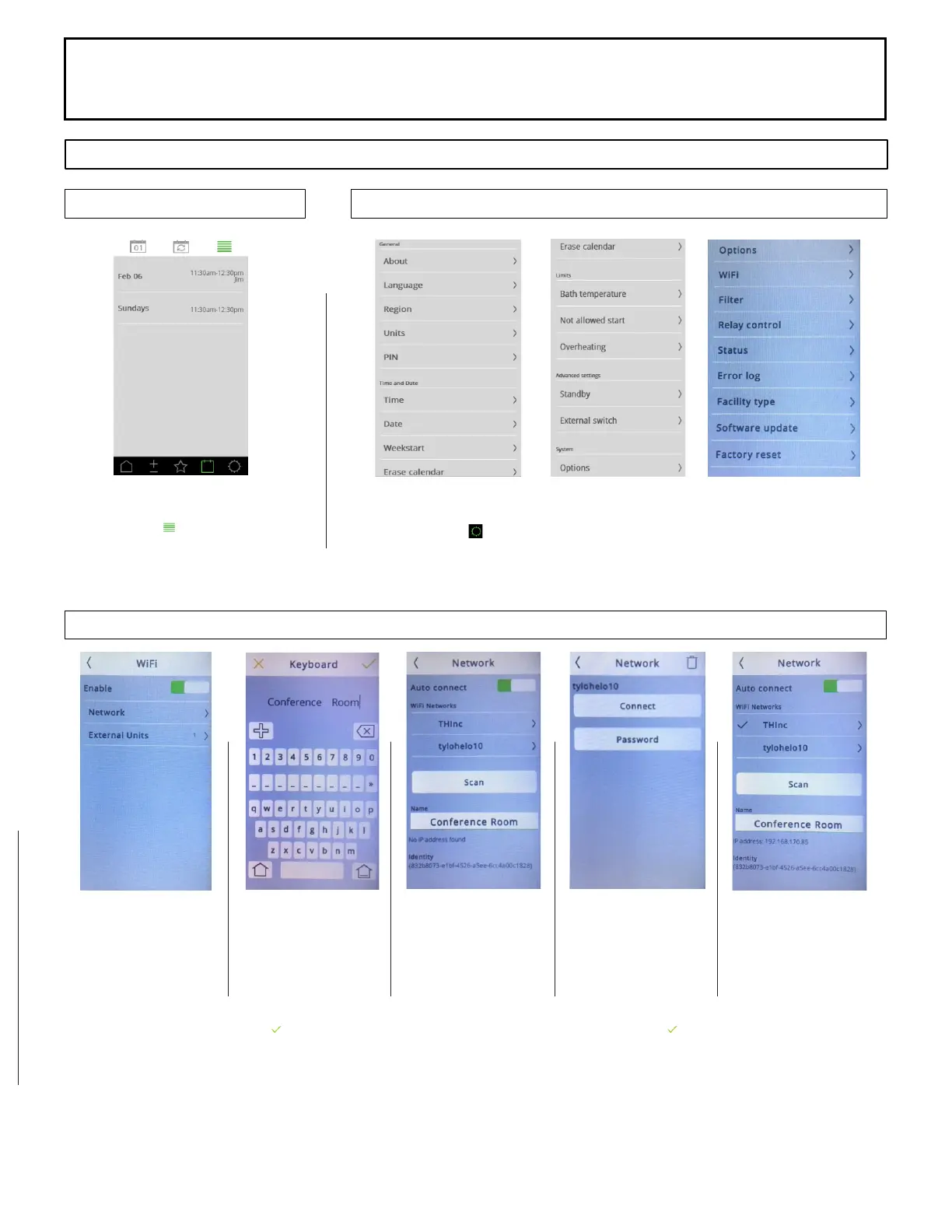
Calendar Screen Options
WiFi Setup Screen
SECTION 2: PREMIUM/A60 CONTROL (1601-33 or 1601-33-1) OPERATION, Continued
Setting Screen Options
Viewing Scheduled Events
Click the in the upper
right corner to see events.
Setting Options
Select the icon in the lower right corner of the control to access
settings.
Connect Control to
WiFi Network
Select the WiFi option
from Setting Screen
Select Network Option
Select Name
Select Name and name
the Control
Enter Name and select
to accept.
Choose WiFi Network
Select Scan to see all
Wi Networks
Select network to
connect
Connect Control to
WiFi Network
Select Password
Enter password and
select
to accept
WiFi Network
Check mark indicates
control is connected to
network
Networking: This control can connect to a Local WiFi Network to be operated by a Phone Application or PC Application.
Download the application from the Google Playstore or Apple Store. Search for sauna brand name and download the free
application.



 To Next Page