Concept 2™ Safety Precautions
©American DJ Supply® - www.americandj.com - Concept 2™ Instruction Manual Page 4©American DJ Supply® - www.americandj.com - Concept 2™ Instruction Manual Page 3
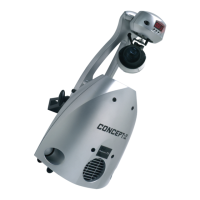
• Scanner and Laser in one effect
• 4.9mW diode laser
• 15 colors plus white
• Two multicolor
• 19 gobos plus spot
• Two interchangeable gobos
• Separate color and gobo wheels
• High Speed Shutter with variable Speed
• 230 degree pan / 110 degree tilt
• Projection angle 16 degrees
• Full Micro-stepping, with 4 stepper motors.
• Built in Microphone
• Auto switch to Stand-Alone (Master/Slave) operation
when DMX signal is disconnected
• Run up to 16 heads without controller
• DMX-512 protocol
• Full Focusing
• Fan cooled
• Uses nine DMX Channels
• Digital DMX display
• Optional Concept-C controller (Not Included)
Safety Issue: This unit may blow a fuse if the maximum allotted load
of 4 amps is reached. If the fuse needs replacement, please see the
fuse replacement guidelines on page 17.
• To reduce the risk of electrical shock or re, do not expose this unit
rain or moisture
• Do not spill water or other liquids into or on to your unit.
• Be sure that the local power outlet match that of the required voltage
for your unit.
• Do not attempt to operate this unit if the power cord has been frayed
or broken. Do not attempt to remove or break off the ground prong
from the electrical cord. This prong is used to reduce the risk of elec-
trical shock and re in case of an internal short.
• Disconnect from main power before making any type of connection.
• Do not remove the cover under any conditions. There are no user
serviceable parts inside.
• Never operate this unit when itʼs cover is removed.
• Never plug this unit in to a dimmer pack
• Always be sure to mount this unit in an area that will allow proper
ventilation. Allow about 6” (15cm) between this device and a wall.
• Do not attempt to operate this unit, if it becomes damaged.
• This unit is intended for indoor use only, use of this product outdoors
v oids all warranties.
• During long periods of non-use, disconnect the unitʼs main power.
• Always mount this unit in safe and stable matter.
• Power-supply cords should be routed so that they are not likely to
be walked on or pinched by items placed upon or against them,
paying particular attention to the point they exit from the unit.
• Cleaning -The fixture should be cleaned only as recommended by
the manufacturer. See page 18 for cleaning details.
• Heat -The appliance should be situated away from heat sources
such as radiators, heat registers, stoves, or other appliances (includ-
ing amplifiers) that produce heat.
• The fixture should be serviced by qualified service personnel when:
A. The power-supply cord or the plug has been damaged.
B. Objects have fallen, or liquid has been spilled into the appliance.
C. The appliance has been exposed to rain or water.
D. The appliance does not appear to operate normally or exhibits a
marked change in performance.
The Concept 2™ carries a one yeare (365 days) limited warranty.
Please fill out the enclosed warranty card to validate your purchase.
All returned service items whether under warranty or not, must be
freight pre-paid and accompany a return authorization (R.A.) number.
If the unit is under warranty you must provide a copy of your proof of
purchase invoice. Please contact American DJ® customer support for
a R.A. number.
Concept 2™ Features
Concept 2™ Product Registration
The Concept 2
TM
comes with a 1 year limited warranty. We recom-
mend filling out the warranty registration card that came with your
fixture to validate your warranty. You may also register your product
on-line at www.americandj.com.
Concept 2™ Warranty Registration




 To Next Page