Change batteries
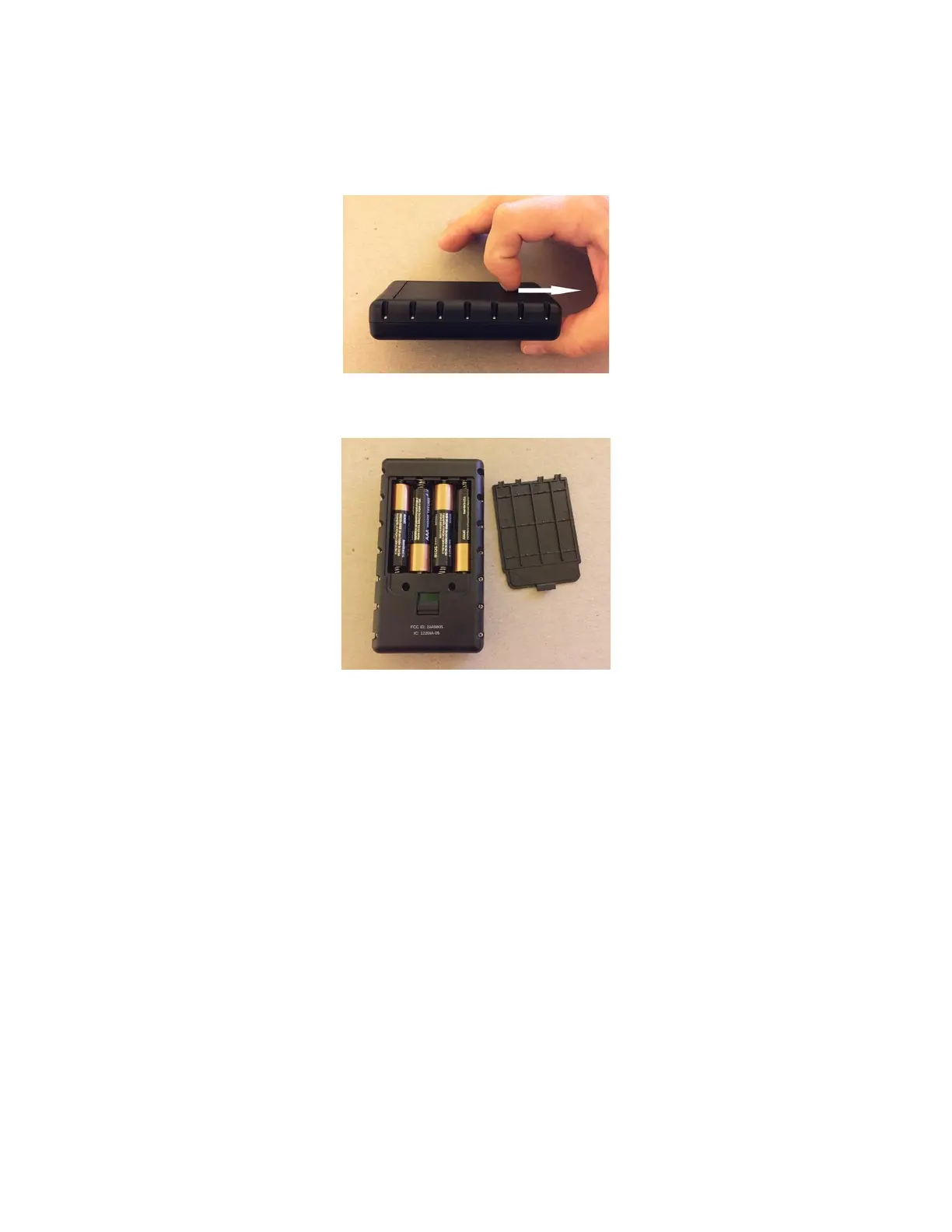
To change batteries, open the battery compartment by sliding locking tab on the back of the
unit down using your thumbnail or small object. Do not force it down, apply gentle force along
the length of the unit, as shown in the following illustration:
Next, remove battery door to get access to 4 AAA batteries
Install new batteries with care, ensuring they are installed in the correct direction, as marked
inside the battery housing . Do not mix old and new batteries and only install fresh batteries.
Do not store Commander for long periods with batteries installed to avoid damage from
corrosion. Remove depleted batteries immediately to avoid damage from corrosion. Use only
reputable battery brands, preferably with leak protection. You can use Alkaline, NiMH or
Lithium chemistries all will have very good battery life.
When batteries are close to depletion, you will hear beep signal start acting
“interrupted/broken”, you can still finish timing current shooter and comfortably finish your
training exercise. You should change the batteries at the first opportunity when this happens.


 To Next Page