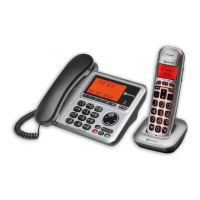
The Amplicomms BigTel 1500/1502/1503 is a cordless telephone system designed for ease of use, featuring a large display, amplified sound, and call blocking capabilities. This user guide provides comprehensive instructions for setting up, operating, and maintaining your phone.
Function Description
The BigTel series functions as a standard cordless telephone, allowing users to make and receive calls. It supports both preparatory and direct dialing, as well as dialing from a redial list or a stored phonebook. A key feature is its audio boost function, which increases earpiece and handsfree volume, making it suitable for users with hearing difficulties. The phonebook can store up to 100 entries, each with a name and number, and allows for custom ringtones and VIP designation.
A significant aspect of this device is its Smart Call Block feature, which helps to avoid nuisance calls. Users can enable manual, automatic (VIPs only or Contacts only), or anonymous call block modes. In manual mode, specific numbers can be added to a blacklist, preventing them from ringing the phone. The automatic modes restrict incoming calls to either VIP contacts or all contacts stored in the phonebook. The anonymous call block mode specifically targets calls that do not display a number, such as private or international calls.
The phone also includes an intercom function for communication between multiple handsets (in Duo/Trio models) and supports three-way conference calls. Other functionalities include setting alarms, customizing handset and base settings, and adjusting display contrast.
Usage Features
The handset features a clear display with various icons and symbols to indicate status, such as signal strength, battery level, call in progress, handsfree mode, alarm status, new voicemail, ringer off, and call block status. The keypad is alphanumeric, allowing for easy dialing and text entry. Dedicated keys for direct memory (M1, M2, M3) enable quick dialing of frequently used numbers.
Making a call is straightforward: users can either enter the number directly or use preparatory dialing. Calls can also be initiated from the phonebook, redial list, or direct memory keys. During a call, the earpiece and handsfree volume can be adjusted, and the audio boost feature can be activated for increased clarity.
The phonebook allows for adding new entries, editing existing ones, and assigning specific ringtones. Entries can be designated as VIPs, which is particularly useful when using the automatic call block modes. The redial list stores the last 10 dialed numbers for quick access.
The Call List displays up to 50 received calls, including date and time information. Unanswered calls are clearly marked. Users can view the call list and dial back numbers directly from it.
The Smart Call Block feature offers several modes to manage unwanted calls. In manual mode, incoming calls can be blocked directly while the phone is ringing, and the number can be added to a blacklist. The blacklist can be managed by adding, editing, or deleting numbers. Automatic modes simplify call filtering by only allowing calls from designated contacts or VIPs. Anonymous call blocking can be enabled independently to prevent calls from withheld or unknown numbers.
Handset settings include options for ringtone melody and volume for internal and external calls, speed dial setup, display contrast, handset renaming, date and time settings, tone setup (key tone, battery tone, out of range), language selection, and automatic answer. The equalizer function allows users to modify the sound quality (Normal, Bass, Treble) during a call. Base settings include dial mode (Tone or Pulse), deleting registered handsets, flash duration, changing the system PIN, and Eco Mode.
Maintenance Features
The device requires minimal maintenance. For initial setup, the base station needs to be connected to the telephone line and power adapter. Handsets come with rechargeable NiMH batteries, which must be charged for 8 hours before first use. It is crucial to use only the supplied rechargeable batteries and power adapters to prevent damage or safety risks. If the handset will not be used for an extended period, it is recommended to disconnect and remove the batteries to prevent leakage.
Cleaning the BigTel 1500/1502/1503 should be done with an antistatic cloth lightly moistened with water. The device should be positioned away from sources of excessive heat, direct sunlight, and vibrations. To optimize reception and reduce interference, the base should not be installed near windows, large metal objects, reinforced concrete, televisions, or other electronic devices.
Troubleshooting guidance is provided for common issues such as no dialing tone, "Out Of Range" display, calls not working, or no display. Solutions typically involve checking connections, reducing range, verifying subscription with the network, or recharging batteries. In case of persistent problems, users are advised to remove handset batteries for a minute, then disconnect and reconnect the base power supply, and finally reinstall the handset batteries.
The phone is designed for connection to a TRT3 class analogue telephone line and complies with relevant safety and conformity standards, including those for radio equipment and environmental protection. Used batteries must be disposed of in compliance with environmental regulations. The device is not designed for emergency calls during power failures.



 To Next Page
 General
 Weight and Dimensions