
 Need help?
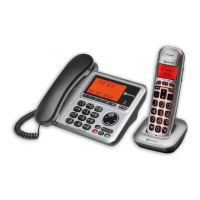
Do you have a question about the Amplicomms BigTel 1580 Combo and is the answer not in the manual?
Lists all items included in the product package for the telephone.
Guide to inserting batteries and charging the handset for initial use.
Instructions for connecting the telephone line and power adapter to the base.
Identification and explanation of the physical parts and buttons on the base station.
Explanation of icons and symbols shown on the base station's LCD display.
Identification and explanation of the physical parts and buttons on the cordless handset.
Explanation of icons and symbols shown on the cordless handset's LCD display.
Initial setup procedure for selecting the country for your telephone.
Instructions on how to initiate a phone call using various methods.
Dialing a number before lifting the handset or speakerphone.
Making a call by lifting the handset or speakerphone and dialing.
How to make a call by selecting an entry from the phonebook.
How to make a call by selecting an entry from the call list.
How to make a call using numbers from the redial list.
Making calls using pre-programmed speed dial keys M1/M2/M3 or 1/2/3.
Procedures for answering incoming calls on the handset or base.
How to terminate an active phone call.
Adjusting the earpiece and handsfree volume levels during a call.
Activating the Audio Boost feature for increased call volume.
Temporarily muting the microphone during a call on the telephone base.
Silencing the ringer of an incoming call temporarily.
Locating a misplaced cordless handset using the paging function.
Setting up and managing a manual list of blocked numbers.
Activating the manual call blocking function.
Methods for adding numbers to the call block list.
Adding numbers to the blocklist while the phone is idle.
Adding numbers to the blocklist from incoming call history.
Adding numbers to the blocklist from the redial list.
Modifying existing entries in the call block list.
Removing specific numbers from the call block list.
Clearing all entries from the call block list.
Using automatic modes to block calls based on predefined criteria.
Blocking all calls except those from VIP contacts.
Blocking calls from numbers not saved in the phonebook.
Blocking calls with withheld or unavailable caller information.
Blocking incoming calls that have hidden numbers.
Blocking all types of anonymous and out-of-area calls.
Programming speed dial numbers for direct memory keys M1, M2, M3.
Setting up speed dial numbers for keys 1, 2, and 3.
Instructions for adding new contacts to the phonebook.
How to display details of existing phonebook contacts.
Modifying details of existing contacts in the phonebook.
Designating a contact as a VIP for special call handling.
Saving phonebook contacts to speed dial memory locations.
Removing a specific contact from the phonebook.
Clearing all contacts from the phonebook.
Saving numbers from the redial list into the phonebook.
Saving redial list numbers to speed dial memory.
Removing a specific number from the redial list.
Clearing all entries from the redial list.
Accessing and reviewing the history of received calls.
Saving numbers from the call list into the phonebook.
Saving call list numbers to speed dial memory.
Removing a specific entry from the call list.
Clearing all entries from the call list.
How to listen to and manage voicemail messages.
Steps to activate or deactivate the answering machine function.
How to play back recorded incoming messages.
Deleting all recorded messages from the answering machine.
Configuring various settings for the answering machine.
Choosing between Answer & Record or Answer Only modes.
Recording a personalized outgoing message for the answering machine.
Playing back and managing your recorded outgoing messages.
Setting the number of rings before the answering machine answers.
Configuring the maximum duration for incoming message recordings.
Enabling or disabling call screening on the telephone base.
Setting the language for the answering machine's voice prompts.
Managing answering machine functions and messages remotely.
Listening to incoming calls while they are being recorded.
Adjusting the volume level for incoming call ringers.
Selecting different melodies for incoming calls.
Configuring tones for key presses, battery, or out-of-range.
Adjusting the contrast level of the LCD display.
Setting the current date and time on the phone.
Selecting the preferred format for displaying the date.
Selecting the preferred format for displaying the time (12/24 hr).
Entering the specific date and time information.
Customizing the name displayed for the cordless handset.
Selecting the display language for the phone's menus and messages.
Pairing a new cordless handset with the base station.
Removing a cordless handset from the base station registration.
Modifying the security PIN code for system access.
Restoring the phone to its default factory settings.
 General
| Display | Yes |
|---|---|
| Volume Control | Yes |
| Ringer Volume | Adjustable |
| Speakerphone | Yes |
| Emergency Dialing | Yes |
| Hearing Aid Compatible | Yes |
| Battery Backup | Yes |
| Visual Ringer Indicator | Yes |
| Answering Machine | Yes |
| Caller ID | Yes |
| Display Type | LCD |
| Extra Loud Ringer | Yes |
| Handset Volume | Adjustable |
| Call Waiting | Yes |
| Redial | Yes |
| Phonebook | Yes |
| Type | Corded |
| Power Source | AC Power |
| Weight | 800 g |













 To Next Page