22
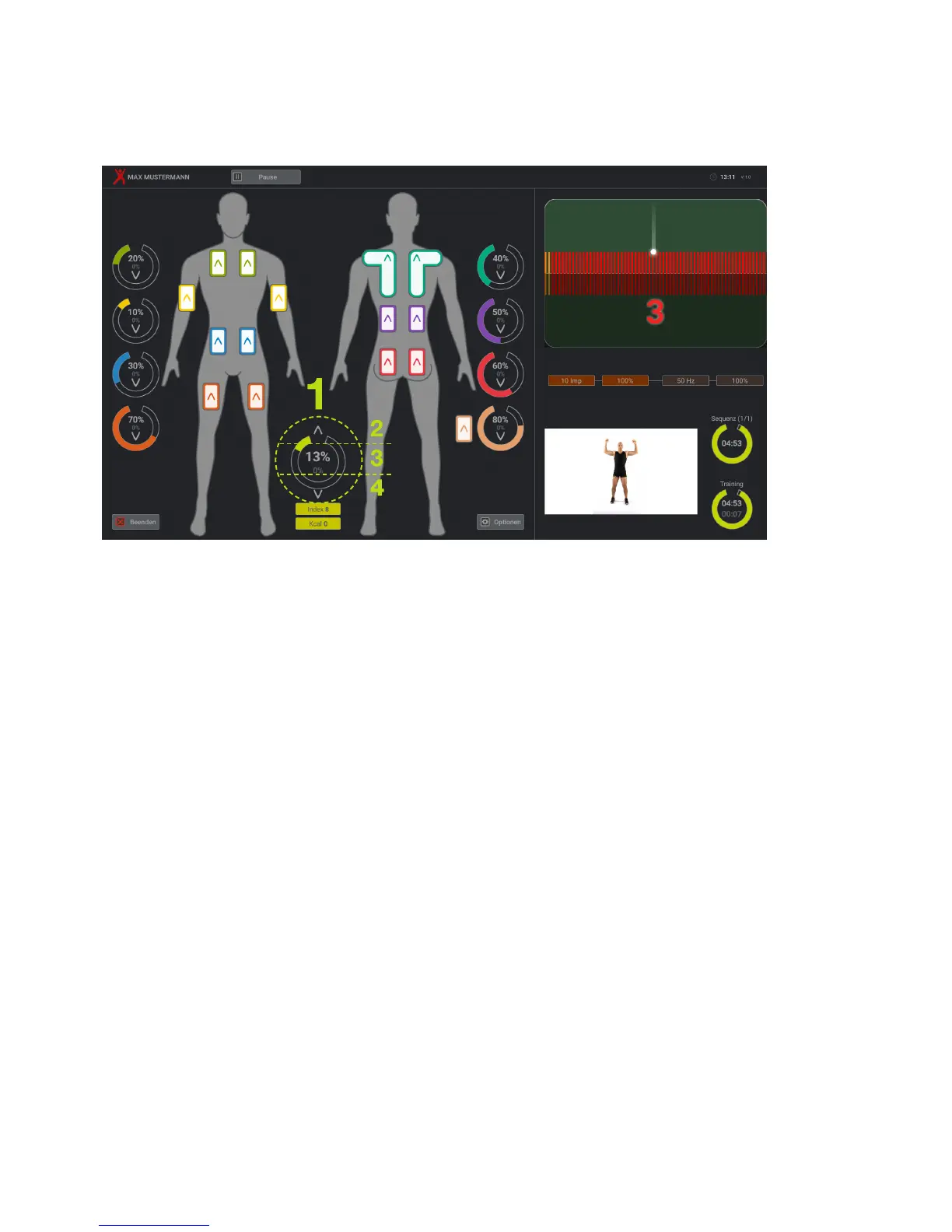
7.2.2 Training screen
When you reach the training screen, you can simply start a training session using the main inten-
sity controller (HI).
The HI (1) makes it possible to regulate the intensity on all channels. The field of the HI is divided
into three areas, which are marked here with the numbers 2, 3 and 4. In field 2, the intensity can
be regulated upwards. Touch the screen the area of zone 2 then the HI automatically continuously
rises in steps of one per cent until you have reached 30%. From 30%, if you leave your finger
pressed down, the intensity rises in increments of 5%. If you would like to raise this by more than
5%, you need to remove you finger from the screen and then place it back on again, then the HI
counts upwards by another 5%. As soon as you have reached an intensity of 50%, the value per
contact only increases by 3 per cent. From 80%, the increase is reduced to 2% per contact.
If you touch the screen in zone 4, the HI setting lowers linearly and with increasing speed.
If you touch the screen the HI area in zone 3, the intensity of the HI is lowered in steps of 10%.


 To Next Page