7
MENU MODE
Changing Settings in the Menu
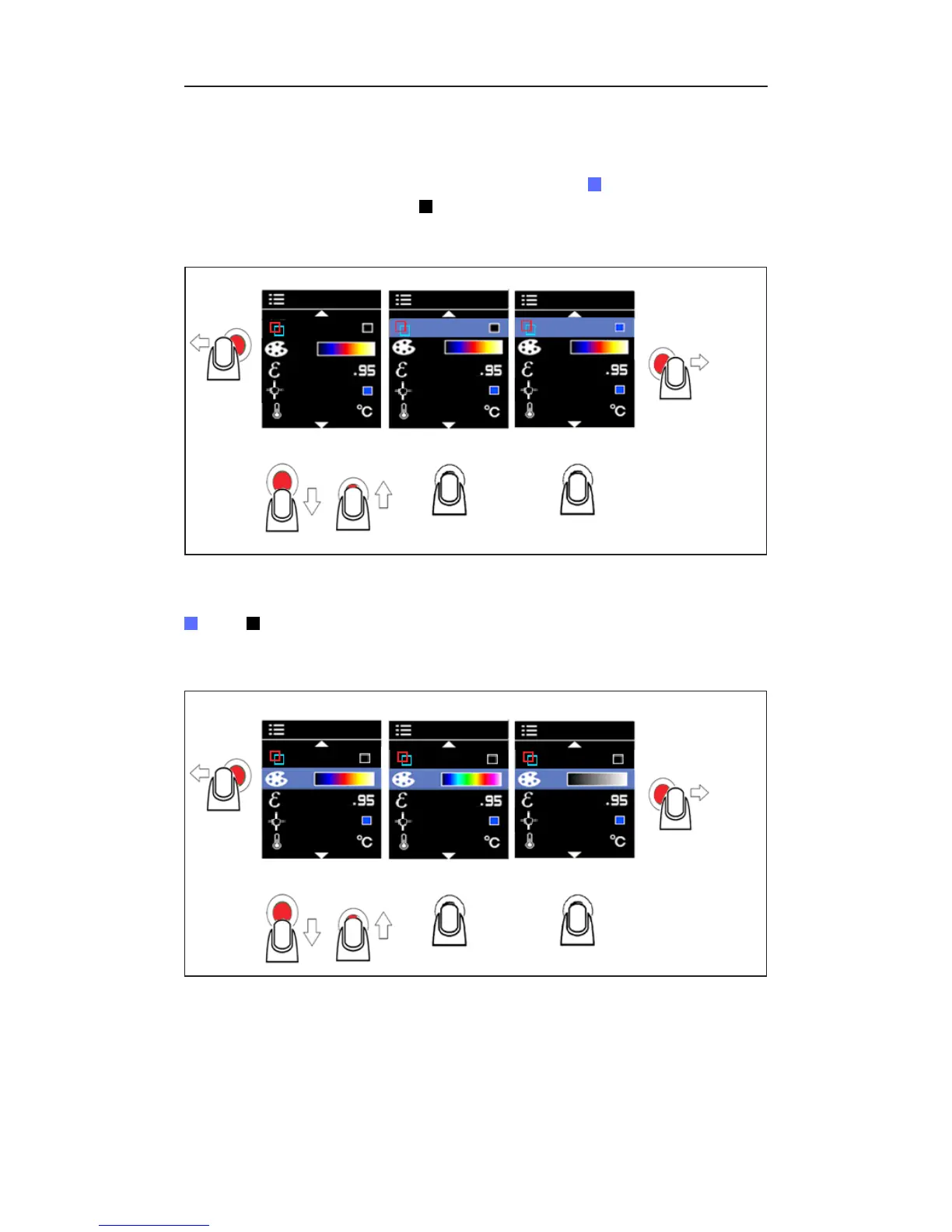
Once the product is powered on, reach the menu by clicking left on the
power button. Settings that can be manipulated include hot and cold
markers, color palette, emissivity, center point marker, selectable °F/°C, and
timed auto power off. Enabled options will appear as blue squares while
disabled options will appear as black squares.
Hot and Cold Markers
Figure 2.1
BACK TO
MEASUREMENT
DOWN ENTER ENTERUP
MENU
Hot (red square outline) and cold (blue square outline) markers indicate the
locations of hottest and coldest areas within a target area. Turn this function
on or off in the menu.
Color Palette
BACK TO
MEASUREMENT
MENU
DOWN
Hot Iron Rainbow Grayscale
ENTER ENTERUP
Figure 2.2
The color palette can be changed depending on the specific application of
the measurement. This option allows for different viewings of an infrared
image by changing the false-color presentation. Grayscale shows a more
equal and linear presentation of colors to enhance detail, while Hot Iron and
Rainbow combine high contrast with Grayscale.


 To Next Page