5
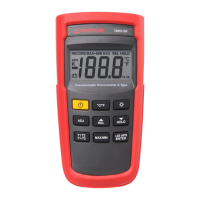
“MAX/MIN” Button
Press “MAX/MIN” key to enter the MIN MAX recording
mode. (Displays the Maximum reading, Minimum
reading, “MAX-MIN”, “AVG” reading stored in record
mode). Press “MAX/MIN” key to cycle through the MAX,
MIN, MAX-MIN, “AVG” readings. In this mode, press
“HOLD” key to stop recording, all values are frozen,
press again to restart recording.
In this mode, the APO function and other keys is
disabled, excluding “HOLD” and “ ” keys. To prevent
accidental loss of MAX, MIN and MAXMIN, in this mode
can only be cancelled by pressing and holding down
the “MAX/MIN” key for 2 seconds to exit and erased
recorded reading.
“>2S APO/ENTER” Button
Pressing and holding down “APO” key for 2 seconds to
trigger on or off APO mode, and then APO annunciator
will appear or disappear on the display. Power is
automatically turn off, if no operation for a period of
time, and “APO” annunciator is displayed at upper-left
corner when APO function is enabled.
SPECIFICATION
Electrical
Temperature
Scale
Celsius or Fahrenheit user-selectable
Measurement
Range
K-TYPE(0.1°C) -200°C to 1372°C, -328°F
to 1999°F
Auto range 0.1°C/1°C, 0.1°F/1°F


 To Next Page