UK-2
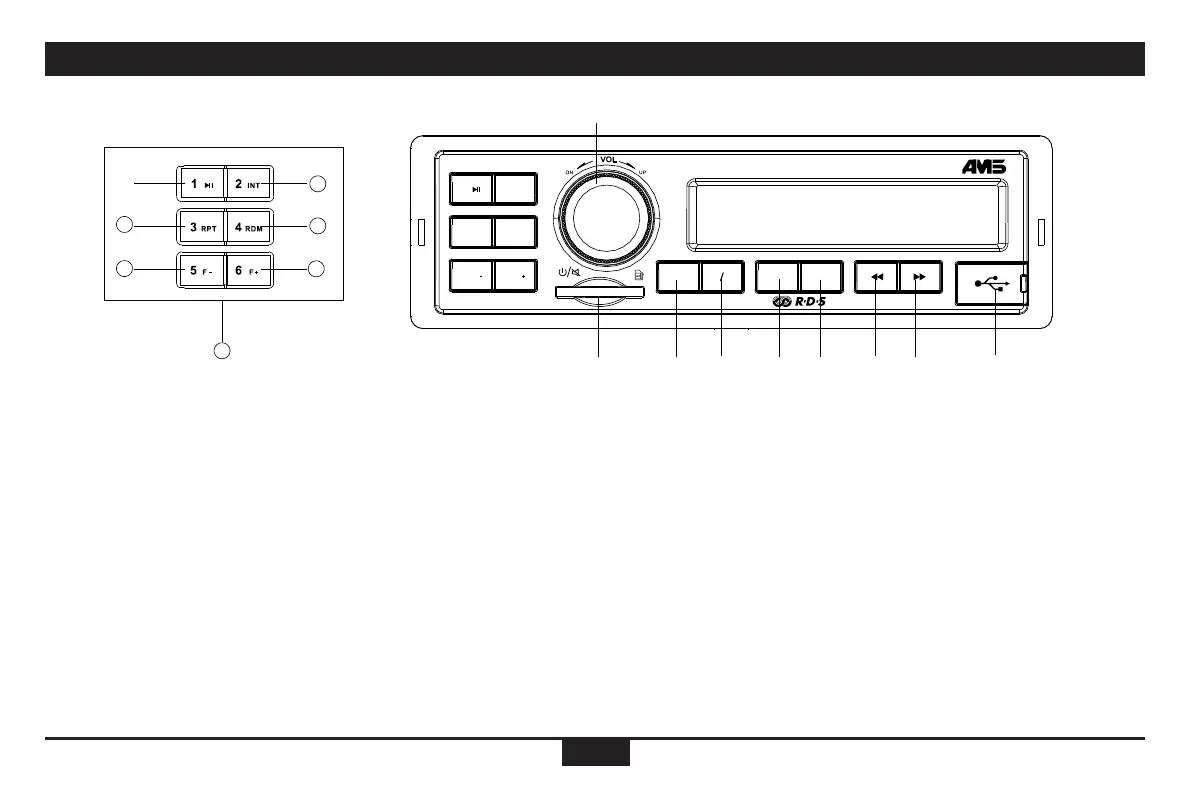
Panel Controls
1. - Power on
- Mute
- When on, hold it to power off.
- Rotate the knob to adjust the volume.
2. - SD card slot
3. - USB slot
4. - Press it ,Source,
Radio
USB (when USB inserted)
Card (when SD card inserted)
EXT (aux-in 3.5 source)
- hold it more than 3 second,reset.
AUX: (front audio input. External peripheral
devices can be connected with the unit)
5. - Band switch:
FM1 -> FM2 -> FM3 -> MW1 -> MW2-
LW
(
EUROPE
)
FM1->FM2->FM3->AM1->AM2
(
USA
)
FM1->FM2->FM3->AM1->AM2
(
JAPAN
)
- Hold it Automatically search station and
store the signal strongly station to 1-6
Preset
6. - VOL/PTY/AF/TA/BAS/TRE/BAL/FAD/
Change password/"PWD" Activate
password/clock format
- Hold it to select EQ preset mode:
EQ OFF-CLASSIC-POP-ROCK-FLAT,
Rotate the VOL knob to adjust value
7. - Press to display clock,
- Hold it to setting clock
- Radio mode:
Display FM/AM frequency
- MP3 mode:
Turn and turn about folder name/le name
/ID3 TAG/Clock
8. - Radio mode
- Auto search the station from high to low
- MP3 mode
Select the previous track
9. - Radio mode
Auto search the station from low to high
- MP3 mode
Select the next track
10. - Play/pause
11. - Program intro play(10 sec.)
12. - MP3 repeat play
13. - MP3 random play
14. - MP3 folder back
15. - MP3 folder ahead
16. - 10
~
15 Radio preset
Press to tune in a preset station.
Hold for more than 2 seconds to store
current station.
①
② ③④
⑤ ⑥ ⑦ ⑧ ⑨
⑩
11
12
13
14
15
16
CT
412
SRC SELFM
AM DSP
AMS
2 INT
4 RDM
1
3
RPT
5
F
6
F


 To Next Page