EN-2
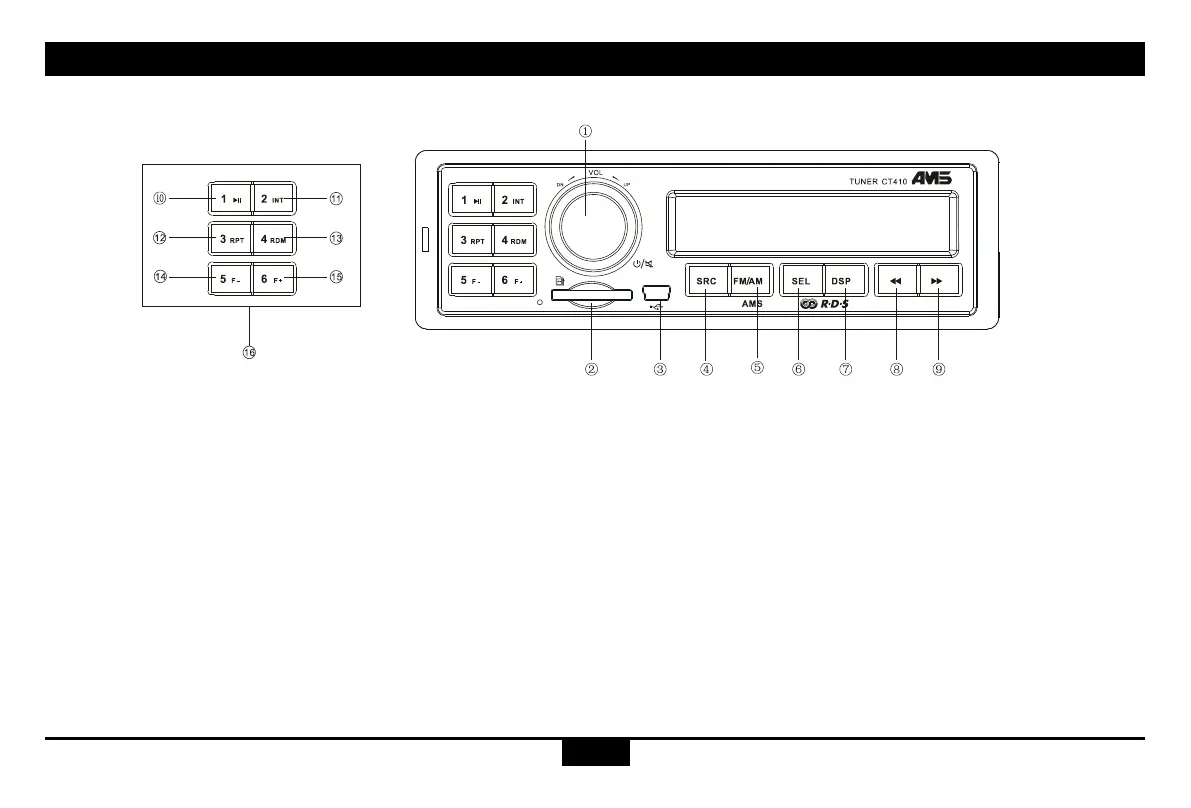
Panel Controls
1. - Power on
- Mute
- When on, hold it to power off.
- Rotate the knob to adjust the volume.
2. - SD card slot
3. - USB slot
4. - Source
Radio
USB (when USB inserted)
Card (when SD card inserted)
5. - Band switch:
FM1 -> FM2 -> FM3 -> AM1 -> AM2-LW
- Hold it Automatically search station and
store the signal strongly station to 1-6
Preset
6. - Press to select VOL/PTY/AF/TA/BAS/
TRE/BAL/FAD,Rotate the VOL knob to
adjust value
- Hold it to select EQ preset mode:
EQ OFF-CLASSIC-POP-ROCK-FLAT,
Rotate the VOL knob to adjust value
7. - Press to display clock,
- Hold it to setting clock
- Radio mode:
Display FM/AM frequency
- MP3 mode:
Turn and turn about folder name/le name
/ID3 TAG/Clock
8. - Radio mode
- Auto search the station from high to low
- MP3 mode
Select the previous track
9. - Radio mode
Auto search the station from low to high
- MP3 mode
Select the next track
10. - Play/pause
11. - Program intro play(10 sec.)
12. - MP3 repeat play
13. - MP3 random play
14. - MP3 folder back
15. - MP3 folder ahead
16. - 10
~
15 Radio preset
Press to tune in a preset station.
Hold for more than 2 seconds to store
current station.



 To Next Page