EN-10
DAB+ function
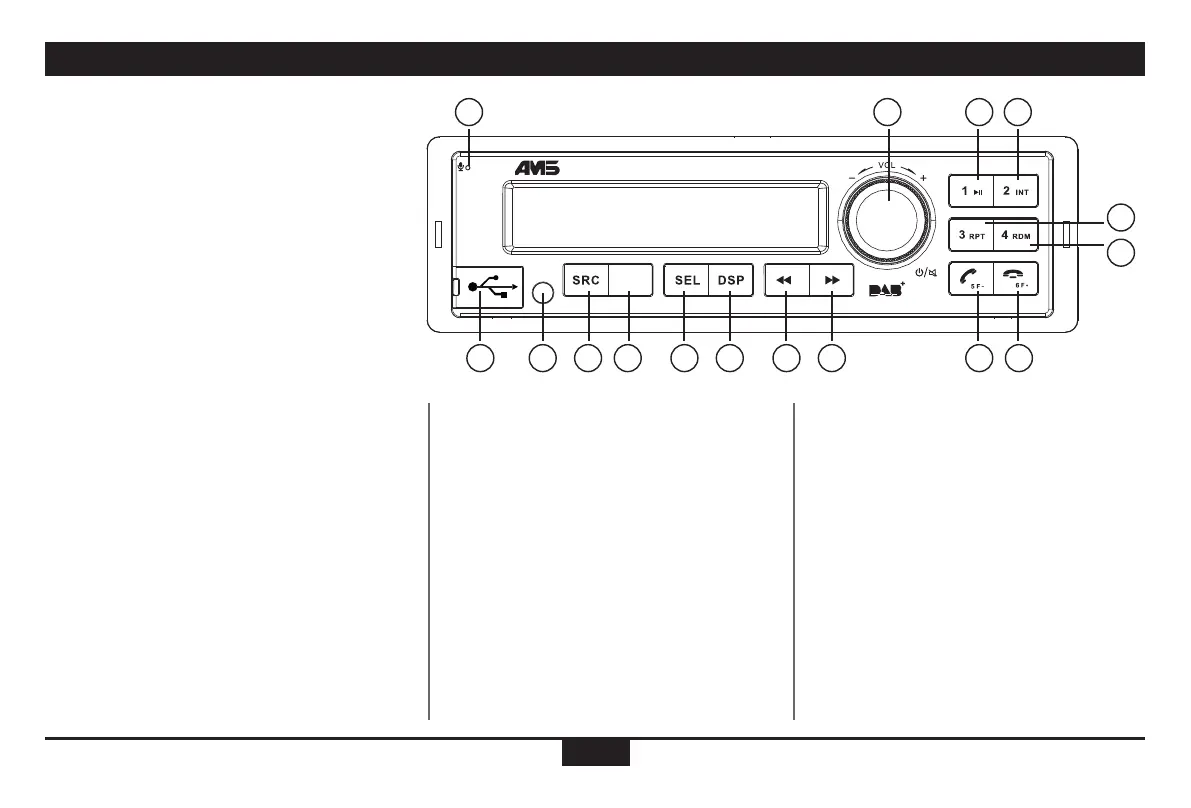
(1). - Microphone
(2). - Power on (press),
- Mute (short press),
- Adjust volume (rotate)
- Power off (long press)
(3). - Press to toggle the playing Sources:
Radio,
USB (when USB inserted),
AUX IN,
A2DP (when Bluetooth is connected),
DAB (CT412-DAB-BT)
- Hold it more than 2 seconds and rotate the
[volume] knob to select PTY mode.
(4).- Band switch:
CT412BT (FM/AM)
FM1 -> FM2 -> FM3 -> MW1 -> MW2-> LW
CT412-DAB-BT or CT424-DAB-BT (BAND/SCAN)
DAB 1 / DAB 2 / DAB 3
- Auto memory system:hold it to automatically
search station and save the strongest signal
station to preset from 1 to 6 on the current
band. DAB mode: scan of DAB transmitters.
(5). - Press [SEL] and rotate [volume] knob to
select EQ (equalizer) preset mode.
- Press to confirm,when selecting the PTY
mode,
When in dial number mode, press [SEL] to
start and rotate [volume] knob to dial
a phone number.
(6). - Radio mode: Press [DSP] (display) to
access: PTY info/ Display FM/AM
frequency/clock
- MP3 mode: track duration
- Hold it to enter setting mode
(7). - Radio mode:
Automatic search the station from high
to low :
Hold the touch 2 seconds for manual
station search.
- MP3 / BT music mode
Select the previous track
Fast rewind (long press)
(8). - Radio mode
Automatic search the station from low
to high:
Hold the touch 2 seconds for manual
station search
- MP3 / BT music mode
Select the next track
Fast forward (long press)
(9). - USB slot
(10). - Play/pause (when USB / BT music)
(11). - Auto playback at the begining
of the track (10 seconds) with an
USB device.
(12). - MP3 repeat play
(13). - MP3 random play
(14). - MP3 folder back/Answer/Dial/Call
transfer/Hang on
(15). - MP3 folder ahead/Hang off/
Disconnect (long press)
(10-15).
-1-6 radio preset
Press to select tune in a preset
station.
Hold for more than 2 seconds to
save current station.
(16). - AUX
2
10
14
11
15
12
13
3 4 5 6 7 89
1
BAND
SCAN
CT412-DAB-BT
16


 To Next Page