4-2
150830-026 Operator Manual Operating Instructions
WARNING – TIPPING
HAZARD:
• Do not use this table for pa-
tients exceeding the 1,000-lb
(452-kg) limit when patient is
positioned in normal orien-
tation. The maximum safe pa-
tient weight on this table for
standard surgical positions
in normal orientation is 1,000
lb (452 kg) with floor locks
locked.
• Do not use this table for pa-
tients exceeding the 500-lb
(226-kg) limit when patient is
positioned in reversed orien-
tation. The maximum safe pa-
tient weight on this table for
the standard surgical posit-
ions in reversed orientation is
500 lb (226 kg) with floor locks
locked.
• When performing surgery re-
quiring a headrest accessory
in reversed patient orientation,
or when using a Fem/Pop
board or the 3080/3085 Ortho
Extension accessory, do not
exceed the 400 lb (181 kg) pa-
tient weight.
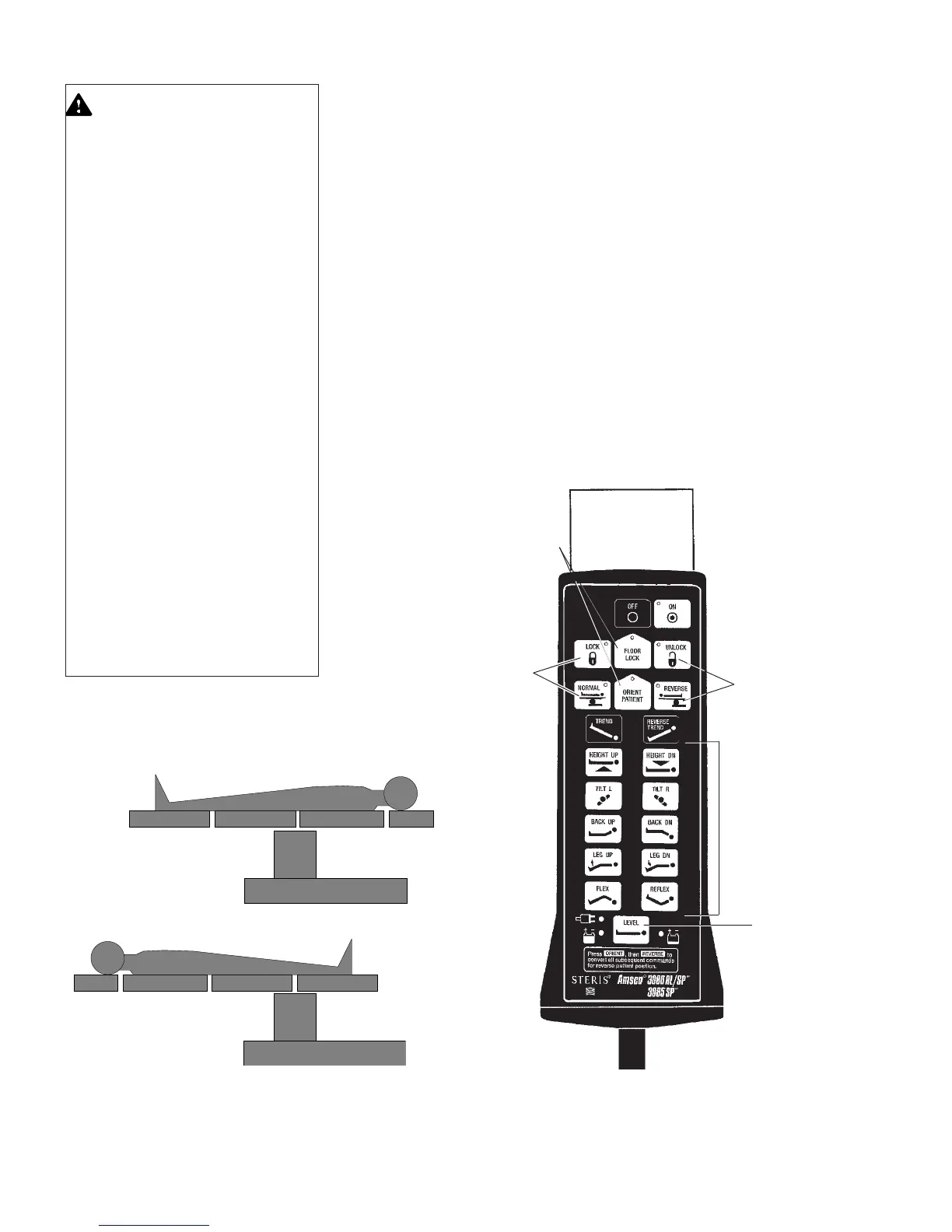
Figure 4-2. Patient Orientation
3. Press ORIENT PATIENT Function button in center row of buttons on hand
control and within five seconds (while LED is still lit), press appropriate
Actuate button (NORMAL or REVERSE) to indicate orientation of patient's
head on table (see Figures 4-2 and 4-3).
NOTE: Activation of the ORIENT PATIENT function automatically translates all
subsequent commands from the hand, foot, and optional Operating Room
Control System (ORCS) controls, so that they correspond correctly to where the
indicated patient's head is on the table. For example, when the REVERSE
Actuate button is activated, the direction of the Trendelenburg and Side Tilt
articulations is automatically reversed, and the Back and Leg articulations are
likewise adjusted so each part of the patient's anatomy is positioned correctly
when the patient is reversed on the tabletop. The anesthesiologist does not have
to think backward to adjust for the reverse orientation of the patient.
If the control is turned OFF or power is lost while the "reverse" orientation is
activated, when the table control is turned ON again, the control automati-
cally reverts to "normal" orientation.
IMPORTANT: When "Reverse" patient orientation is selected, the Flex and
Reflex articulation functions are disabled. Also, refer to
SECTION 2
for patient
positioning and weight limitation.
Actuate
Buttons
Actuate
Buttons
Return-to-Level
Button
Actuate
Buttons
Function
Buttons
Figure 4-3. Hand Control
Normal Orientation
Reverse Orientation


 To Next Page