American Security Products Co. ESL15 Operating Instructions Released Aug. 9, 2018
Revision A
Page 6 of 10
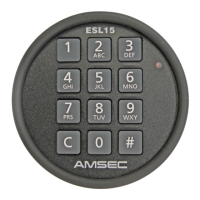
A Function is “set” in the following standard sequence:
C - # - (2 Digit Function Code) - # - (Master User Code) - # - (Function Setting) - #
o After each “#”, a Short Good Combo Tone (Short Warble) will be given, until the last “#” of the sequence is pressed,
at which time it sounds a Long Good Combo Tone (Long Warble) indicating the successful setting of a function.
o Any time during the sequence, if incorrect numbers are pressed, a Bad Combo Tone (4 short beeps) will sound and
the lock will go to rest. A function that has an on/off condition rather than a numeric setting requires a 1 (on) or a
0 (off) as the Function Setting.
Time Delay Settings (Functions 01, 02 & 03)
o To Enable Time Delay:
C - # - 01 - # - (Master Code) - # - 1 - #
o To Disable Time Delay:
C - # - 01 - # - (Master Code) - # - 0 - #
o To set the Delay Period:
C - # - 02 - # - (Master Code) - # - (Delay Period, 1-99 minutes) - #
o To set the Open Period:
C - # - 03 - # - (Master Code) - # - (Open Period, 1-9 minutes) - #
Multiple User Settings (Functions 10, 11, 12 & 13)
o To Enable Multiple User Mode:
C - # - 10 - # - (Master Code) - # - 1 - #
o To Disable Multiple User Mode:
C - # - 10 - # - (Master Code) - # - 0 - #
o To Add or Enable a Subordinate User:
C - # - 11 - # - (Master Code) - # - (User Number, 1-8) - #
o To Disable a Subordinate User:
C - # - 12 - # - (Master Code) - # - (User Number, 1-8) - #
o To Disable all Subordinate Users (1-8):
C - # - 13 - # - (Master Code) - # - 1 - #
Note: Disabling a Subordinate User does not erase the combo associated to that user, so if you re-enable
that User number it is not necessary to re-enter a combo for it unless you are treating it as a new user.
Dual Combo (Functions 30 & 31)
o To Enable Dual Combo Mode:
C - # - 30 - # - (Master Code) - # - 1 - #
Note: Enabling Dual Combo Mode turns on (enables) User 1 if a User 1 is not already active in Multi-User
mode. The User 1 combo must be set before this feature will function. See Section 4 for changing
instructions.
o To Disable Dual Combo Mode:
C - # - 30 - # - (Master Code) - # - 0 - #


 To Next Page