11
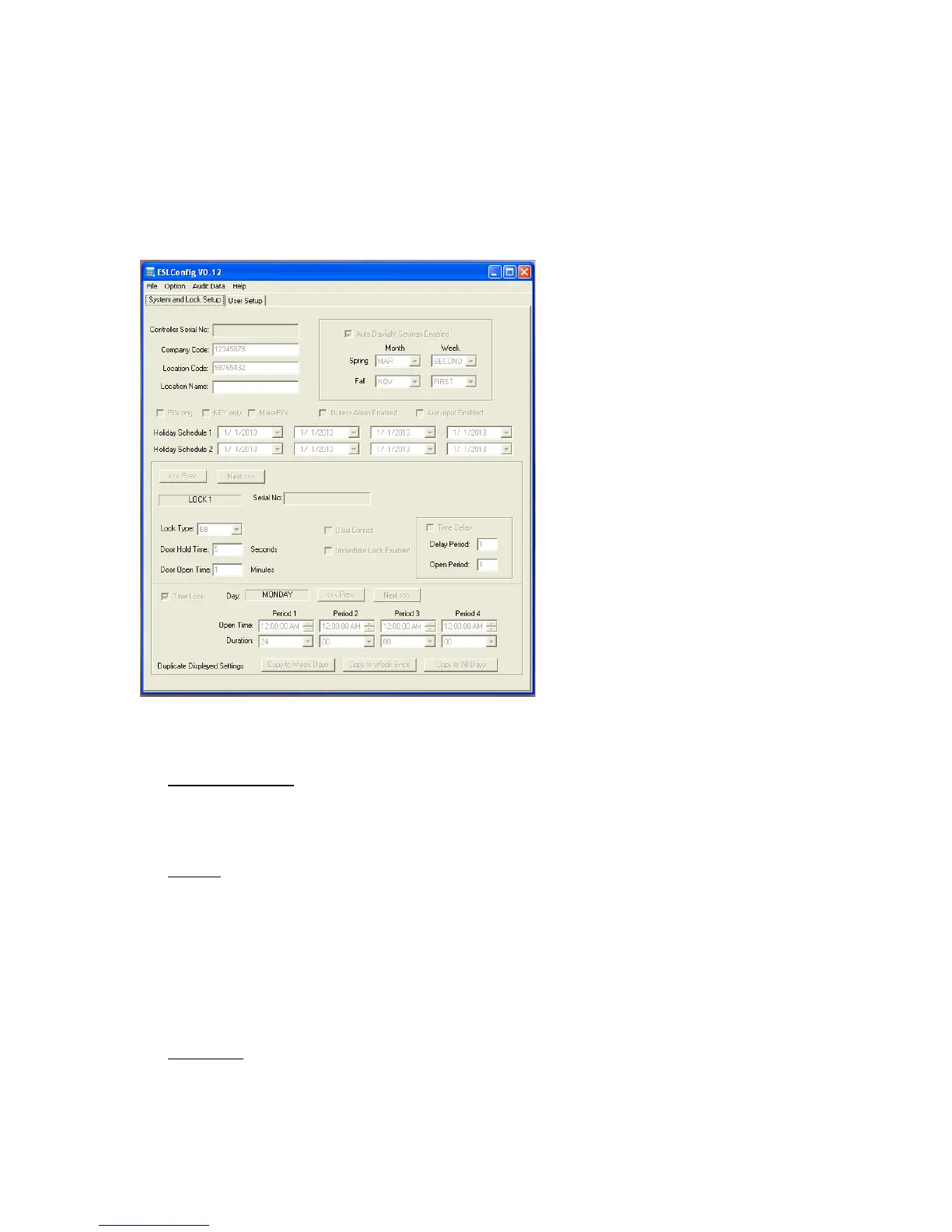
To!move!a!cop y!of!a!system!configuration!from!ESLConfig!to!a!controller,!select!File!at!the!top!
left-hand! corner! of! the!window,! choose!Output! to!Flash! Drive,!and! then!choose! All.!This! will!
save!the!configuration!file!with!the!name!ESLAUDIT.EAS.!!To!load!the!configuration!file!into!the!
controller,!see!page!6.!
!
Settings!are!modified!on!the!screens!that!are!shown!below:!
!
!
!
"2,(+3)Q)#.*D)"+(%5)
!
G621'7<()"6A'/7,)
Auto!Daylight!Savings!Enable!will! cause!the!system!clock!to!change!appropriately!on!the!
Sunday!morning!of!the!indicated!week.!
!
G%0+,,)
Duress! Alarm! Enable! will! activate! duress! codes.! Duress! codes! are! both! one! number!
higher!and!o ne!number!lower!than!any!PIN!value.!For!example,!if!your!PIN!i s!515151,!if!
you!log!into!the!system!with!either!PIN!515152!or!515150,!a!duress!signal!will!be!sent!to!
the! monitoring! station!through! the! store’s!alarm! system.! For!this! feature! to! function,!
the!optional!AC!expansion!module!must!be!installed!and!connected!to!the!store’s!alarm!
system.!
!
$%S)8/5%())
Aux!Input)is!a!feature!that!allows!an!optional!switch!to!be!installed!into!the!op tion al!AC!
expansion! modul e.! If! this! feature! is! installed! and! enabl ed! and! Time! Lock! is! enabled,!


 To Next Page