13
F'3+)#.*D)
The!Time! Lock!box! must!be!checked!to!enable! this!feature.! When!enabled,!a! lock!can!
only!be!opened!during!an!open!period.!Up!to!four!open!periods!can!be!defined!for!each!
day!of!the!week.!For!each!open!period,!the!starting!time!is!established!Open!Time!and!
the!duration!of!each!o pen!period!is!specified!in!hours.!Settings!are!established!for!each!
day!of!the!week.!
!
By!cl ickin g!on!any!of!the!three!duplicate!display!setting!boxes,!you!can!copy!the!settings!
for!the!day!that!is!displayed!to!other!days.!!
!
L,+0)"+(%5)
!
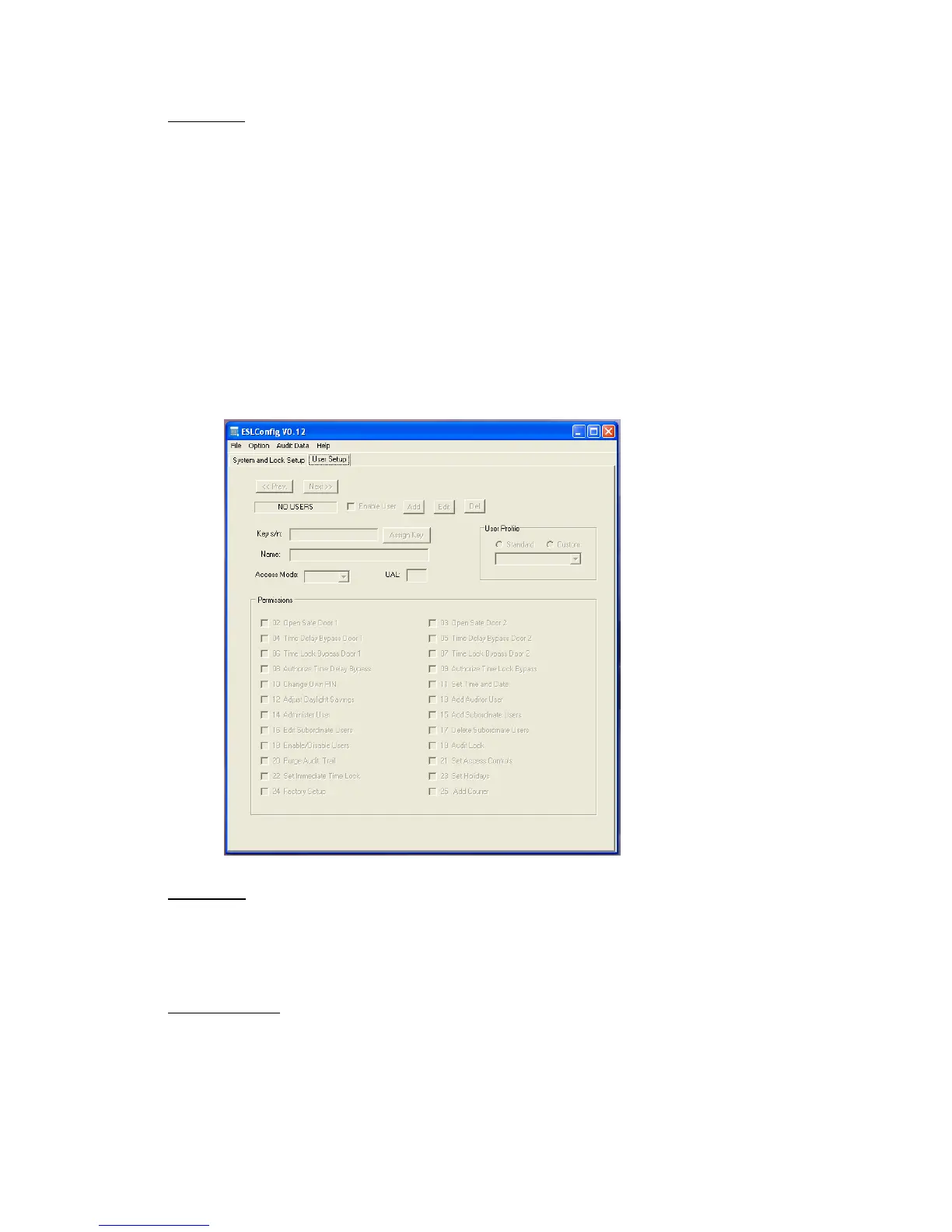
The!second!tab!in!the!ESLConfig!program!is!the!User!Setup!tab.!
!
!
!
!&'()L,+0,)
To!edit!users,!scroll!through!the!user!numbers!with!the!Prev.!and!Next!button s!located!
on!the!upper!right!of!the!User!Setup!screen.!The!Add!and!Del!buttons!are!used!to!add!or!
delete!a!user.!
)
F25+,).I)L,+0,)
There!are!eight!standard!user!profiles!with!predetermined!permissions:!
!
Door!1!User!
Door!2!User!
Door!1-2!User!


 To Next Page