EasyManua.ls Logo

ANCEL AD310 - Vehicle Info

ANCEL AD310
21 pages
Print Icon
To Next Page IconTo Next Page
To Previous Page IconTo Previous Page
Loading...
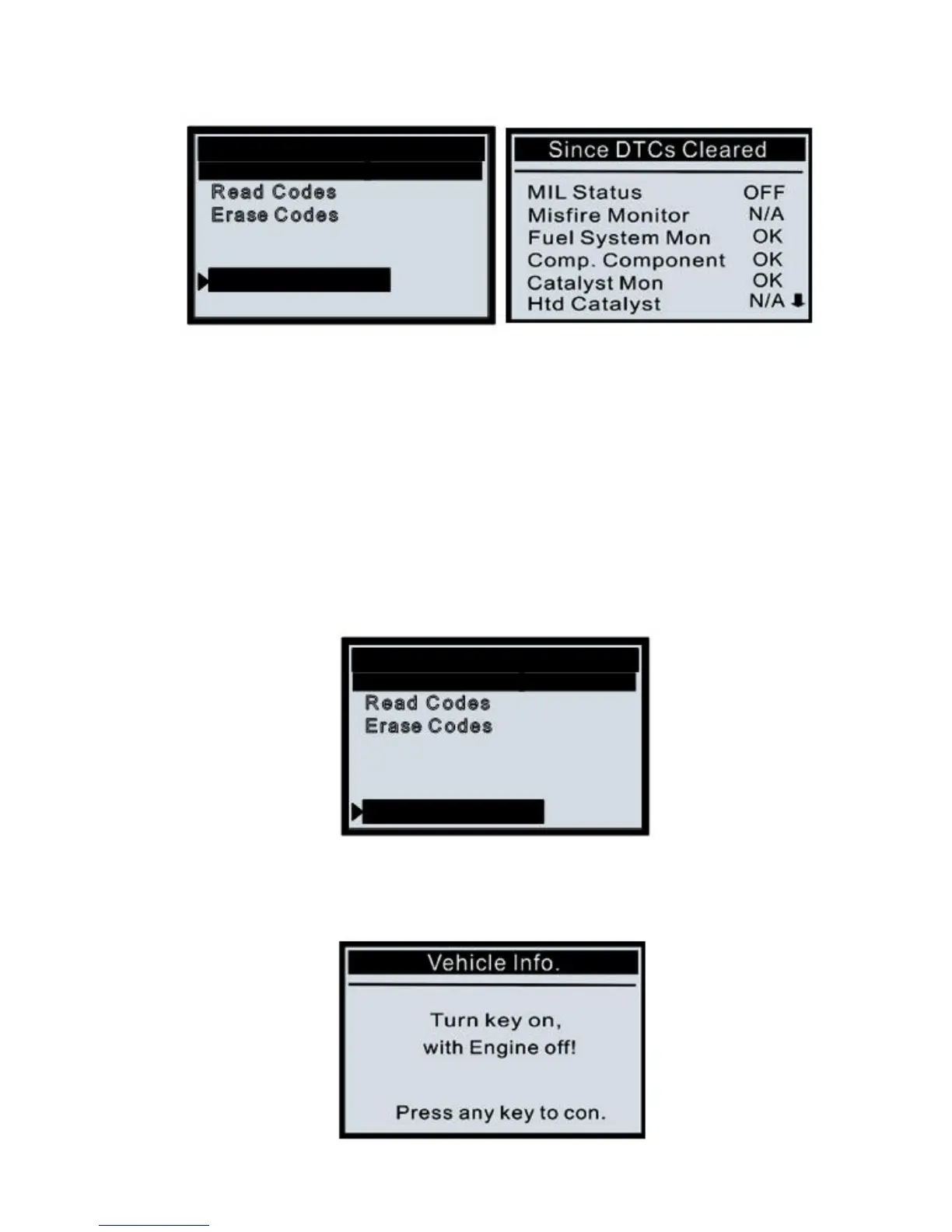
Select [I/M Readiness Test] and Press [ENTER], the screen will display the
interface as shown below:
Diagnostic Menu
R ead C odes
Erase C odes
Live D ata
View F reez e F ram e
I/M R eadines s
Vehicle Info.
Press EXIT return to the Diagnostic Menu.
4.6 Vehicle Info.
Select [Vehicle Info.] and press [ENTER], the screen will display
the formation such as VIN (Vehicle indentification Number), CID
(Calibration ID) and CVN (Calibration verify number).
1) Use UP/DOWN scroll button to select Vehicle Info. from the Diagnostic Menu and
press ENTER.
Diagnostic Menu
R ead C odes
Erase C odes
Live D ata
View F reez e F ram e
I/M R eadines s
Vehicle Info.
2) An advisory message comes up to remind you. Wait a few seconds or press
any key to continue.
18