
 Need help?
Do you have a question about the ANCEL AD310 and is the answer not in the manual?
Explains the evolution and purpose of the OBD II system, including its warning lamp.
Defines DTCs as alphanumeric codes identifying problem areas in a vehicle's diagnostic system.
Describes the physical location of the vehicle's 16-pin Data Link Connector (DLC).
Details the eleven OBD II Readiness Monitors and their function in emissions testing.
Explains how the PCM indicates completed emission component testing and the meaning of "OK" and "INC" status.
Provides definitions for key OBD II terms like PCM (Powertrain Control Module) and MIL (Malfunction Indicator Light).
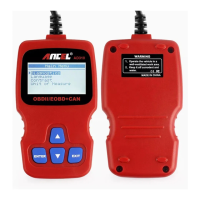
Describes the ANCEL AD310 scan tool, its buttons (Enter, Exit, Scroll), and the LCD display.
Details the scan tool's display, operating/storage temperatures, power requirements, dimensions, and weight.
Lists the components included in the ANCEL AD310 scan tool package, including the main unit and manual.
Explains how to select and set the language on the scan tool via the Main Menu using scroll buttons.
Describes how to adjust the display contrast using UP/DOWN buttons and save the settings.
Details how to select and save the desired unit of measure (Metric or Imperial) from the Unit of Measure menu.
Explains how to retrieve stored and pending diagnostic trouble codes (DTCs) from the vehicle's ECU.
Outlines the procedure for erasing trouble codes, including prerequisites (key on engine off) and confirmation.
Explains how to view real-time vehicle data, including sensor values, RPM, temperature, and system status.
Describes how to view snapshot data of vehicle operating conditions at the time of an emission-related fault.
Explains I/M Readiness, indicating if emissions systems are operating properly and ready for inspection.
Details how to access and view vehicle identification information like VIN, CID, and CVN.
Outlines the terms and conditions of the one-year limited warranty for the ANCEL AD310 scan tool.
Provides contact information for questions and procedures for returning the scan tool for repair.
 General
| Display | LCD |
|---|---|
| Functions | I/M readiness |
| Supported Protocols | KWP2000, ISO9141, J1850 VPW, J1850 PWM, and CAN |
| Compatibility | OBD2 compliant vehicles |
| Operating Temperature | 0 to 60°C (32 to 140 F°) |
| Weight | 150g |

 To Next Page